
Key Takeaways
- Semantic layers: Semantic layers are collections of data, reusable calculations, and business logic across platforms such as Microsoft Fabric and Databricks.
- Conversion: The Semantic Bridge converts Databricks metric views to Power BI and Tabular semantic models.
- Scripting: The Semantic Bridge provides a way to programmatically manipulate metric views and define validation rules.
- Framework: The Semantic Bridge is an initial framework for platform-agnostic translation of semantic layers across platforms.
This summary is produced by the author, and not by AI.
NOTE
The Semantic Bridge is a feature available only in the enterprise edition of Tabular Editor 3.
Introducing the Semantic Bridge in Tabular Editor 3
A semantic model – or semantic layer – lets you centralize business logic to give data meaning. You do this by using data structures to model a real-world business process. Semantic models are being used more than ever before to support business decision-making via reporting, conversational BI, and other traditional and AI applications and exist in many data platforms including Fabric (Power BI), Databricks, Snowflake, Tableau, and others.
In organizations (especially larger enterprises) it’s common to see multiple data platforms. This could be transient, such as when migrating from one to another. However, it could also be an intentional strategic or architectural decision to benefit from the unique features and strengths or align different platforms with your specific business needs. For instance, you could extract, transform, and load your data in Databricks, then consume it or produce reports from Power BI (with or without Fabric). Our colleague Liping Huang wrote an article that explains in detail some of these patterns.
However, a common challenge when using multiple platforms such as Databricks and Fabric is using or converting semantic models between them. Until now, this is something that required manual or duplicated development effort to rebuild the model.
In this article, we introduce a new feature in Tabular Editor 3 – the Semantic Bridge – which can translate a Databricks metric view to a Power BI semantic model. We’ll explain the purpose and benefits of this feature, and how it’s the first steps toward a framework for platform-agnostic semantic modelling.
NOTE
Tabular Editor strives to be an integrated development environment to help developers in all tasks that relate to semantic model development, management, and optimization. The goal of the Semantic Bridge is to facilitate easier and simpler use of Databricks metric views from Power BI and Analysis Services; not explicitly for Tabular Editor to be an external tool for semantic models on other platforms.
What is a Databricks metric view?
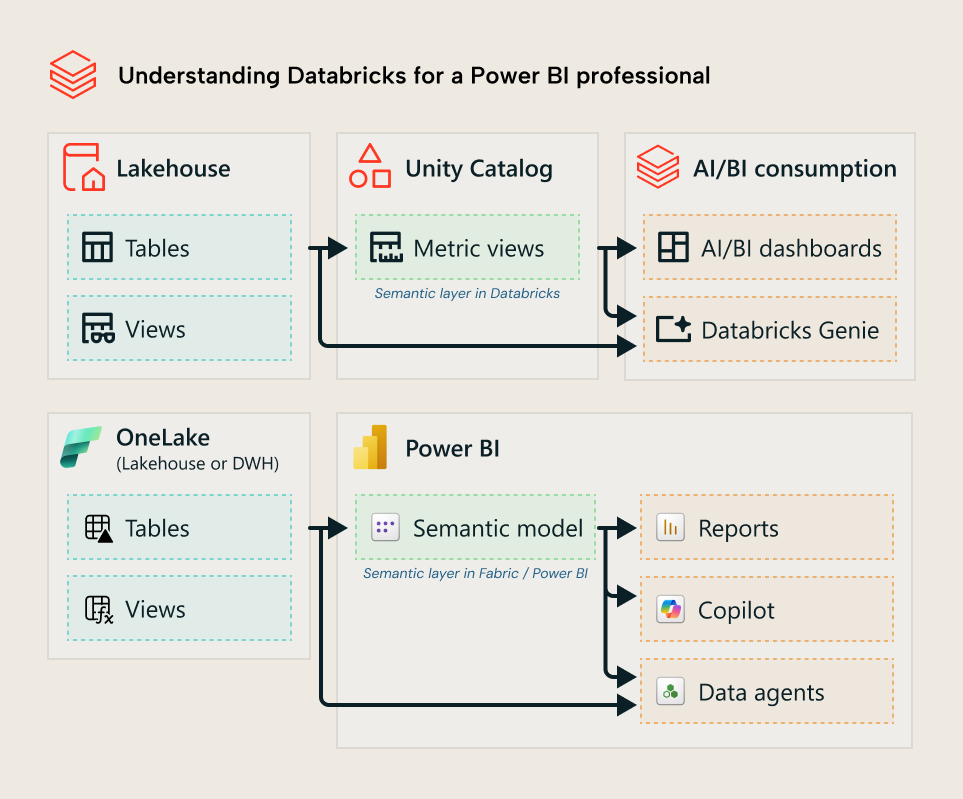
Among our collaborators and customers, there are many who use Databricks and Power BI. We often get questions and requests related to how to best leverage and complement these platforms or migrate between them. Databricks, like Power BI, has semantic models called metric views. Released in summer of 2025, metric views in Databricks support reporting from AI/BI dashboards and conversational BI via Databricks Genie, similar to Power BI reports and Copilot in Power BI, respectively.
The following diagram gives you a (very) high-level overview to understand what Databricks metric views are if you are familiar only with Power BI:
NOTE
If you want to learn more about Databricks (including metric views) we have a 5-part series about it written by our friend and peer Johnny Winter. Start with Part 1, here.
We also recommend the content from Advancing Analytics which goes into depth about all topics related to Databricks, and recent videos by Alex the Analyst on YouTube.
The Databricks documentation is of course also a very good resource.
However, some organizations use Databricks to extract, transform, and load data, but who want to report on it in Power BI. Reporting in Power BI requires a semantic model, but what if you already set up your semantic layer in Databricks via a metric view?
Convert a Databricks metric view into a Power BI semantic model
In simple terms, the Semantic Bridge takes the metric view definition (a YAML file) and converts it to a semantic model in Tabular Editor. Then, you can validate, further develop, or deploy that semantic model to Power BI and Microsoft Fabric for use with reports, Copilot, or other items.
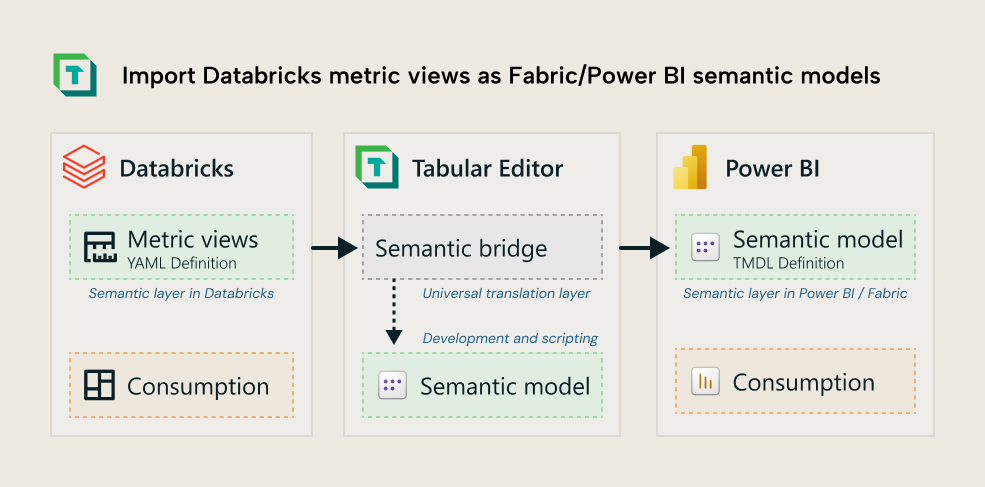
The following video shows a demonstration of how this works.
In the video you can see a user open a Databricks metric view definition in Tabular Editor 3, which converts it automatically to a semantic model. The video shows the metric view conversion from a local .YAML definition, creating equivalent TOM objects and translating SQL to DAX. In the future you’ll be able to connect Tabular Editor 3 to a metric view in the Databricks platform, directly. Examples of what is converted includes:
- Tables for every dimension table (a join in the metric view) and fact table.
- M partitions defined against the Databricks source system.
- Columns in the Power BI semantic model representing all dimension fields in the metric view.
- Relationships in the Power BI semantic model as defined in the metric view.
- DAX measures for all measures defined in the metric view. Basic aggregations are automatically translated from SQL to DAX; if no automatic translation is possible, an empty DAX measure is created for the calculation with the SQL specified in a multi-line comment, for later conversion either manually or using AI.
If there are any issues with your import, they’ll be shown in a diagnostic view like the following example:
You can also consolidate multiple metric views into a single, multi-fact Power BI semantic model. This is useful since Databricks metric views (as of the v1.1 specification in January 2026) only support a single fact table. You can see a simple example of this below:
One metric view that has orders data can coalesce with other metric views on other fact tables to a single semantic model with conformed dimensions. However, the Semantic Bridge is useful for more than just conversions and migrations, since it provides a programmatic interface for Databricks metric views.
Programmatically develop and test Databricks metric views
The Semantic Bridge is a simple interface for a broader, scalable framework. It includes a platform-agnostic object model for semantic models. In simple terms, it lets you change semantic models in code, irrespective of the platform. This means that you can use C# scripts to make bulk changes to metric views or streamline their development. If you don’t know C#, then AI can help you. Currently, this is only possible from the user interface in Tabular Editor 3, through this is functionality we expect to make available through a command-line interface (CLI) in the near future.
For instance, you can write changes to the Databricks metric view via a C# script before you import it.
NOTE
Currently, Semantic Bridge only works with a local YAML definition of a metric view from Databricks. In the future, it will be possible to make direct changes in Databricks.
You can see an example of this in the following demonstration, which shows a simple script that removes a join and any dimensions that use that join. In Power BI terms, this deletes dimension table and all fields in it, like you would with a normal C# script:
The script from the video is below:
var model = SemanticBridge.MetricView.Model;
var categoryJoin = model.Joins.First(j => j.Name == "categories");
var categoryDimensions = model.Dimensions.Where(d => d.Expr.Contains("categories"));
model.Joins.Remove(categoryJoin);
foreach (var dim in categoryDimensions)
    model.Dimensions.Remove(dim);
This scripting and programmatic interface can also be used to define validation rules that work similar to best practice (BPA) rules. They can be used to perform simple automated testing and validation of a Databricks metric view. The following demonstration shows you an example of this
The full script for the BPA rule in the video is below:
using TabularEditor.SemanticBridge.Platforms.Databricks.Interfaces;
var path = "C:/Users/GregBaldini/source/repos/TE3/TabularEditor/SemanticBridge.";
SemanticBridge.MetricView.Load(path);
List<IMetricViewValidationRule> rules = [
    SemanticBridge.MetricView.MakeValidationRuleForDimension(
        "no_underscores_in_dimension_names",
        "Naming",
        "Don't use an underscore in a dimension's name; use spaces instead",
        (d) => d.Name.Contains('_')),
    SemanticBridge.MetricView.MakeValidationRuleForJoin(
        "no_sql_queries",
        "Structure",
        "Only reference tables or views; do not embed SQL SELECTs",
        (j) => j.Source.Contains("select", StringComparison.OrdinalIgnoreCase))
];
SemanticBridge.MetricView.Validate(rules).Output();
These scripts and BPA rules can be useful if you intend on Databricks metric views being the source of truth for your business logic and calculations, which you just mirror in Fabric (Power BI).
The Semantic Bridge is an MVP
This is an initial implementation to help our collaborators and customers with a common request. Currently, the Semantic Bridge has a few limitations; you can read more about this in our documentation, but here’s some examples:
- It doesn’t yet connect directly to Databricks. It uses the metric view YAML file, which you can retrieve manually or programmatically (via the databricks CLI or APIs, for instance).
- It doesn’t write back (or sync) changes in the Power BI semantic model to Databricks, automatically. However, you can do these changes programmatically via the object model with C# scripts in Tabular Editor. Any changes to the YAML file must be uploaded to Databricks via the UI or programmatically.
- Some complex expressions aren’t automatically translated between SQL and DAX. Their expressions are passed as comments to the new Tabular object expression (calculated column or measure). You have to re-write these measures or calculated columns manually or with assistance from a coding agent if they’re flagged by the Semantic Bridge.
- The Semantic Bridge is an agnostic framework but is currently only set up to work with Databricks. It doesn’t yet support Snowflake, Tableau, or other platforms. In a future article, we’ll explain what an “agnostic framework” means and how this is possible in more of a technical deep-dive.
All of these and more are possible enhancements that we can address in the future depending on the needs and demands of our customers and market. You can also find more information about the Semantic Bridge in the following video from our collaborator and friend Simon Whitely at Advancing Analytics:
Further Reading
- Semantic Bridge documentation (Tabular Editor Docs). The documentation explains the current Databricks metric view conversion workflow, supported objects, and MVP limitations.
- Semantic modelling patterns with Power BI and Databricks (Tabular Editor). Liping Huang’s article gives the broader platform architecture context for using Databricks and Power BI together.
- Simplifying analytics with metric views in Databricks (Advancing Analytics). This article explains metric views from the Databricks side and why they matter for shared business definitions.
- Why Your Databricks Metrics Views and Power BI Aren't Seeing Eye-to-Eye (Advancing Analytics). Simon Whiteley describes the interoperability problem that Semantic Bridge is designed to address.
In conclusion
The Semantic Bridge is a new feature in Tabular Editor that we built to help our customers and collaborators streamline creation of Power BI semantic models from Databricks metric views. It’s built on a framework that, looking toward the future, could facilitate platform-agnostic semantic modelling for various purposes, including automating migrations, integrations, and more.
If you’re interested in this feature and have questions or requests, please reach out to us via our contact form or social media channels like LinkedIn. We’d love to hear your feedback and requests.
Bring Databricks metric views into Power BI with Semantic Bridge.
Give Tabular Editor a spin