Key takeaways
- Keep shared transformations out of individual models: Dataflows are useful when Power Query logic would otherwise be copied across semantic models and slowly drift.
- Choose between Gen1 and Gen2 deliberately: Gen1 still fits Pro workspaces but is in legacy status; Gen2 needs Fabric capacity but brings automation, more destinations, and a better authoring experience.
- Use notebooks when engineering matters more: Dataflows suit low-code ingestion and transformation; notebooks fit larger, custom, or Spark-heavy work.
Intro to dataflows
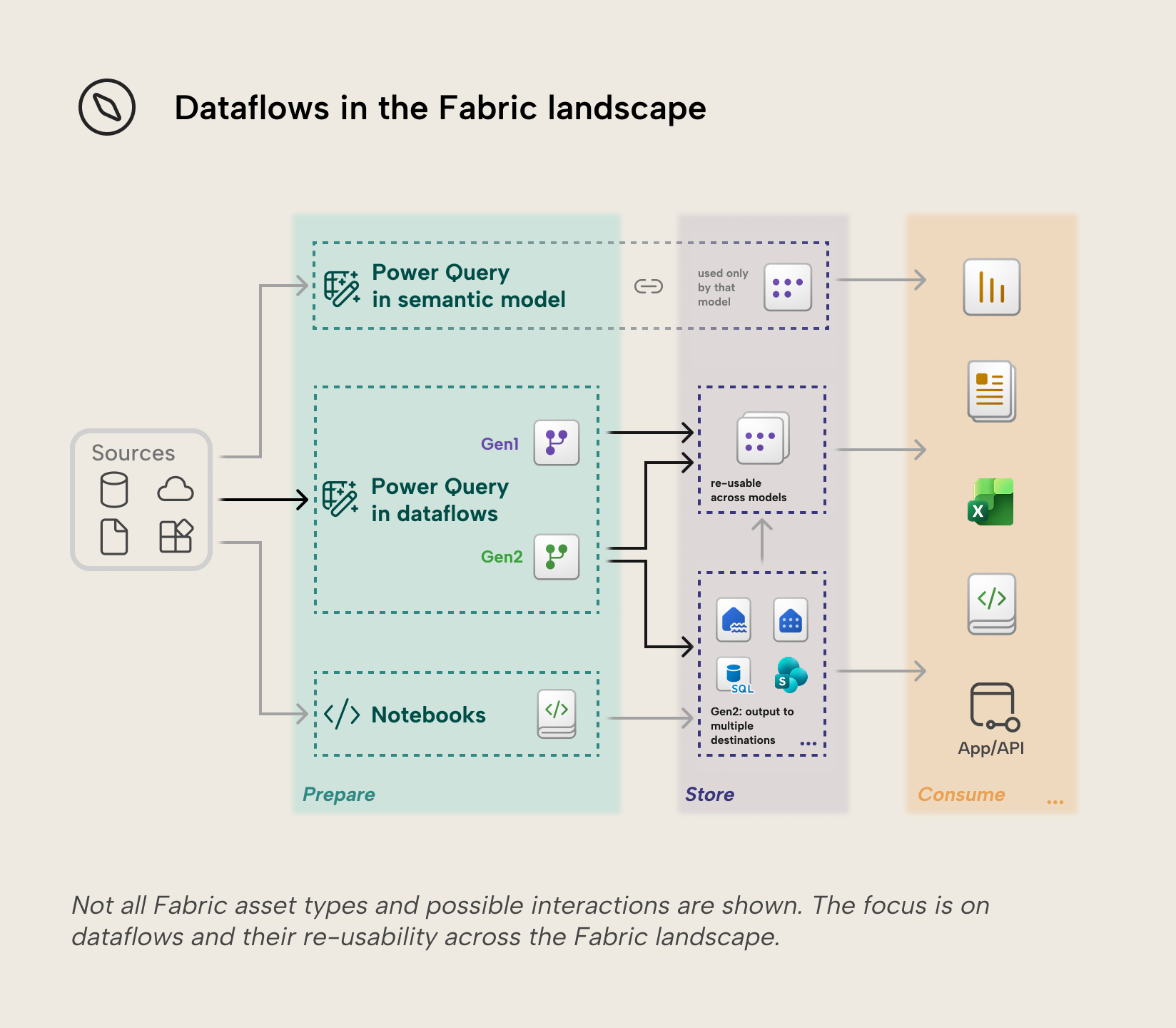
A dataflow is Power Query that lives outside a single semantic model. It connects to source data, applies transformations in Power Query M, and persists the resulting tables. Pulling the Power Query out of the semantic model means the same transformation can be reused, refreshed, secured, and governed independently of the model.
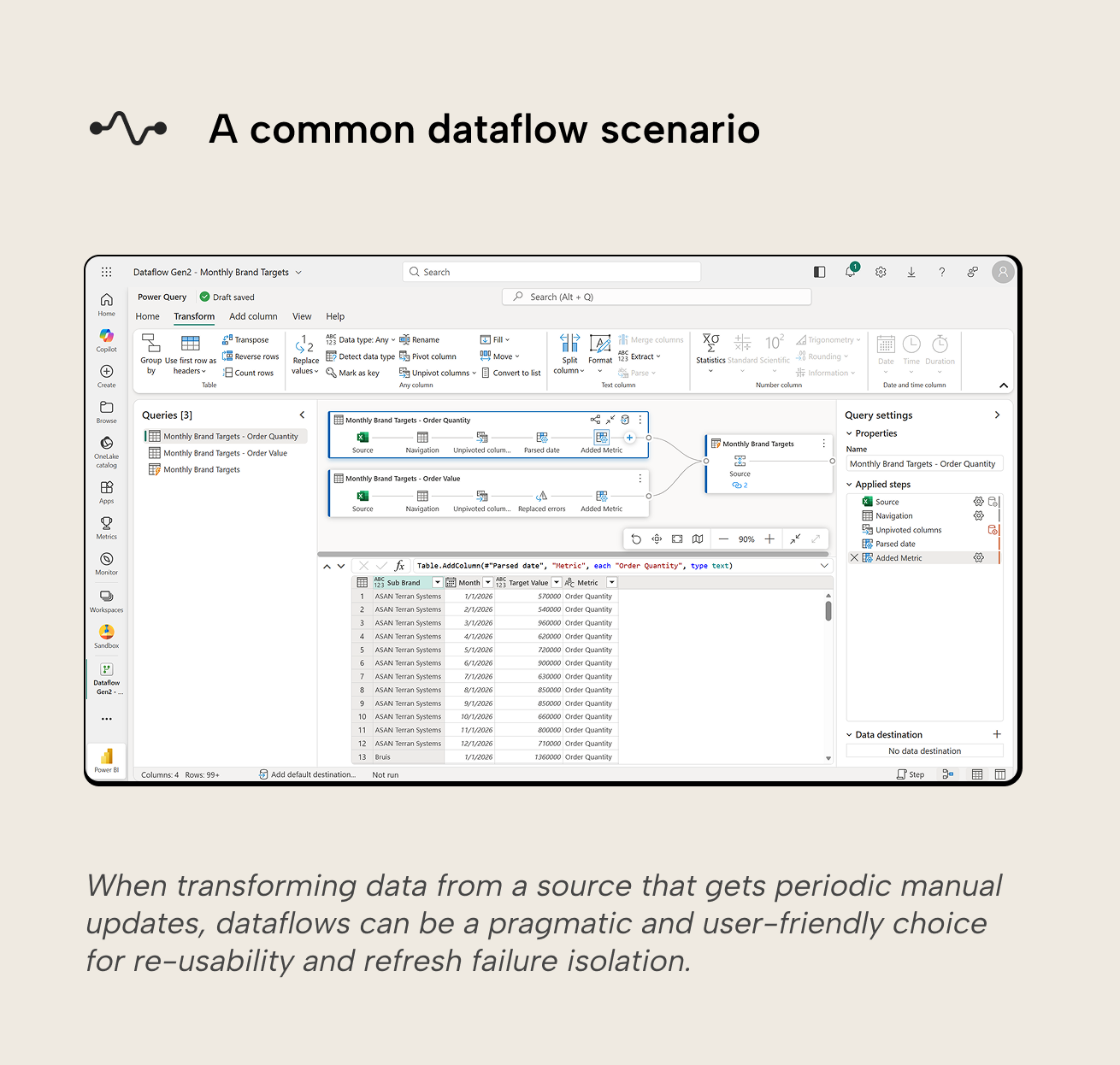
Common dataflow use cases include:
- Centralizing repeated data transformations by decoupling them from semantic models.
- Moving data from a variety of sources to a variety of Fabric and Azure destinations.
- Exposing data from a source that users shouldn’t directly interact with, or just in a format that's more suitable for the user.
In practice, dataflows sit between two extremes: Power Query embedded in individual semantic models, which is quick but leads to duplication and logic drift; and full data engineering pipelines or notebooks, which are flexible but require more engineering discipline.
Gen1 and Gen2
Dataflows have been around for a while. Since the introduction of Microsoft Fabric, two generations now exist side by side: Dataflow Gen1 (“Gen1”) and Dataflow Gen2 (“Gen2”). Gen2 dataflows are Fabric-only and are the successor to Gen1, which have entered legacy status, meaning they will be retired at some point, forcing a migration to Gen2. There is overlap, but some key differences:
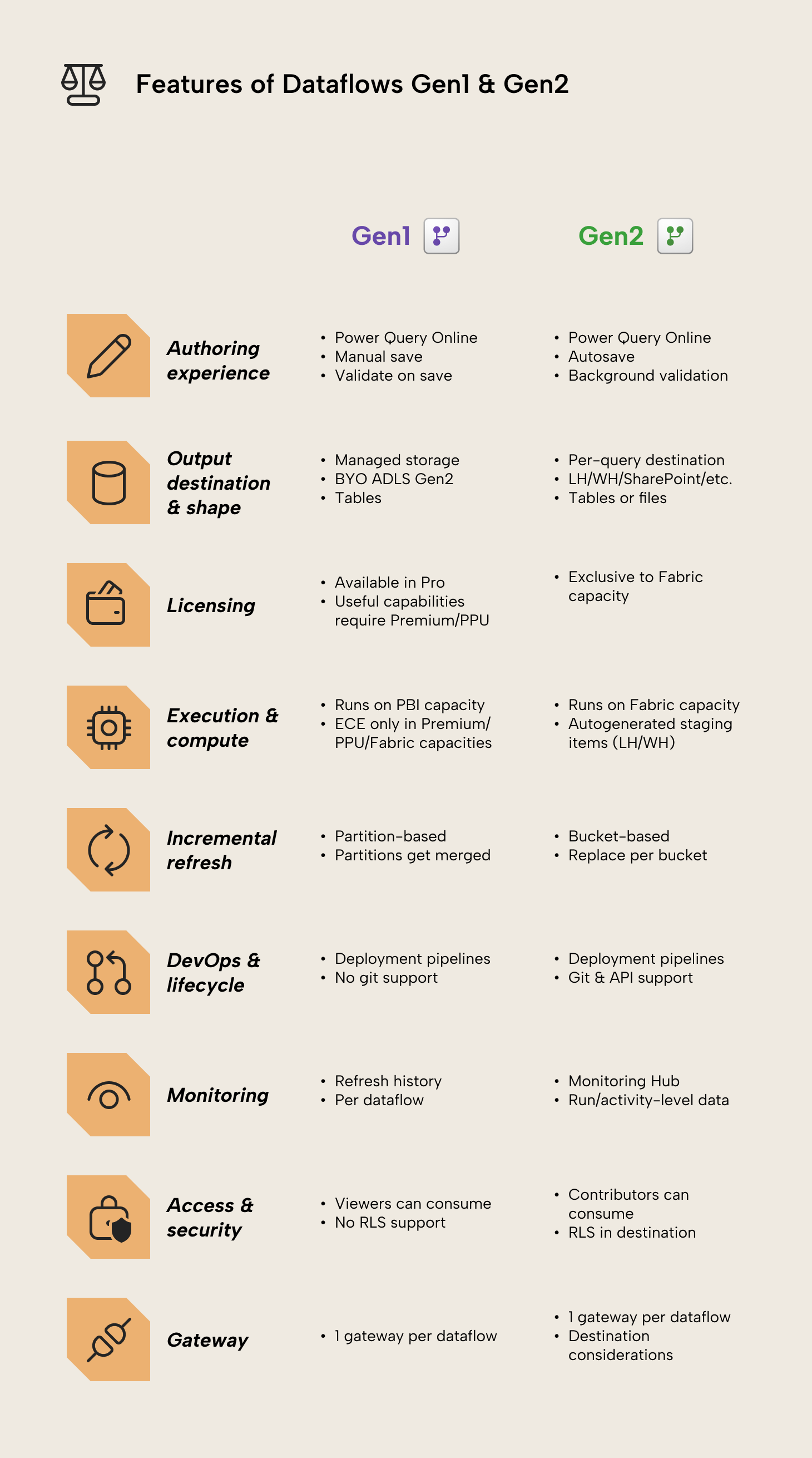
- Authoring experience. Gen1 and Gen2 both use the Power Query Online experience in the Power BI Service, but Gen2 has autosave (including drafts) and background validation.
- Output destination. Gen1 by default persists output in internal storage provided by Power BI, or an ADLS Gen2 storage account provided by you. Gen2 can output a query to a variety of destinations: Azure SQL database table, Azure Data Explorer (Kusto) table, ADLS Gen2 file, Fabric Lakehouse delta table, Fabric Lakehouse file, Fabric Warehouse table, Fabric KQL database table, Fabric SQL database table, and SharePoint file. Destinations are configured per query, so a single Gen2 dataflow can load different queries to different destinations.
- Output shape. Gen1 publishes entities in managed storage intended to be consumed as tables via the dataflow/CDM connectors, not as user-designed files. Gen2 can publish tables or files, where “files” are a first-class destination for downstream file-based workflows.
- Licensing. Gen1 is available in Pro workspaces. Some important features of Gen1 dataflows like the Enhanced Compute Engine, DirectQuery, incremental refresh, and computed/linked entities are only available to Fabric, Premium, or PPU capacity workspaces. Gen2 requires the workspace to be on a Fabric or Fabric trial capacity.
- Execution and compute. Gen1 dataflows in Pro workspaces run on the shared Power BI capacity with tighter refresh limits. If Gen1 is in a Fabric, Premium or PPU capacity workspace, the Enhanced Compute Engine (ECE) can be enabled after which features like DirectQuery to that Gen1 dataflow become available. It’s then also possible to re-use queries from existing dataflows by referencing them (linked entities) into new computed entities. Gen2 dataflows run on Fabric SQL compute engines backed by the Fabric capacity and use automatically created staging assets like lakehouses and warehouses for data access and storage. These staging assets exist in the workspace and Microsoft advises not to access or modify them directly.
- Incremental refresh. Gen1 incremental refresh is partition-based. Partitions are reloaded selectively and can get merged opportunistically over time as they move out of the incremental range, e.g. months are merged into quarters, to improve storage and query performance. Gen2 incremental refresh works with fixed single-unit buckets (i.e. days or weeks or months, etc.) and uses a replace approach in the destination for the buckets of data it processes (i.e. delete and insert for that range), with settings in the Gen2 editor and explicit limits such as bucket count.
- Integration with other Fabric assets. Gen1 default Power BI storage can be consumed through the Power Query dataflows connector available in semantic models and dataflows. Other Fabric assets can only use Gen1 dataflows if you brought your own ADLS Gen2 storage. For Gen2 dataflows, other Fabric assets are first-class citizens: storage can be output to the variety of destinations described earlier and pipelines can orchestrate runs of Gen2 dataflows.
- DevOps and lifecycle. Gen1 dataflows are supported in Fabric deployment pipelines (with some limitations) but aren't supported by workspace Git integration. For CI/CD in practice, that means you’d need workarounds like exporting and importing Gen1 dataflow definitions through the REST API. Gen2 dataflows are fully supported by Fabric deployment pipelines and workspace Git integration.
- Schema changes. Gen1 stores the data in a dataflow-managed format, so the schema is whatever it is at refresh time. Changing the schema drops all data and always requires a full reload. Gen2, in contrast, can output to destinations where schema changes must be handled: either strictly (fixed schema and fail if it doesn’t match) or flexibly (dynamic/managed: the destination schema is adjusted to match).
- Monitoring. Gen1 has refresh history per dataflow in the Power BI Service user interface. Gen2 refreshes are available in the ‘Monitoring Hub’ interface with more run metadata and activity-level details.
- Permissions. Gen1 can be consumed by workspace Viewers, without support for row-level security. Gen2 can only be consumed by workspace Contributors and up; Viewer isn’t supported. Row-level security is supported through the destination.
- Gateway constraints. Both Gen1 and Gen2 dataflows can only use one gateway per dataflow. Gen2 currently has some known gateway outbound port 1433 issues for destinations.
- Platform limits. Gen1 on shared capacity has stricter limits (e.g. refresh time-outs at 2 hours per table and 3 hours per dataflow) and useful features like incremental refresh are gated behind capacity requirement. The limits for Gen2 are more specific and related to Data Factory, like permission and tenancy constraints.
- Copilot and AI integration. There is no AI integration or Copilot support for Gen1 Dataflows. Gen2 features Copilot support for creating queries and sample data with natural language prompts, if you’ve set up Copilot in Fabric with the appropriate subscriptions.
Gen2 is where Microsoft is investing and should be the default choice for Fabric workspaces. Gen1 can still be a pragmatic choice in Pro or shared-capacity environments, accepting that their lifespan will be limited and migration to Gen2 is inevitable.
Dataflows vs Power Query in import semantic models
Power Query inside an import semantic model is often the fastest way to get started, but scales poorly when you have multiple models, multiple teams, or repeated data transformation that should be consistent across the tenant/organization.
Dataflows are usually a better fit when:
- Reusable transformation across models. If the same transformation logic is duplicated across multiple models, you have to maintain it in multiple places and accept the risk of drift. Centralizing the logic in a dataflow reduces both.
- Controlled source access. Instead of every semantic model or user having direct access to the source system, a dataflow can become the managed ingestion and transformation layer. This is especially useful when only specific data from a source should be consumed.
- Separation of refresh. Dataflows refresh independently from semantic models. They can run on their own schedule and won’t cause downstream model refreshes to fail if they fail. That also means that there are two refresh layers to coordinate: the dataflow(s), and then the semantic model.
- Multi-consumer support. Power Query in a semantic model can only serve that model. A Gen2 dataflow can land transformed tables in a lakehouse or warehouse and then feed semantic models, notebooks, SQL-based consumers, etc.
Embedding Power Query in semantic models is often still the right choice if:
- Transformations specific to the model can’t be pushed upstream and are unlikely to be re-used by other models.
- You want one refresh (the semantic model one) to reason and worry about.
WARNING
The right tool for the job
Dataflows are designed for low-code ingestion and transformation. They can persist results, but they don’t replace the governance patterns you typically apply in a warehouse like stable schemas, explicit modeling, lineage, and controlled change management. If you notice your dataflows becoming the core system that everything depends on, that’s usually a sign to introduce a lakehouse/warehouse layer and simplify the dataflows.
Dataflows vs Fabric notebooks
Notebooks and dataflows overlap because both can ingest and transform data. Who should make and own them is the key difference that splits them.
Dataflows tend to fit when:
- Simplicity matters more than engineering flexibility. This is most suitable for decentralized or self-service scenarios where non-technical teams take ownership of ETL.
- Low-code transformations with Power Query M in a graphical user interface. Power BI developers often already have the Power Query skill so can get started with dataflows quickly.
- A simple way to publish re-usable tables in different formats. Gen2 can land tables or files to supported destinations per query.
- A lighter BI ingestion operating model, in an environment where engineering-heavy transformations are rare and Power Query M is well adopted.
Notebooks are usually a better choice when:
- Cost and performance are the primary concerns. Notebooks in Fabric are generally considered more cost-effective and performant than alternatives for many scenarios, although this isn't universal.
- You need engineering-grade flexibility or observability, like custom libraries, tests, complex logic and structured logging. This is typically more suitable for centralized scenarios where BI or IT teams own ETL processes, or where decentralized teams are more comfortable working with code.
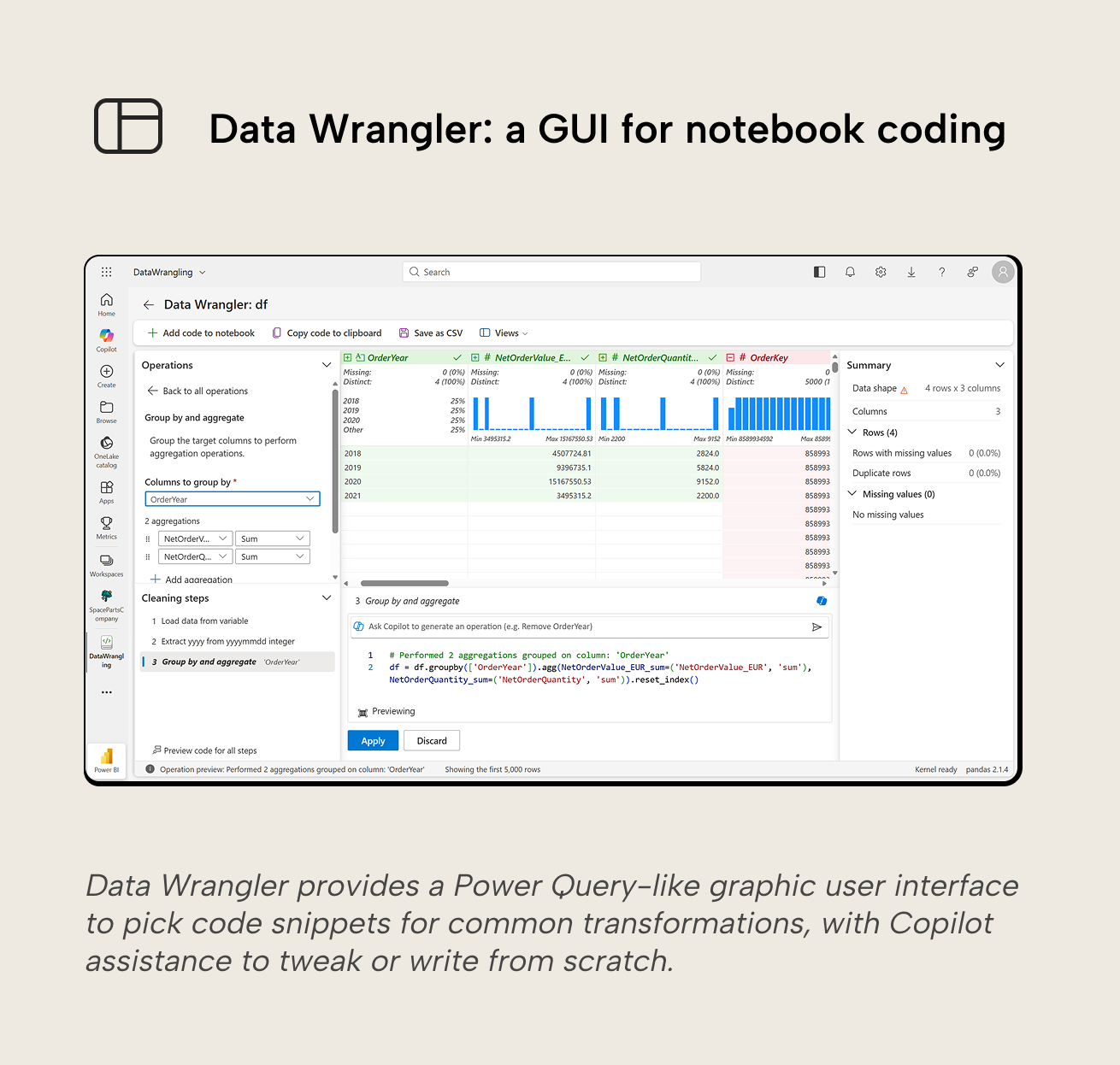
- A code-first lifecycle is preferred. Notebooks are typically written in PySpark, Python, or T-SQL. This is particularly interesting when you use LLMs and coding agents like Claude Code to facilitate notebook development. Data Wrangler lowers the “barrier of entry” to code by providing a GUI to pick code snippets for common transformations, and integration of Copilot to assist with writing code.
- Workloads are often heavy or large-scale.
Getting started with dataflows
When starting with dataflows, first decide whether you need Gen1 or Gen2:
- If you’re not on Fabric capacity, Gen1 is the only choice you have.
- If you do have access to a Fabric capacity, then Gen2 is on the table. You don’t automatically have to go for Gen2, however. If semantic models will be the only consumers of the dataflow, and you don’t need to land the data in a lakehouse/warehouse/SharePoint/etc., Gen1 can be a pragmatic on-ramp.
- If the dataflow will be used beyond semantic models or the data must be landed in a lakehouse/warehouse/SharePoint/etc., Gen2 is the only dataflow option.
Once you’ve picked a generation, the next choices are mostly about scope, contracts and operations:
- Keep the scope reusable, not model-specific. Dataflows are most valuable when they produce curated, broadly useful tables. If you find yourself adding transformations that only apply to one semantic model, it’s a sign that this logic belongs in that semantic model’s Power Query instead.
- Treat the output schema as a contract. Whether you’re publishing to managed storage in Gen1 or destinations in Gen2 (lakehouse, SharePoint, etc.), downstream consumers will depend on specific column names, types, and meanings. If any of these change without prior notice, refreshes will fail and users can be impacted. When frequent changes are expected, plan for them up front (especially in Gen2 destinations where you can choose between strict or flexible schema handling).
- Be deliberate about refresh orchestration. Moving transformations into a dataflow introduces another refresh layer. This separation can be a strength (independent schedules, isolation of failures), but it also means having to make sure dataflows have refreshed successfully before downstream consumers’ refreshes.
- Choose the destination based on who needs the data. In Gen2, the output destination is part of the design. Pick the destination that best fits the consumption patterns:
- Use lakehouse or warehouse tables when you want a durable curated layer that can be consumed by multiple semantic models, notebooks, or SQL-based consumers.
- Use files when the downstream workflow is file-based (e.g. exports for external sharing, interoperability with Spark).
- Have a rule for when to switch to notebooks. Dataflows are good for low-code transformations and simple ETL. Once the work needs complex algorithms, large joins, tests, or custom libraries, notebooks are usually the better long-term choice.
- Name and document dataflows like they’re a shared asset. Dataflows are high-dependency items once re-used. Use clear naming, short descriptions and ownership conventions so people can (securely) discover and adopt them.
Start small with reuse in mind and avoid turning dataflows into an accidental data warehouse.
For further reading
- Data preparation guide (Tabular Editor). Our step by step guide on preparing data for semantic models, focusing on gathering and validating the requirements.
- Lake model workflow (Tabular Editor). Our article on how Fabric Lakehouses can feed semantic models. Lakehouses can be a consumer of Dataflow Gen2.
- Generation comparison reference (Microsoft Learn). Microsoft's comparison of the two generations, covering feature differences, destinations, and migration paths in detail.
- Lake storage reference (Microsoft Learn). Direct Lake is the storage mode often fed by Dataflow Gen2 through OneLake.
In conclusion
Dataflows are best viewed as a reusable low-code transformation layer between sources and semantic models. Gen1 can be a deliberate choice if your organization is not yet ready for Fabric and accepts that a migration to Gen2 must follow. For all other low-code scenarios Gen2 is the natural choice. If transformations become engineering-heavy, or cost and performance dominate the decision, notebooks are often the better long-term home.
Feed cleaner Fabric dataflows into stronger Tabular Editor 3 models.
Give Tabular Editor a spin