Bridge Databricks and Power BI seamlessly

The Semantic Bridge translates Databricks Unity Catalog metric views into Power BI and Tabular semantic models — automatically.
Write your business logic once. Deploy the same model from Databricks directly to Power BI and Tabular.

Semantic-Bridge-hero

Automate your tabular modeling workflow

Write DAX faster, apply changes in seconds, and enforce best practices automatically.
Tabular Editor combines AI, scripting, and best practice analysis to remove manual work across your entire model. 

Everything you need for cross-platform semantic modeling

Productivity through automation

A single guided step translates your entire metric view into a ready-to-use semantic model – tables, sources, columns, measures, and relationships, all perfectly aligned.

Deterministic SQL-DAX translation

The semantic bridge includes an SQL-to-DAX compiler that automatically translates measure and derived column definitions. This provides a deterministic translation of common analytical query patterns. Anything that cannot be translated is passed through unchanged.

Validation & Diagnostics

Built-in rules detect translation issues instantly. Success, partial success, or failure — you always know exactly what needs your attention.

C# Scripting Support

Programmatically manipulate metric views using Tabular Editor's C# scripting interface — the first and only way to automate metric view workflows. Work with metric views using familiar scripting environment.

From Databricks metric view to Power BI model in seconds

Many organizations run Databricks and Power BI side by side. Until now, reusing business logic between them meant duplicating your work by hand. The Semantic Bridge eliminates that entirely. Import any Databricks Unity Catalog metric view YAML, and Tabular Editor automatically generates all the corresponding Tabular model objects — tables, columns, measures, and relationships.
  • Auto-generates tables, columns, measures and relationships
  • Full undo/redo support — replay or reverse any import instantly
  • Works with new, empty models or existing models you want to enhance
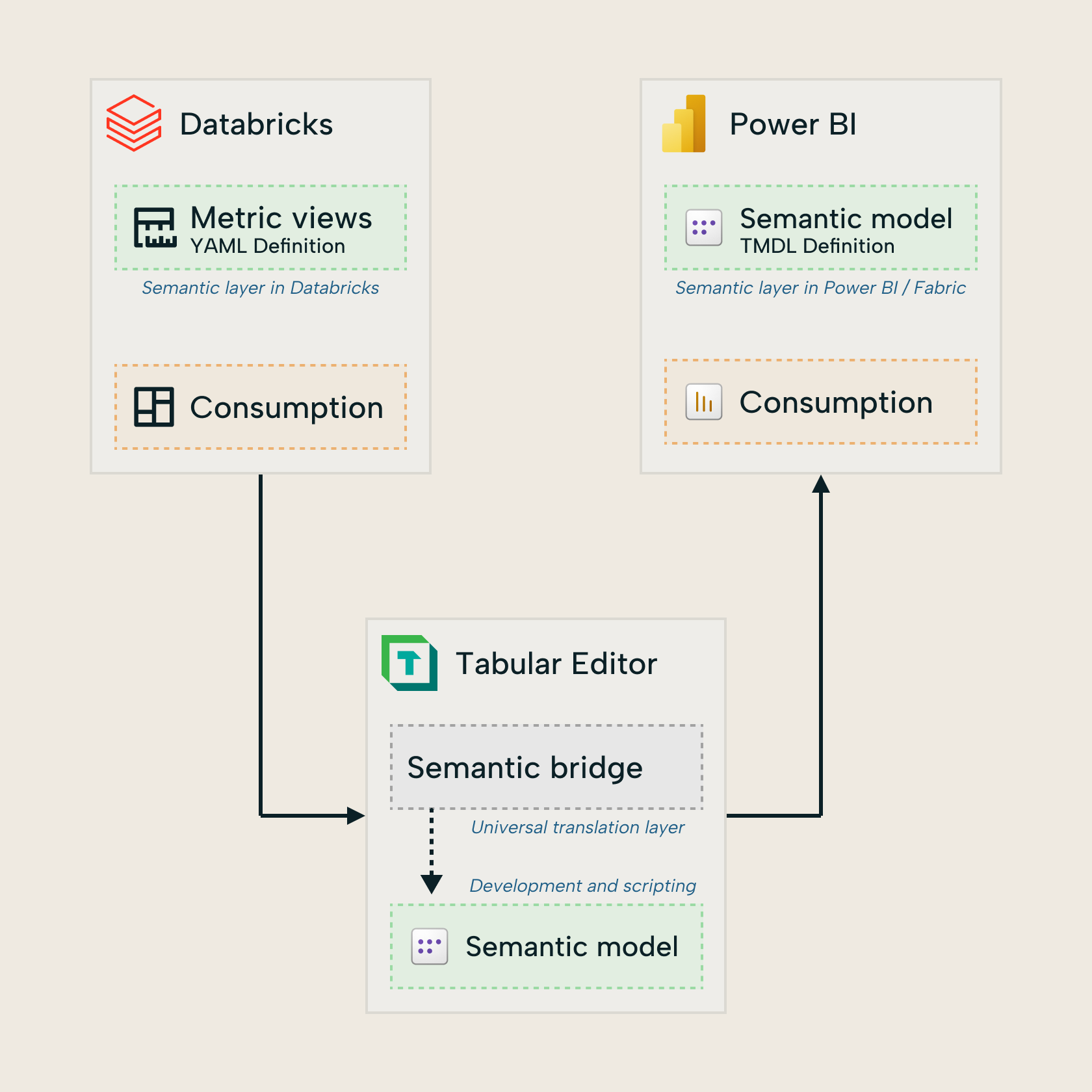
semantic-bridge-databricks-to-power-bi-square-3
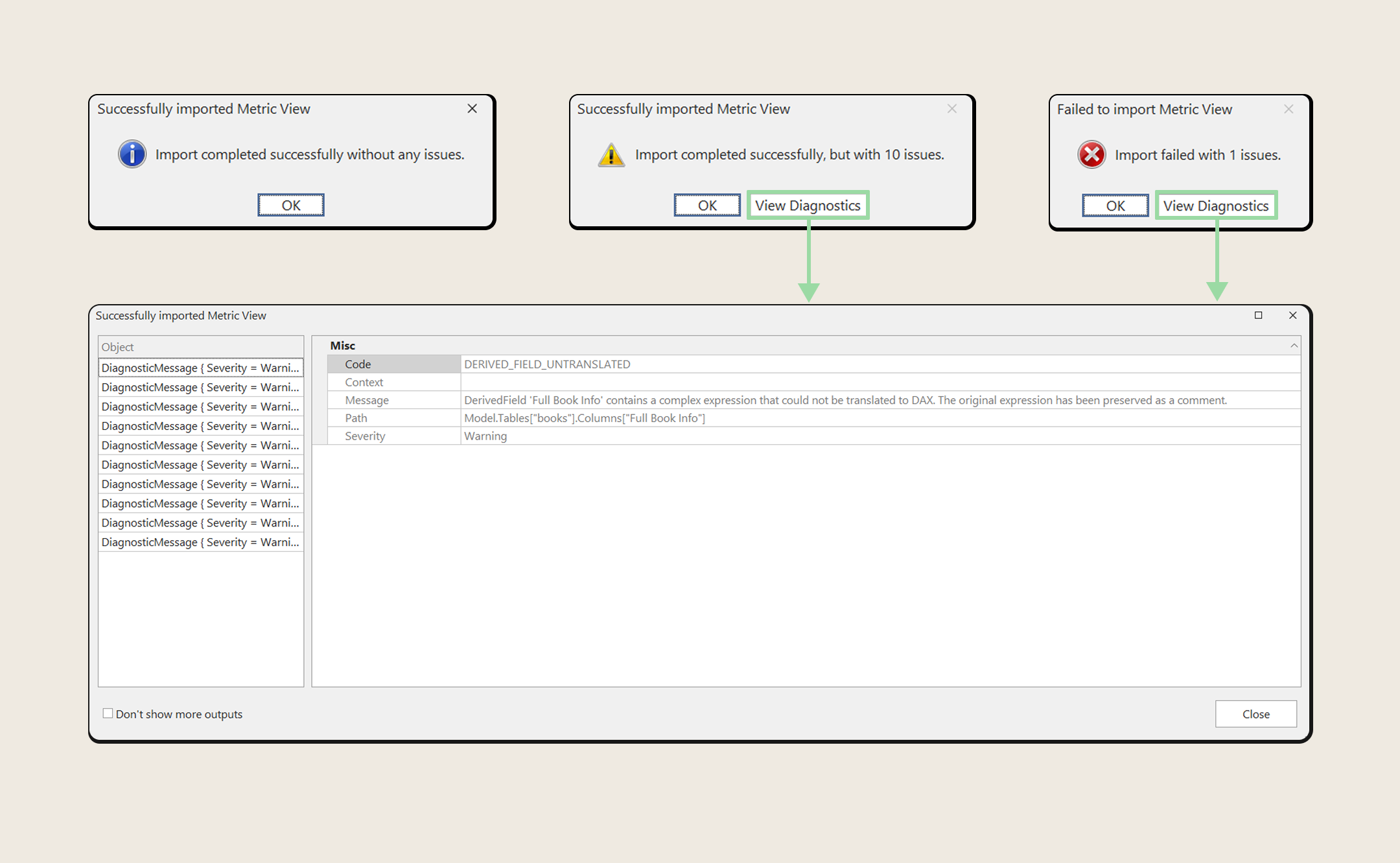
semantic-bridge-diagnostics-square-2

Always know exactly where you stand

Not everything in a metric view translates perfectly — and the Semantic Bridge is upfront about that. After every import, you get a clear diagnostic report so you know what was translated, what needs attention, and what couldn't be converted.

  • Three clear outcomes: success, partial success, or failure
  • Detailed diagnostic messages for every untranslated object
  • Built-in validation rules for naming conventions and structure
  • Create custom contextual rules for duplicate detection and cross-object checks
  • Create custom contextual rules for duplicate detection and cross-object checks

The only way to automate Databricks metric view workflows

Need to go beyond the GUI? The Semantic Bridge exposes Databricks metric views through Tabular Editor's powerful C# scripting interface — giving you the first and only programmatic access to manipulate metric view objects.

Use the same scripting environment you already know for Power BI models to load, inspect, modify, and validate metric views. The AI Assistant can generate scripts for you on demand.

  • Load and inspect metric view structure programmatically
  • Add, remove, and rename objects
  • Write predicate-based and contextual validation rules
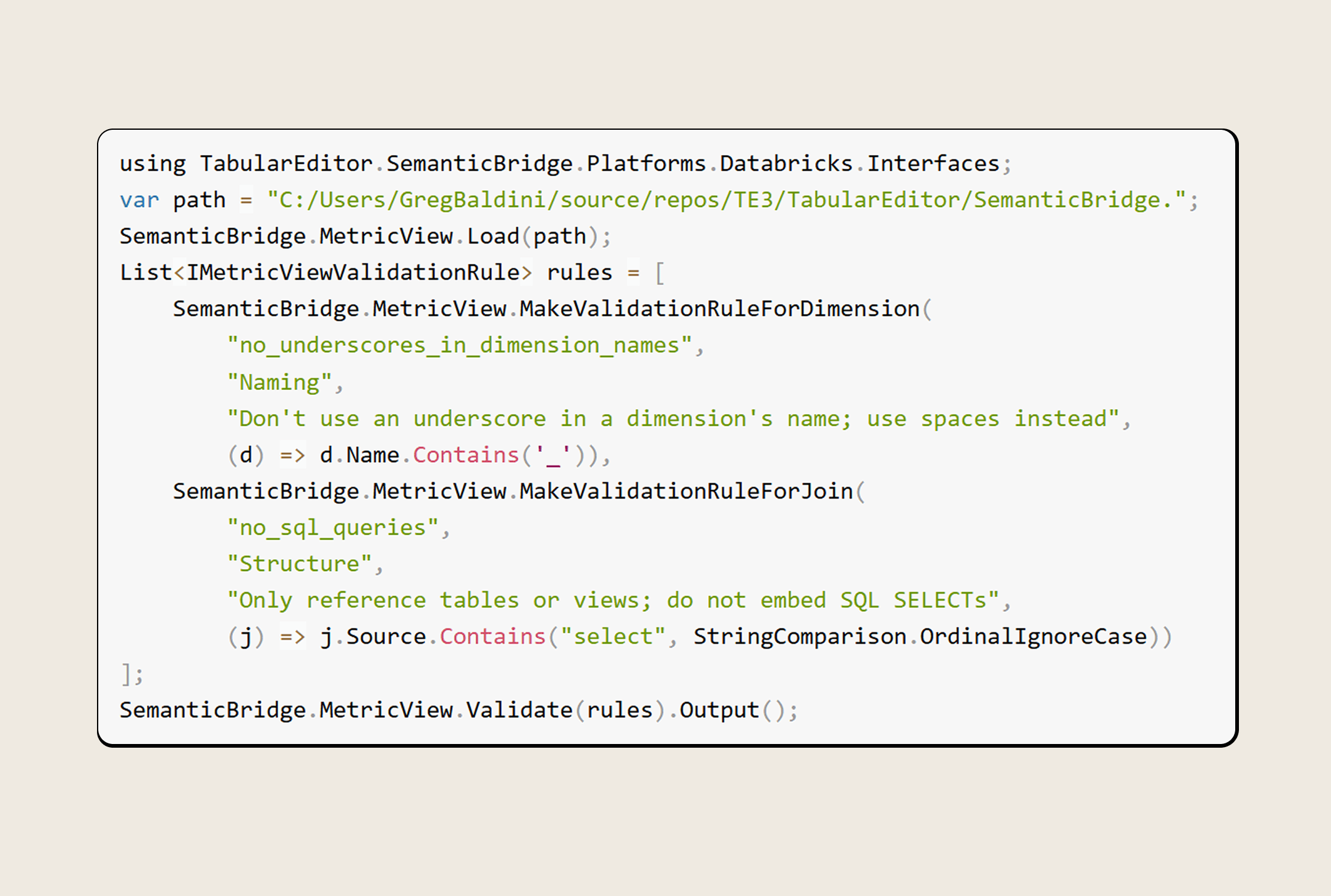
semantic-bridge-bpa-script

From metric view to deployed model in four steps

Prepare your Metric View

Create or export your Databricks Unity Catalog metric view as a YAML file and place it where Tabular Editor can access it.

Import via Semantic Bridge

Use File Open Import from Metric View YAML. A guided dialogue walks you through the import settings.

Review diagnostics

Check the diagnostic report. Fix any flagged issues — such as measure definitions — directly in Tabular Editor.

Develop & deploy

Further develop your model, validate it with BPA rules, and deploy to Power BI or Microsoft Fabric.

Ready for the next level?

Stop duplicating semantic models across platforms

 The Semantic Bridge is available in Tabular Editor 3 Enterprise Edition.

What is the Tabular Editor Semantic Bridge?

The Semantic Bridge is a semantic model compiler built into Tabular Editor 3 Enterprise Edition. It translates the structure and expressions of a Databricks Unity Catalog metric view into a fully formed Power BI/Tabular semantic model — including tables, columns, measures, and relationships. This lets you reuse business logic across platforms without manual duplication.

Which edition of Tabular Editor 3 includes the Semantic Bridge?

The Semantic Bridge is available exclusively in the Enterprise Edition of Tabular Editor 3. It is also available during the 30-day free trial, so you can evaluate it before purchasing. 

What is a Databricks metric view?

A metric view is Databricks' semantic layer, introduced in Unity Catalog in 2025. It is defined as a YAML file and supports reporting in Databricks AI/BI dashboards and conversational BI via Databricks Genie — similar to how Power BI semantic models support reports and Copilot. The Semantic Bridge allows you to bring the logic from a metric view directly into Power BI. 

Does the Semantic Bridge support bi-directional translation?

The current release (available from Tabular Editor 3.25.0 onward) focuses on translating Databricks metric views into Tabular/Power BI semantic models. The Semantic Bridge is built on a platform-agnostic framework designed to support bidirectional, multi-platform translation in future releases, with future platforms prioritized by customer feedback.

What happens if not everything in my metric view can be translated?

The Semantic Bridge provides three clear outcomes after every import: success (everything translated), partial success (most objects translated, with diagnostic messages explaining what needs your attention), or failure. You can view all diagnostic messages directly in Tabular Editor and use the full undo/redo functionality to reverse or replay any import. 

Can I use C# scripts with metric views?
Yes. The Semantic Bridge exposes a C# scripting interface that lets you programmatically load, inspect, and manipulate Databricks metric views. You can add, remove, and rename objects, create custom validation rules, and automate translation workflows. This is the first and only way to interact with metric views programmatically.
Is the Semantic Bridge a finished feature?
The Semantic Bridge was released in Tabular Editor 3.25.0 as an MVP (Minimum Viable Product) feature. It is under active development, with known limitations documented in the official documentation. The API and feature surface are subject to change as the feature evolves. We actively welcome feedback to help shape its direction.