
Key Takeaways
- Power BI Project (PBIP) is a text-based metadata format for semantic models and reports: Text-based formats offer many benefits over the Power BI Desktop (PBIX) binary format, which helps you improve productivity and reduce cost.
- The PBIP format is a prerequisite for scaling Power BI with or without agents: The format lets you track and manage changes with source control, facilitate automated testing, or use coding agents to make changes to both models and reports.
- Use PBIP unless you have a very good reason to use PBIX: The only benefit PBIX still has is simplicity, since it’s a single file. PBIX might therefore be more appropriate only for self-service business users who don’t use agents, but anyone else should be using the PBIP format to get the benefits.
- When using agents, avoid making read/write changes to metadata directly, with or without agent skills: Making direct changes to model metadata is slower, more expensive (measured in tokens) and more prone to mistakes. Instead, you should let agents use tools like MCP servers or command-line interfaces (CLIs) for semantic models and reports.
This summary is produced by the author, and not by AI.
You should use PBIP instead of PBIX files
The PBIP format is an alternative to PBIX for storing the metadata that defines your semantic model and report. It allows more robust workflows and is far more agent-friendly, while the PBIX binary format packs everything into one file.
In this article, we argue that you should use PBIP format by default, deferring to the PBIX format only when PBIP isn’t an option.
What is the PBIP format?
The Power BI Project (PBIP) format was introduced in June 2023 as part of a “Developer Mode” initiative. In simple terms, it means that you save your Power BI report and semantic model definitions as human-readable text files in a folder structure. You can read and edit these text files with any text editor such as VS Code or good old Notepad. In contrast, the older PBIX format is binary; the report and semantic model definition are packaged into one file you can only read or edit with specific software like Power BI Desktop.
If you save a semantic model or report into a PBIP format, you end up with a project folder that consists of subfolders for the report and semantic model:
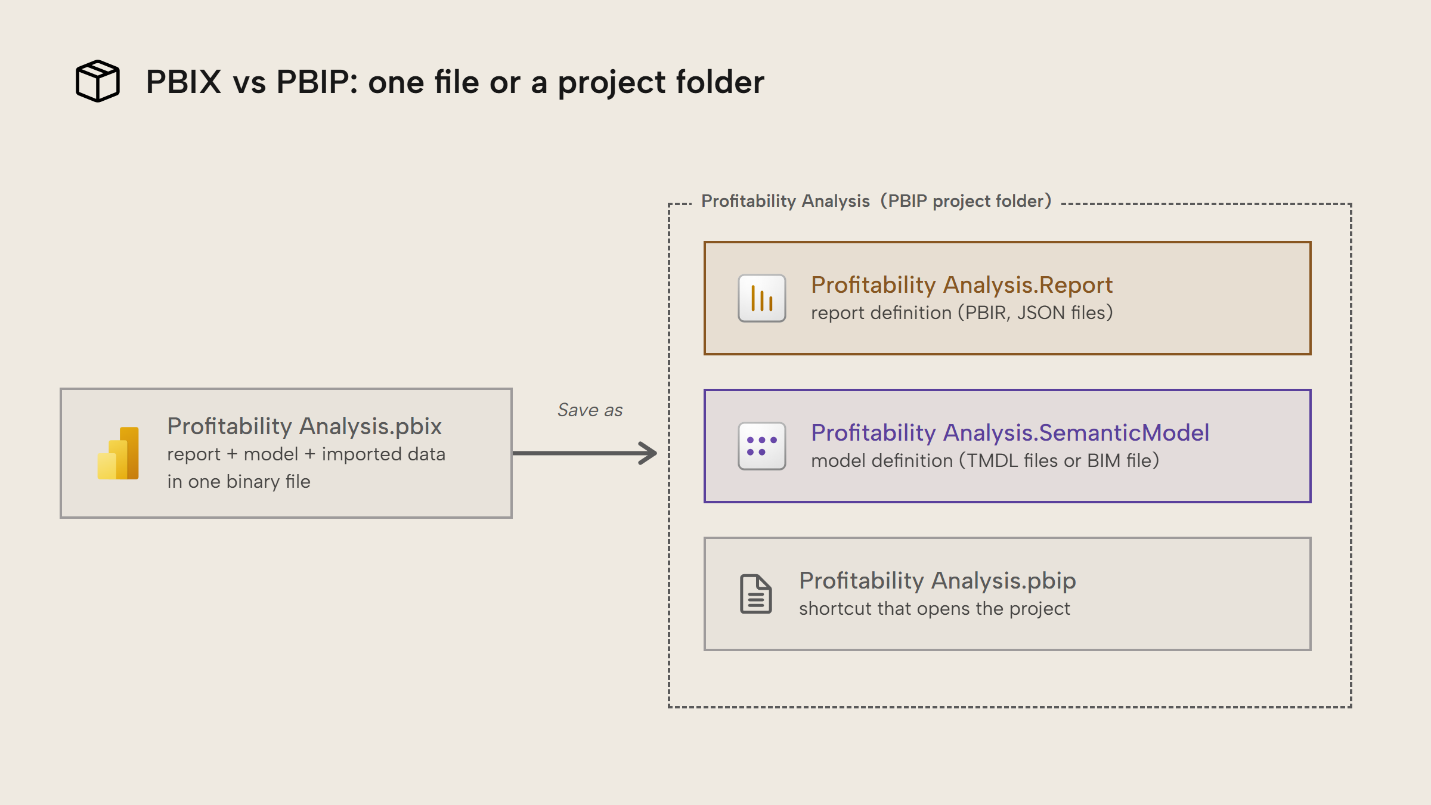
Basically, the PBIP format is splitting up one file (PBIX) into many (PBIP) in a project. For many Power BI users, having many files of the PBIP format might seem less convenient. For instance, with PBIX, you can easily pass single files along through Teams or Slack chats, email, OneDrive, and so on.
NOTE
If you just have a thin report connected to a semantic model, you might not have the .SemanticModel folder. In that case, you can also open the report directly from the definition.pbir file inside of the .Report folder, itself.
The drawbacks of a single PBIX file
Despite the would-be convenience of the single-file PBIX format, there are many limitations:
- You can’t share a file for an import model without also sharing all data imported to it. This ignores many data security policies your organization would like to see respected.
- You can’t open the file to view or modify its contents. At least, you can’t in a way that’s supported by Microsoft. If you poked around with PBIX you may know you can just change the
.pbixextension to.zipand look inside to see the compressed data. This is a big rabbit hole to get into, but in a nutshell, this can lead to breaking changes that corrupt the file and make it impossible to open again. - If you do try to commit a PBIX file to Git, this quickly leads to bloated repo sizes. PBIX forces you to keep every single file and doesn’t allow “diffs” (which track only what changed and leave unchanged content alone). A PBIX file of 1 GiB committed 10 times bloats your Git repo to 10 GB, and you also typically need to pay for Git Large File Storage (LFS).
- Because you can’t open and view file contents, you can’t view changes to individual objects, properties, or expressions. You also can’t change them programmatically, either yourself, as part of a pipeline, or using a coding agent.
NOTE
If you’re using a coding agent to edit a semantic model today (via an MCP server, a CLI or another technique), then you’re probably doing so via the XMLA endpoint. This modifies the model open in Power BI desktop or in Power BI / Fabric; it requires that the model is open or deployed to a workspace. You can’t modify the model in the PBIX file in a supported way.
There’s no equivalent to this for reports; if you want an agent or code to modify a report, then it must be in the PBIR format acting on the PBIR files.
How to save as the PBIP format
To save as PBIP from Power BI Desktop, you must first enable the preview option, then File > Save As > .pbip. You can use Power BI Desktop to develop semantic models and reports the same way as you would PBIX; saving as PBIP or PBIX doesn’t affect the model or report capabilities at all, only how it’s saved to disk.
We can think of PBIP as a folder tree, consisting of two main parts:
- The
.Reportpart that stores the report definitions as JSON files following a documented public schema: PBIR. This part describes which visuals are on which page of the canvas, columns and measures used, filters applied, and so on. It decides what you see when you’re on the ‘Report’ pane in Power BI Desktop, and everything your users see when they consume the report in the Power BI service or Fabric, or an embedded solution. - The
.SemanticModelpart, where the model definition lives. Another file format is used here: the Tabular Model Definition Language (TMDL, often pronounced tim-dul. The older model.bim/TMSL format is also supported.). This part says which tables/columns/measures/etc. are in your model, how tables are related, and so on. It’s everything else that you do in Power BI Desktop besides the ‘Report’ pane.
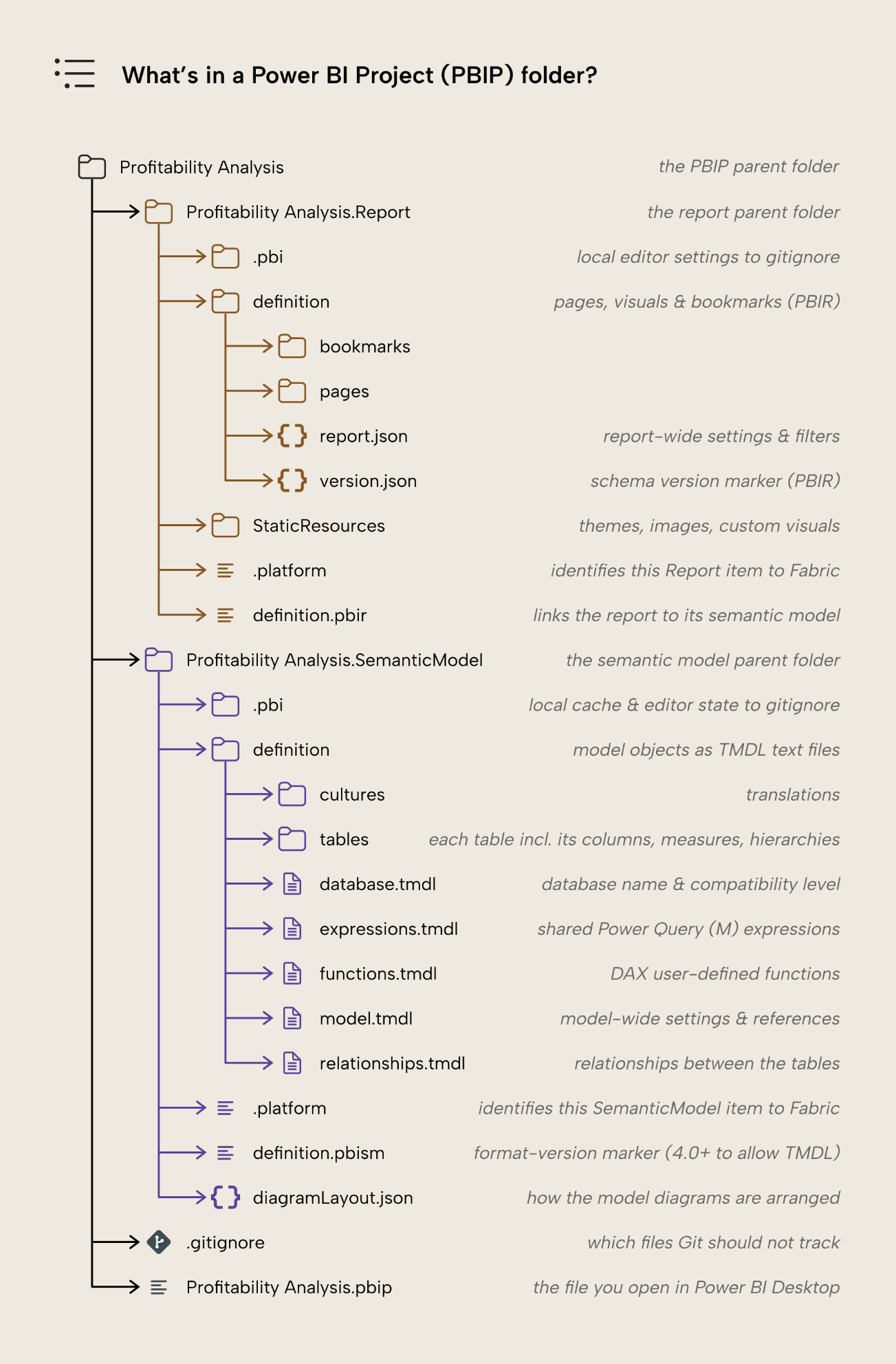
When you deploy (or “publish” from Power BI Desktop) a PBIP to the Power BI service, the parts each create a new item or overwrite their existing respective items: a report and a semantic model. This is the same behavior as PBIX, which also writes to separate items, albeit clearer in PBIP because these separate tracks are easy to inspect and work on.
Why use PBIP?
PBIP should be your default format because of the benefits it offers over a binary format:
- Searchable. It’s trivial to just Ctrl+F a keyword across the whole model and report like any folder of text files.
- Agent-friendly. The Large Language Models (LLMs) that agents run on require text to work from. The next section will expand on this in detail.
- Diffable. Instead of opening two PBIX files to spot changes side-by-side, with PBIP you or an agent can just look at a comparison and see the code changes. The easiest way to do this is if you’re using Git to perform source control.
If you add Git on top, you also get:
- Full history. Every change is tracked from the initial state onward, giving you a paper trail of how the solution came to be. Again, this trail is also specific to each file, so you can view the history for a table and all its columns and measures.
- Better collaboration. Because changes are tracked on an object-by-object or property-by-property level, you can more easily merge changes from different people or agents together into a single file. Practically speaking, this means that multiple people in a team can be working on the same reports and models at the same time. Doing so requires that you’re using source control with a specific branching and merging strategy, though.
While not every Power BI developer uses Git today, the benefits it brings make it well worth learning. An example of a Git diff is below:
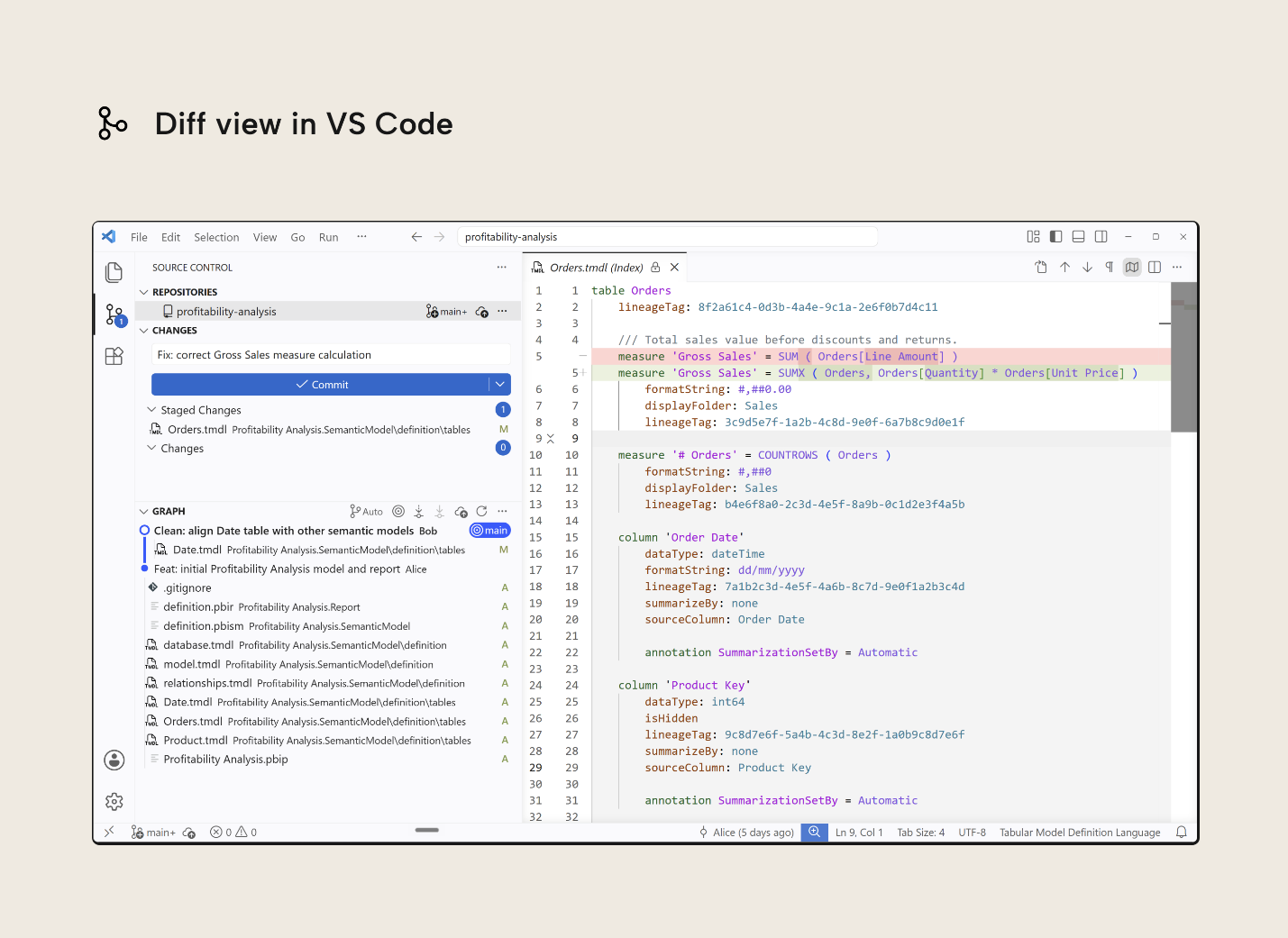
These benefits also reinforce each other: you can delegate scoped work to agents knowing every change is tracked and reversible in Git. PBIP is a prerequisite to agentic development with potentially big productivity gains.
That said, there are specific drawbacks to PBIP:
- Windows has a path limit of 260 characters. Names of semantic objects can become long, leading to long paths that become impossible to save to. Keep root folder names short to buy some room for subfolders and files.
- Report linguistic schema (the report page synonyms used by Q&A) and Sensitivity Labels (Purview’s information-protection labels) aren’t yet supported.
NOTE
The .gitignore file in PBIP lets you say what shouldn’t be tracked in Git. Don’t track cache.abf (this is a binary data file) or localSettings.json (these are settings that only apply to your machine). Power BI Desktop creates this .gitignore file for when you save as PBIP, unless one already exists.
LLMs and their agents need text
LLM-powered agents are increasingly helpful in building semantic models and reports, and those agents need text to work with. You can think of PBIX like a closed box an agent must first unpack before it can work with its contents. PBIP, in contrast, is a transparent and tightly organized box; much easier to find and read what it’s looking for: just a single visual of a report page, only the DAX expressions for the measures ending with “MTD”, and so on. To an agent, a PBIP folder is just a codebase.
Under the hood, these agents are next-token predictors, i.e. they generate text by selecting the next piece of text that probably fits best with what came before. Generating text in files with predetermined structures this way is fragile and wasteful. Fragile because a single misplaced property breaks the entire file and wasteful because it burns tokens generating what is knowable beforehand (i.e. the schema; which properties exist and how they’re structured). This is a very simplified version that illustrates the core problem: letting the LLM write schema files token by token is inefficient.
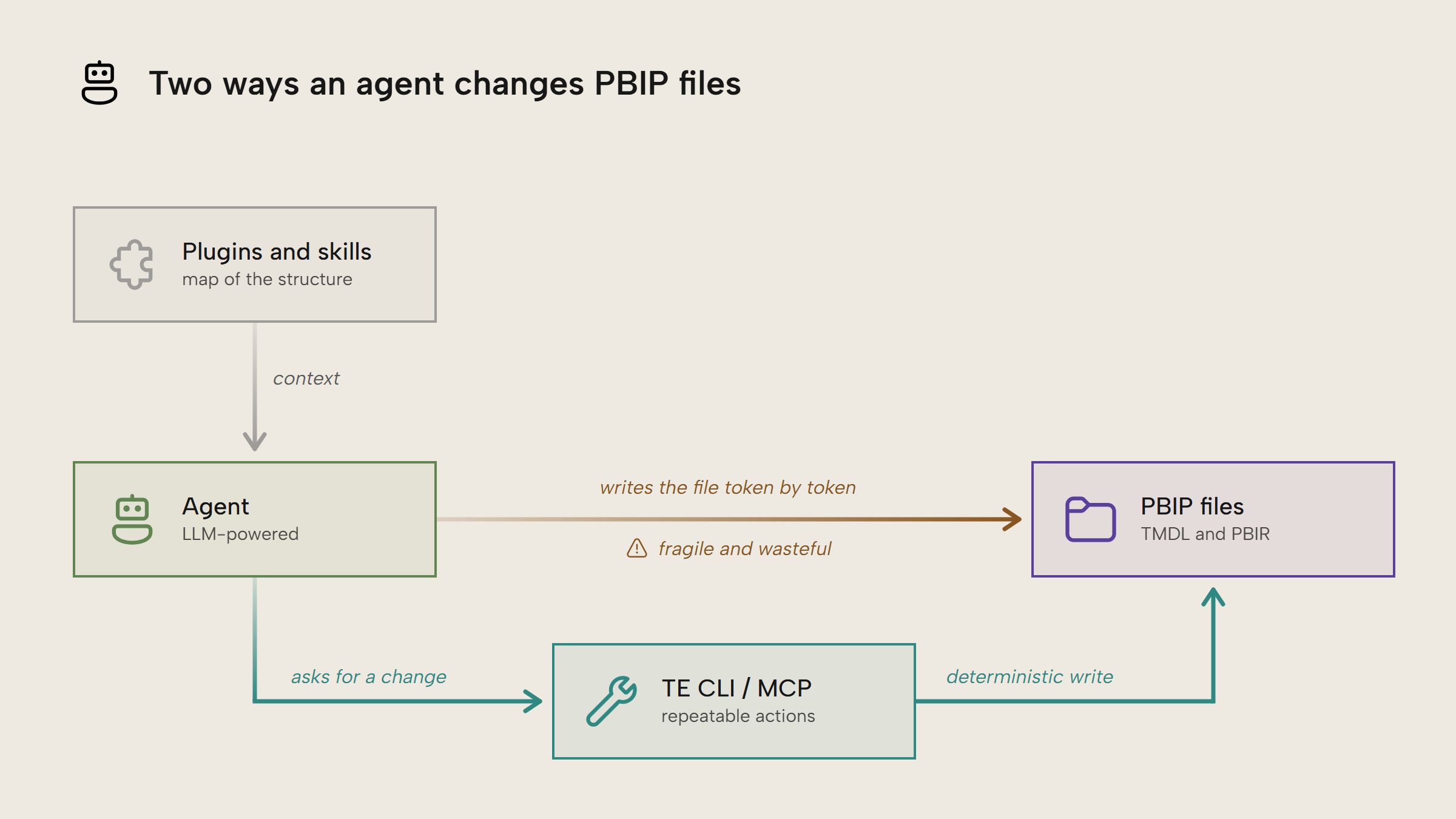
Agents are much more effective when you give them:
- Appropriate context. This is information about what the goal is, potential pitfalls on the way to that goal, examples of a good outcome, etc. Specifically, for working with PBIP, plugins like Kurt’s power-bi-agentic-development give your agents a map of the content and structures they’re working with.
- Proper tools. PBIP and its files follow a documented structure. Tools like the TE CLI and MCP servers turn that structure into repeatable actions. The agent asks for a change and the tool writes it. These actions are deterministic and use cheap CPU compute to write changes. Generating text, in contrast, uses much more expensive LLM tokens, and the output is harder to predict.
The TMDL definition of the ‘Orders’ table shown earlier runs 79 lines and 2,254 characters, 324 of which are 9 lineageTags GUIDs the format requires. These are purely random identifiers, yet every character must be exactly right or the model breaks. A tool doesn’t have to generate any of that. With the TE CLI, adding the Gross Sales measure is this line of code:
te add Orders/'Gross Sales' -t Measure -i "SUMX ( Orders, Orders[Quantity] * Orders[Unit Price] )" -q formatString -i "#,##0.00" -q displayFolder -i "Sales" --save
te creates the lineageTag itself, deterministically. Letting agents run wild on PBIP files may work sometimes, but it’s far less efficient or consistent than when you hand them the right context and tools to work with.
Further Reading
- Tabular Model Definition Language (TMDL) (Microsoft Learn). Microsoft’s reference for the format behind the
.SemanticModelfolder. - Git integration with Power BI Desktop projects (Microsoft Learn). Accessible walkthrough of putting a PBIP folder under Git in VS Code.
- power-bi-agentic-development (Kurt Buhler on GitHub). Kurt’s marketplace of plugins for agents working with Power BI. The plugin for PBIP is just one of many.
- Introduction to C# scripts and macros (Tabular Editor). Worked examples of deterministic editing at the object-level model, the same principle the TE CLI automates from the command line.
Conclusion
PBIP defines a report and semantic model as text. This seemingly simple property enables source control, better collaboration and agent-friendliness out of the box. Agents can treat the folder as a codebase, read directly from it and write through tools like the TE CLI and MCP servers, guided by plugins as the map. PBIX isn’t going away, but it really should only be used if you have an explicit reason to not use PBIP.
Take your semantic models further with Tabular Editor.
Give Tabular Editor a spin