Key takeaways
- AI Assistant: A built-in chat assistant that can explore your model, write DAX queries, generate C# scripts, run BPA analysis, optimize your model, and more.
- Run C# scripts with change review: A new way to run C# scripts that snapshots your model first and shows a side-by-side diff, so you can accept or revert the whole script with one click.
- New DAX and UDF support: New parameters and functions are fully supported in code assistance and semantic validation.
This summary is produced by the author, and not by AI.
Version 3.26.0
We're happy to launch the March 2026 release of Tabular Editor 3 as we continue our dedication to helping you build better semantic models faster.
AI Assistant
The new AI Assistant is your practical helper that understands both your model context and Tabular Editor, and assists you in building semantic models quickly and efficiently. Semantic model development involves both repetitive tasks and model optimization, where a skilled assistant can further your work. It can help you write DAX, make bulk changes, write advanced C# scripts, and check, fix, and write best-practice rules.
Our AI Assistant is one aspect of our vision for working with LLMs and agents to create and maintain semantic models.
The AI Assistant uses a “bring your own API key” architecture, which enables you to choose either commercial models or bring your own enterprise or local LLM to use with the AI Assistant, ensuring you can stay compliant with your organization's policies. Additionally, the Tabular Editor AI Assistant has built-in permission controls so that you decide if you want to share model metadata, results of DAX queries, etc., with your AI provider. All prompts and responses are stored locally and aren't shared outside your environment, except with your AI provider, of course.
TIP
The AI Assistant supports OpenAI, Anthropic, Azure OpenAI, and any OpenAI-compatible endpoint. Configure in Preferences > AI Assistant with your API key. Keys are encrypted and stored locally. Microsoft 365 Copilot and GitHub Copilot licenses can't be used with the Tabular Editor AI Assistant, as these are products and don't expose publicly available endpoints.
What can the AI Assistant do?
The AI Assistant in Tabular Editor 3 can assist you with various tasks inside Tabular Editor 3 that we have observed take time or require specific skills. In the most basic way, it can, of course, answer your questions about Tabular Editor, how to use the tool, where to find settings, but it can do more than that.
NOTE
Here’s an interactive walkthrough of the AI assistant, teaching you how to set up and use it.
The AI Assistant interacts with your model and makes changes through C# scripts using Tabular Editor’s powerful scripting engine. The advantage is that the developer stays in control to assess and review the changes the model makes. Here is an example where the AI Assistant performs bulk changes to a table’s measures, adding display folders, descriptions, and format strings. The difference from other AI approaches is that the C# script is reviewed first, and the AI Assistant directly integrates with our Run C# Scripts with change review feature, which we have also introduced in this release (see the next section).
You will also notice in the video that the AI Assistant is integrated with the rest of the Tabular Editor UI so that you can refer to what you are working on inside the AI Assistant. This means that you can also interact directly with the BPA Analyzer to identify issues, fix them, and even write your own rules:
The AI Assistant can also interact with your model data by writing and executing DAX Queries against your live model:
The AI Assistant is intended as an entry-level tool that integrates tightly with Tabular Editor 3, rather than a general-purpose AI agent harness. To maintain focus on what matters most for semantic model development, certain capabilities fall outside its intended scope: connecting to external files, services, or the web; adding or using MCP servers or other tools; delegating to another AI model; or managing Tabular Editor and AI Assistant preferences.
Consent and privacy
As the AI Assistant interacts with your model’s data and metadata, we have built-in consent checks to ensure you send only the information you wish to the AI provider. You're asked for consent in the AI Assistant when the AI Assistant wants to interact with model metadata, reading or modifying documents inside Tabular Editor, as well as when querying your model with DAX:
Custom instructions
The AI Assistant includes built-in instructions reachable through the slash (/) command, but you can also add your own custom instructions, which can enable your own standards and workflows that you might want to document for the AI Assistant to use.
Getting started
The AI Assistant is available through the View -> AI Assistant menu, but before you can get started, you'll have to configure your API key under Preferences -> AI Assistant using one of the supported providers.
Run C# scripts with change review
This feature ensures that you know exactly which changes a C# script makes to your model. Let’s say you selected 50 measures and want to run a script against them. How do you know which changes are made to each of those measures? This is where the new script review button comes into play, showing you the additions, changes, and removals the script will make. It’s similar to diff views in source control, just for scripts:
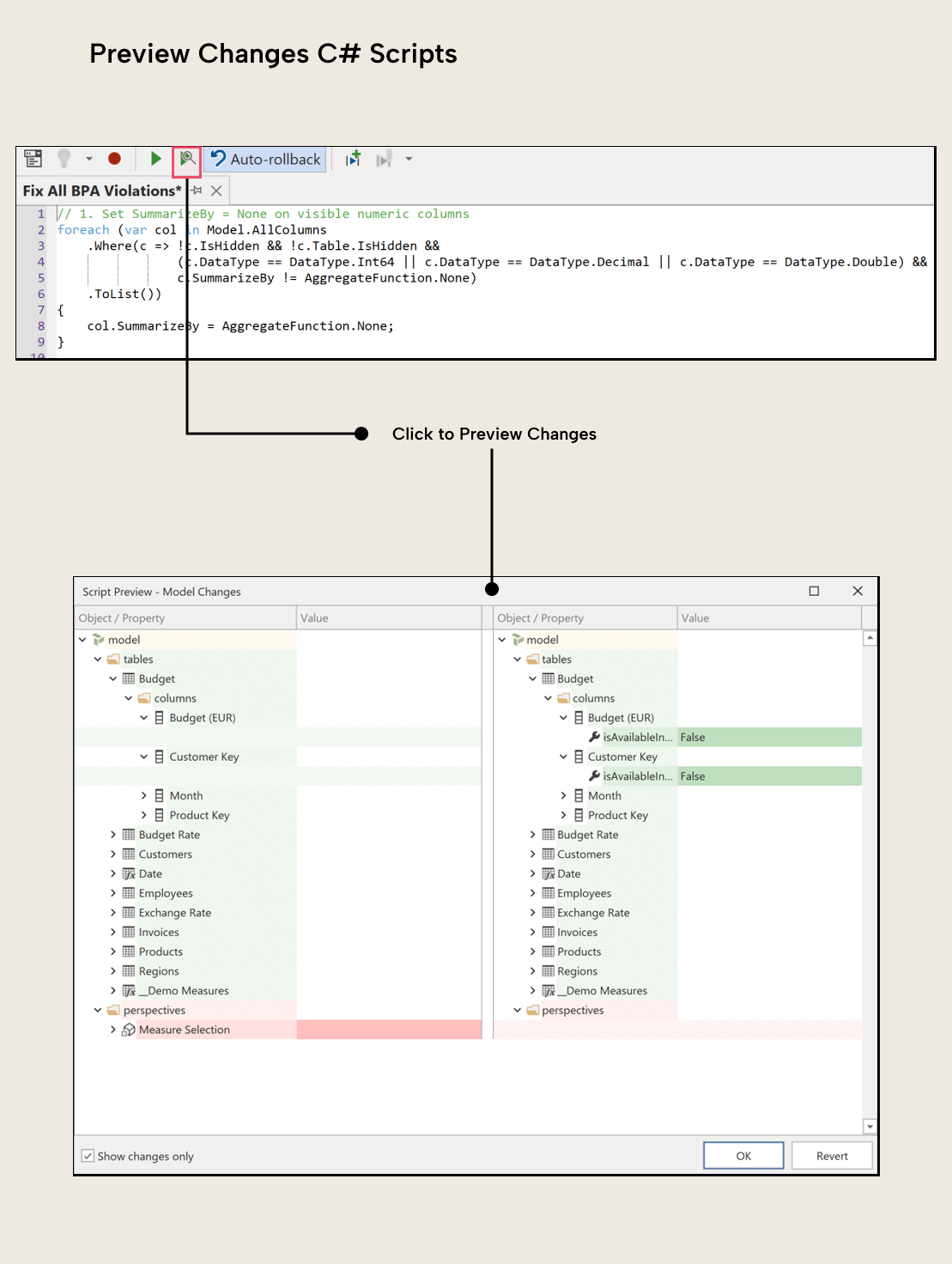
A snapshot of your model prior to the changes is taken, the script is run, and the side-by-side view is shown, letting you review every change the script makes. But even if you click OK and want to undo, you can still do that by just using Ctrl+Z.
NOTE
The AI Assistant automatically displays the change review pop-up when generating and executing C# scripts against your model, ensuring AI-generated model changes receive human review.
Support for new DAX and UDF implementations
User-defined Functions (UDFs) and time intelligence functions in DAX have received several updates, all of which Tabular Editor 3 fully supports in 3.26.0. In the UDF category, a notable change is that UDFs now support up to 256 parameters (up from 12), and Microsoft has introduced a new TABLEOF function and added support for table references to NAMEOF, making it easier to write dynamic functions. Outside of full UI support for the above, we have also added autocomplete support for MEASUREREF, COLUMNREF, TABLEREF, and CALENDARREF type hints when declaring UDF parameters.
On the time intelligence side, DATESINPERIOD has a new optional EndBehavior parameter for calendar-based calculations, and DATEADD has similar optional parameters for date extension and truncation. These new parameters have proper validation, so if you use them without a calendar reference, Tabular Editor will tell you what went wrong.
New built-in BPA rule for UDFs
User-defined functions (UDFs) in DAX let you define reusable expressions in your semantic model. If you name a UDF with a simple, single-word name like Discount, you risk a conflict the moment Microsoft introduces a built-in DAX function with the same name. When that happens, the built-in function takes precedence, and your existing DAX expressions break silently.
The new built-in rule “User-defined functions should use compound names” flags any UDF whose name doesn't contain a dot (.) or underscore (_) separator. The fix is straightforward: use a namespaced name like MyLib.Discount or Finance_Discount instead.
Other improvements
- TOM Explorer table groups toggle: New toolbar button to show or hide table groups without opening Preferences.
- Semantic Bridge usability improvements in the C# API and initial support for serialization and deserialization of
v1.1metric views in the C# object model. - Support for Databricks ODBC Driver in addition to the existing support for the Simba Spark ODBC Driver.
- Non-Azure Databricks instances can now authenticate with
OIDC, which should help users who, for example, use Amazon Web Services to host Databricks. - Expanded C# scripting accessors. Each
Selectedobject type has both a singular and a plural accessor.
For further reading
- Assistant setup reference (Tabular Editor Docs). Covers providers, permissions, local storage, and slash commands.
- Compound-name rule reference (Tabular Editor Docs). Explains the BPA rule introduced here and why namespaced UDF names avoid future DAX conflicts.
In conclusion
The March 2026 release of Tabular Editor offers significant innovations in the form of the AI Assistant and change review, along with a multitude of smaller improvements and bug fixes.
Try the Tabular Editor 3 AI Assistant and review model changes before you apply them.
Give Tabular Editor a spin