Key takeaways
- Ambiguity means multiple filter paths: It occurs when there's more than one valid path to propagate filters between two tables, structurally or via DAX that changes relationship weight.
- It makes models unpredictable: Ambiguity muddies the results, which should be predictable and explainable, and can produce results that are clearly or subtly wrong.
- Design your way out of it: Sometimes a quick fix solves ambiguity, but often it's a symptom of a flawed or drifted model design.
Overview
When building a Power BI semantic model, you may have run into an error like this one:
WARNING
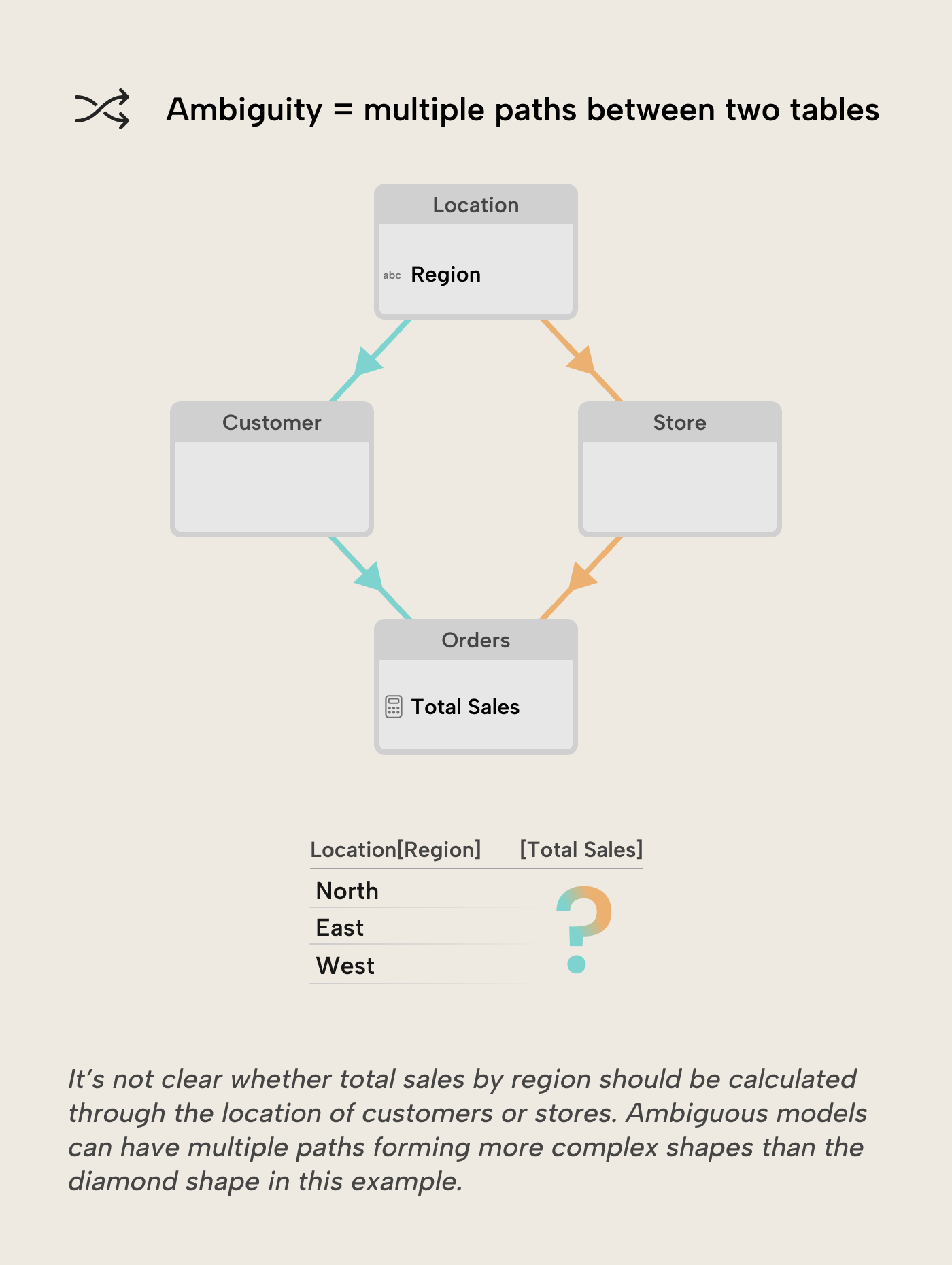
There are ambiguous paths between Location and Orders:
Location → Customer → Orders and
Location → Store → Orders
The error message is fairly descriptive, but it still leaves you stuck because you can’t continue creating or activating the relationship like you were trying to. How did you get here, and where do you go from here? This article will provide some answers to those questions.
What do ambiguous paths mean?
It means that Power BI has more than one valid path to propagate filters between two tables through relationships, i.e. there is relationship ambiguity in the model. More precisely, the semantic model engine considers all active relationships and evaluates filter propagation paths when a query runs. When more than one valid path exists between a source and a target table, an algorithm applies rules (among which are relationship weight and priority) to choose which path to use. If multiple paths end up in a tie, Power BI can raise an error or refuse a model change commit.
Relationship ambiguity is a problem because the results produced by a semantic model should be explainable and predictable. The algorithm to resolve ambiguity is deterministic and will return the same result for the same inputs, but the results are hard to explain when ambiguity is involved, and potentially just plain wrong.
NOTE
We’re specifically talking about relationship ambiguity in semantic models (Power BI, SSAS Tabular, Azure AS) in this article. There are other forms of ambiguity in models that can also be problematic, like conflicting filter context, circular dependencies, evaluation order ambiguity, or just confusing naming of objects in the model. Those are outside the scope of this article.
When can ambiguity arise?
There are three broad situations that can introduce relationship ambiguity:
- Multiple simultaneously active propagation paths
- Bidirectional relationships form filter-propagation cycles
- DAX expressions can change relationship behavior
We discuss them in more detail below.
Multiple simultaneously active propagation paths
This happens when there are two or more active relationship chains between the same source table and target table, and all relationships on those chains can propagate filters in the current evaluation context. You could visualize this by thinking of the chains as forming diamond or polygon shapes in the relationship diagram, for example:
- Location → Customer → Orders
- Location → Store → Orders
Power BI must choose one path when a filter on Location is applied that propagates to Orders. The algorithm can either resolve the ambiguity by applying its rules or raise an error if paths end up in a tie.
Bidirectional relationships form filter-propagation cycles
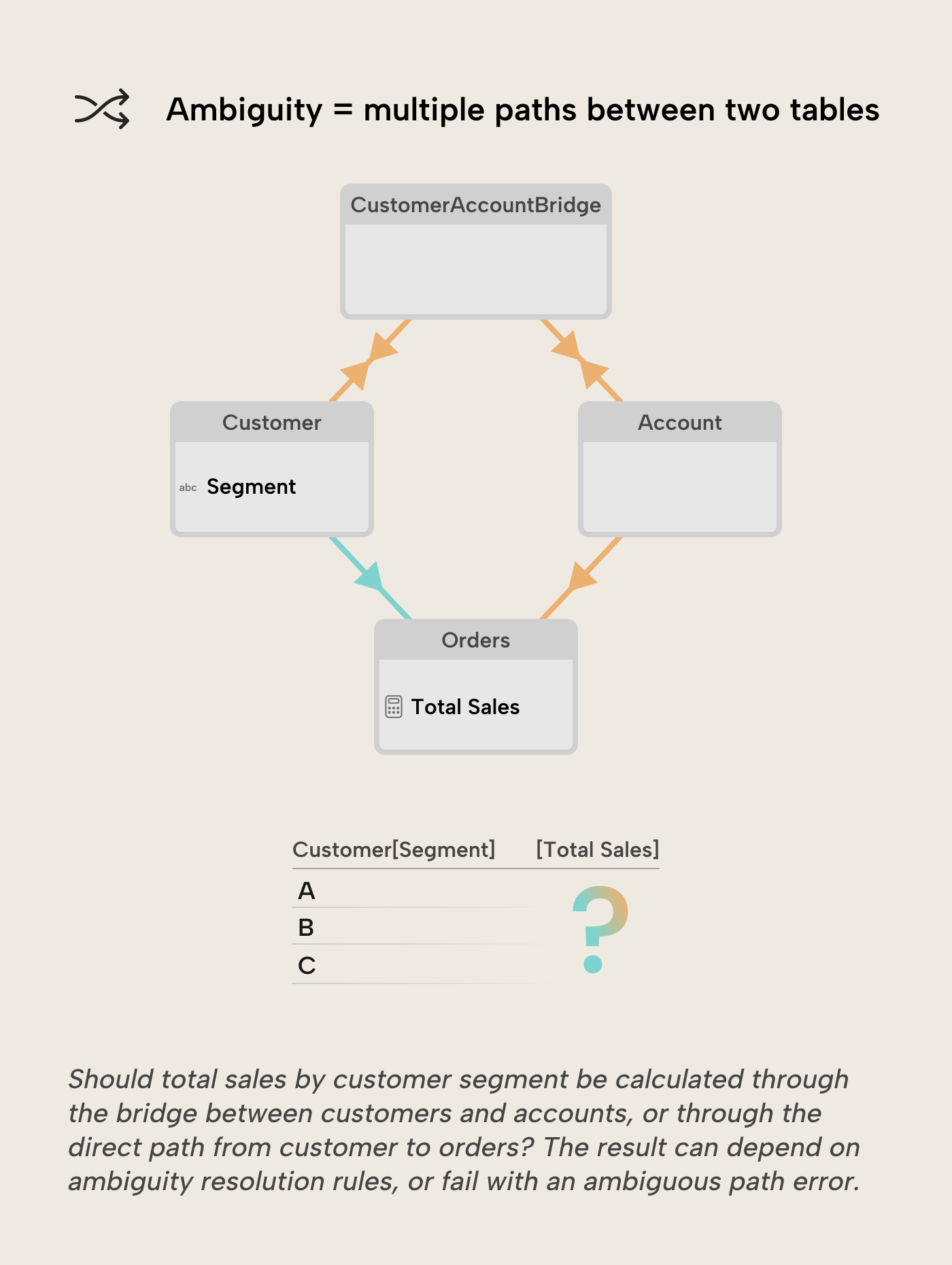
Bidirectional relationships enable filtering in both directions on relationships that can form cycles between the same source and target table. You could visualize this as loops in the relationship diagram, for example:
- Customer → Orders
- Customer ↔
CustomerAccountBridge↔ Account → Orders
Power BI doesn’t always prevent this. It may:
- Block the commit of a relationship change with an error, or
- Accept the model and rely on the engine’s path-selection algorithm to resolve ambiguity. In this case, results become hard to predict and debug, as illustrated by the SQLBI article on bidirectional relationships and ambiguity.
DAX expressions can change relationship behavior
A DAX expression can temporarily change how relationships behave in a calculation. The USERELATIONSHIP function activates an inactive relationship by modifying its weight in the path-selection algorithm, potentially leading to paths that end up in a tie and an ambiguous path error.
The CROSSFILTER function can change the cross-filter direction of an existing relationship, potentially creating an additional bidirectional path between the source and target tables, again leading to ambiguity for that calculation.
Ambiguous Sales :=
CALCULATE (
    [Total Sales],
    USERELATIONSHIP ( 'Orders'[Order Date], 'Date'[Date] ),
    USERELATIONSHIP ( 'Orders'[Ship Date], 'Date'[Date] )
)
This measure, for example, tries to activate two competing relationships between the Date and Orders tables, which typically leads to a tie in which path to choose and an ambiguous path error.
Common patterns that introduce ambiguity
Some common examples that introduce ambiguity include:
- Changing a relationship’s cross-filter direction from single to both, often done to let column slicers of different tables cross-filter each other so only existing combinations are possible to select.
- Creating a shared parent dimension that connects to multiple dimensions, which are themselves related to the same fact table, e.g., to slice by a shared concept like geography.
- Location → Customer → Orders
- Location → Store → Orders
- Applying bidirectional filters on both sides of a many-to-many bridge table, e.g., to allow flexible filtering in both directions of customers relating to accounts.
- Customer ↔
CustomerAccountBridge↔ Account
- Customer ↔
How to fix ambiguity?
Ambiguous relationship paths are often a symptom of two different problems:
- Trying to achieve a specific behavior like cross-filtering slicers and seeing it just works if a relationship is made bidirectional, maybe not fully knowing the unwanted side effects bidirectional relationships can bring.
- A flawed or drifted model design, either from the start or by trying to expand a well-designed model with a new concept that overlaps with existing concepts, like expanding a model to include both store locations and customer addresses through a shared parent
Locationdimension.
For problems falling into the first bucket, quick targeted fixes can suffice. For the second bucket, quick fixes often just move ambiguity around or introduce other problems. A model redesign towards a star schema where exactly one intentional filter path exists between any two tables is then the better option.
Applied to the common examples we discussed earlier:
Let column slicers of different tables cross-filter each other so only existing combinations are possible to select
- DON’T flip a unidirectional relationship to bidirectional just to let column slicers from different tables filter each other.
- DO adopt the SQLBI pattern for filtering column slicers from different tables, without relying on bidirectional relationships.
Slice two or more dimensions by a shared concept like geography
- DON’T try to introduce a shared parent dimension that structurally competes with existing dimensions to filter the same fact table.
- DO remodel so exactly one path exists from the shared concept to the fact table, i.e., by merging the location attributes into the existing dimensions or by creating role-playing dimensions.
Filtering of dimensions in both directions through a bridge table
- DON’T model the bridge with both relationships set to bidirectional (Customer ↔
CustomerAccountBridge↔ Account), especially if the bridge is also connected to fact tables or other dimensions. - DO treat many-to-many relationships between dimensions as a special case.
- Use a bridge pattern with one bidirectional relationship.
- Use CROSSFILTER to temporarily set the relationship to bidirectional if you only need it for a few dimension-to-dimension calculations, instead of enabling bidirectional filtering for the whole model.
The goal of the fixes is always the same: make sure there is a single, intentional filter path between any two tables that matter for calculations. If you have to rely on the engine’s path-selection algorithm to sort it out, it’s usually a sign that the model design itself needs attention rather than another quick fix.
For further reading
- Relationship modeling guide (Tabular Editor). A practical guide to defining relationships correctly in the first place, reducing the risk of the ambiguous paths described in this article.
- Introductory DAX primer (Tabular Editor). Covers USERELATIONSHIP and CROSSFILTER, the functions used to work around ambiguity when model redesign isn't an option.
- Relationship behavior reference (Microsoft Learn). Explains relationship cardinality, cross-filter direction, and path priority, which are the mechanics behind ambiguous-path behavior.
In conclusion
Relationship ambiguity is present whenever there are multiple valid filter propagation paths from one table to another. Ambiguity makes results hard to explain and debug, so it should be avoided through thoughtful model design. Fixing ambiguity can range from adopting a targeted model and DAX patterns to redesigning the model so there is always a single and intentional filter path between tables.
Find ambiguous relationship paths before they confuse reports in Tabular Editor 3.
Give Tabular Editor a spin