

Key takeaways
- Context is any information that the AI ingests to generate its response: Aside from the choice of model, context is the most important thing you can add to improve performance and output relevance when you use AI.
- There’re many different kinds of context: Context can be added by you with documents or the conversation history, or it can come built-in from the application you’re using (like Claude Code or GitHub Copilot). It can also be retrieved by the agent with tools from websites, applications, and other places.
- Not all markdown files are the same: Some files are treated differently. Memory files like CLAUDE.md or AGENTS.md are loaded automatically into context, while AI skills can be invoked by you or.
- Agents need just enough context to do the task: Skills and prompts can help, but irrelevant or too much context rapidly decreases performance (quality, token-efficiency, and time-to-response) and more detail often adds distractions.
- Agents need the right context at the right time: By leveraging progressive disclosure, you can include just enough context at the appropriate time, managed through a well-crafted AGENTS.md, the use of skills, and organizing your reference files.
This summary is produced by the author, and not by AI.
Context management is a core building block of effective agentic development
The most important task for you during agentic development is to create, gather, and curate context. Context is anytext (or images) that the model ingests to produce a more relevant and useful response. Providing the right context at the right time helps agents produce better results; it’s about more than just writing markdown files:
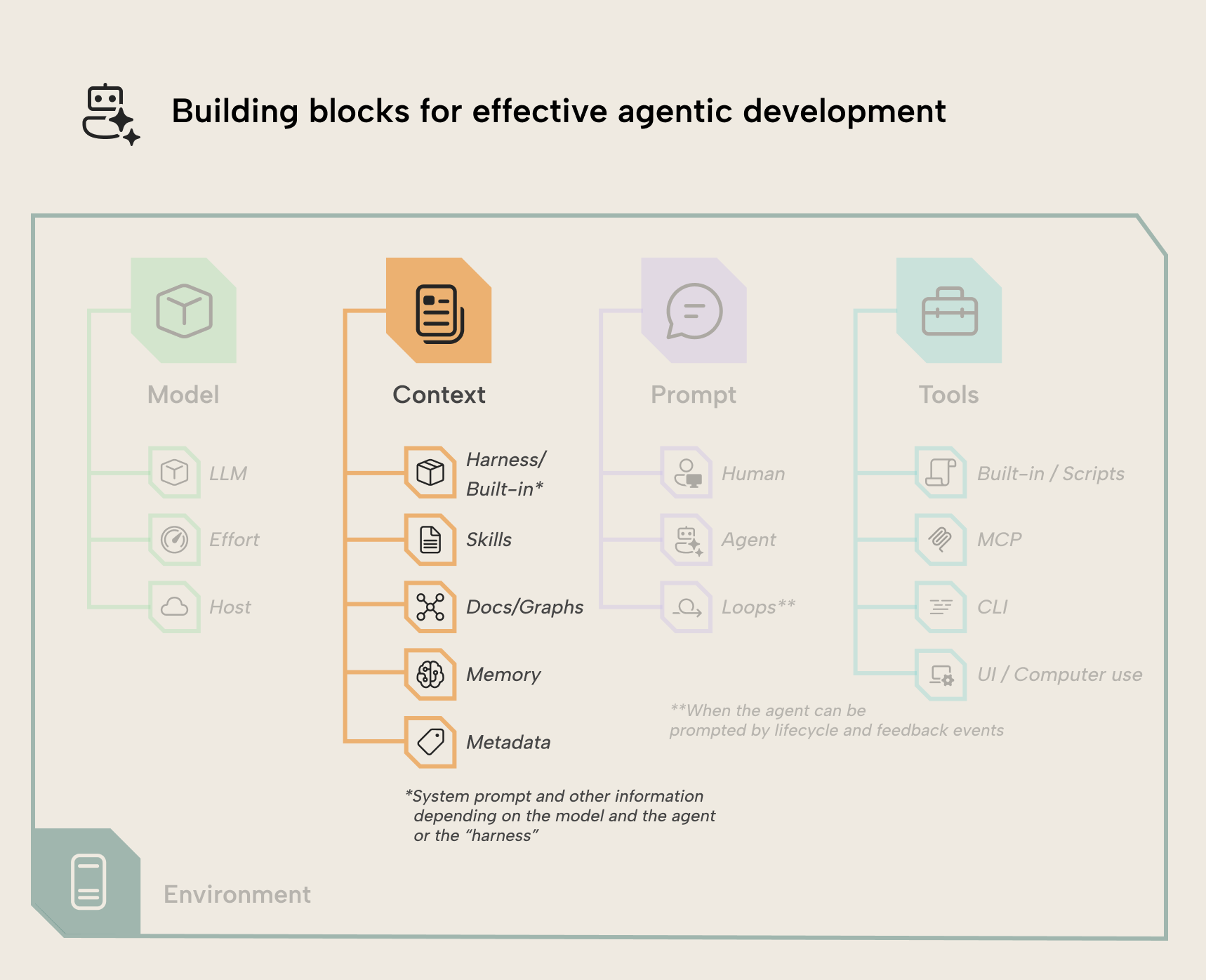
In this article we give some guidance on how you can curate context for agentic development in business intelligence. This first article discusses more broadly the concept of “context” and why it’s so important when you use AI. You should treat context as a “first-class citizen” and a top priority.
Future articles focus on specific types of context highlighted in the previous diagram
- Harness / built-in context: The application that enables agentic capabilities of the LLM. A “harness” is something like Claude Code whereas the LLM is Claude Opus. The harness provides more than context, but also tools, orchestration, permissions, and verification.
- Skills: Special context files that teach an agent how to do something. Skills are handled differently than other files using a process called progressive disclosure. Skills can be configured per user or project.
- Docs/graphs: Documentation about data and processes that are inter-connected by linking related concepts. Fabric Ontology or Databricks Genie Ontology are examples of a business definition layer that builds and relies on an ontology graph.
- Memory: Special context files that are always loaded into context; the agent doesn’t actively read them. They are appended to the system prompt. Memory files are like CLAUDE.md or AGENTS.md and can be configured at the level of a user or project.
- Metadata: The information about files and artifacts, such as the contents of a Power BI Project (PBIP) including TMDL and PBIR files. Metadata are important as examples but also the substrate that agents read and modify to facilitate development.
A few quick definitions
When working with AI agents, common everyday words take on specific technical meanings. Before we begin, it’s worth very quickly defining a few of them:
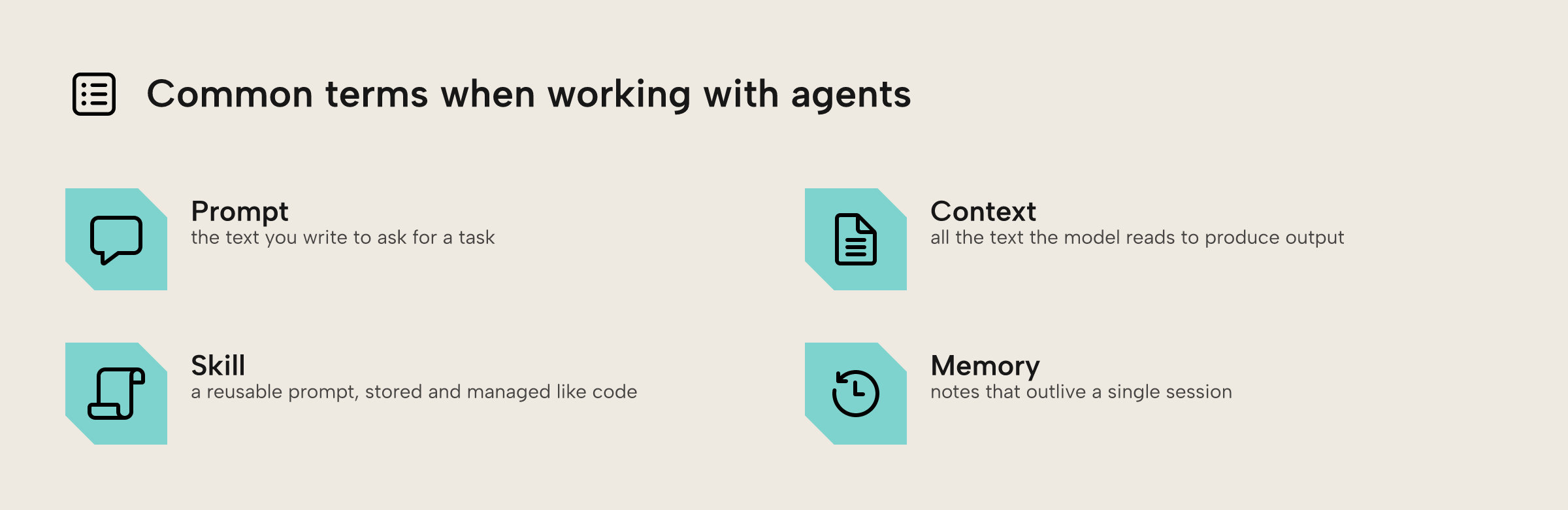
These are four common terms to understand when working with agents:
- Prompt. This is whatever text you write to the agent to instruct it to perform a task. When LLMs were glorified chatbots, a lot of effort went into writing a good prompt. This effort was sometimes called prompt engineering, and it’s less important now (more about that later). In your prompt you can use special syntax or phrases to change model behavior, such as invoking a skill with
/skill or words like ultrathink (which maximizes effort for one turn) and ultracode (which allows use of a special feature called multi-agent workflows) in Claude Code - Context. The broader set of prompts, conversation, tool descriptions and more placed in front of an agent in order to do its job. Agents can only work with the context provided to them and that amount is fairly constrained, so managing this is important.
- Skill. A skill is like a reusable prompt stored and managed like documentation. However, it is detected by the agent harness and can include executable scripts and reference files. It should be written like regular prose but should be stored and managed like code.
- Memory. A file or tool outside of the LLM to work around the amnesia LLMs have across sessions. Memories provide contextual or situational information and are not the same as a skill or an instructions file like AGENTS.md.
In short, there’s different types of text that LLMs work with, which it might ingest and use in different ways.
AI agents depend on the provided context
As mentioned in an earlier blog post about LLM fundamentals, LLMs work by taking in and outputting text. They do this one token, or chunk, at a time. Even AI agents work this way when they are using tools such as reading a file or running a command in the terminal. An agent harness reads the output text, intercepts it, and runs the tool calls on behalf of the agent:
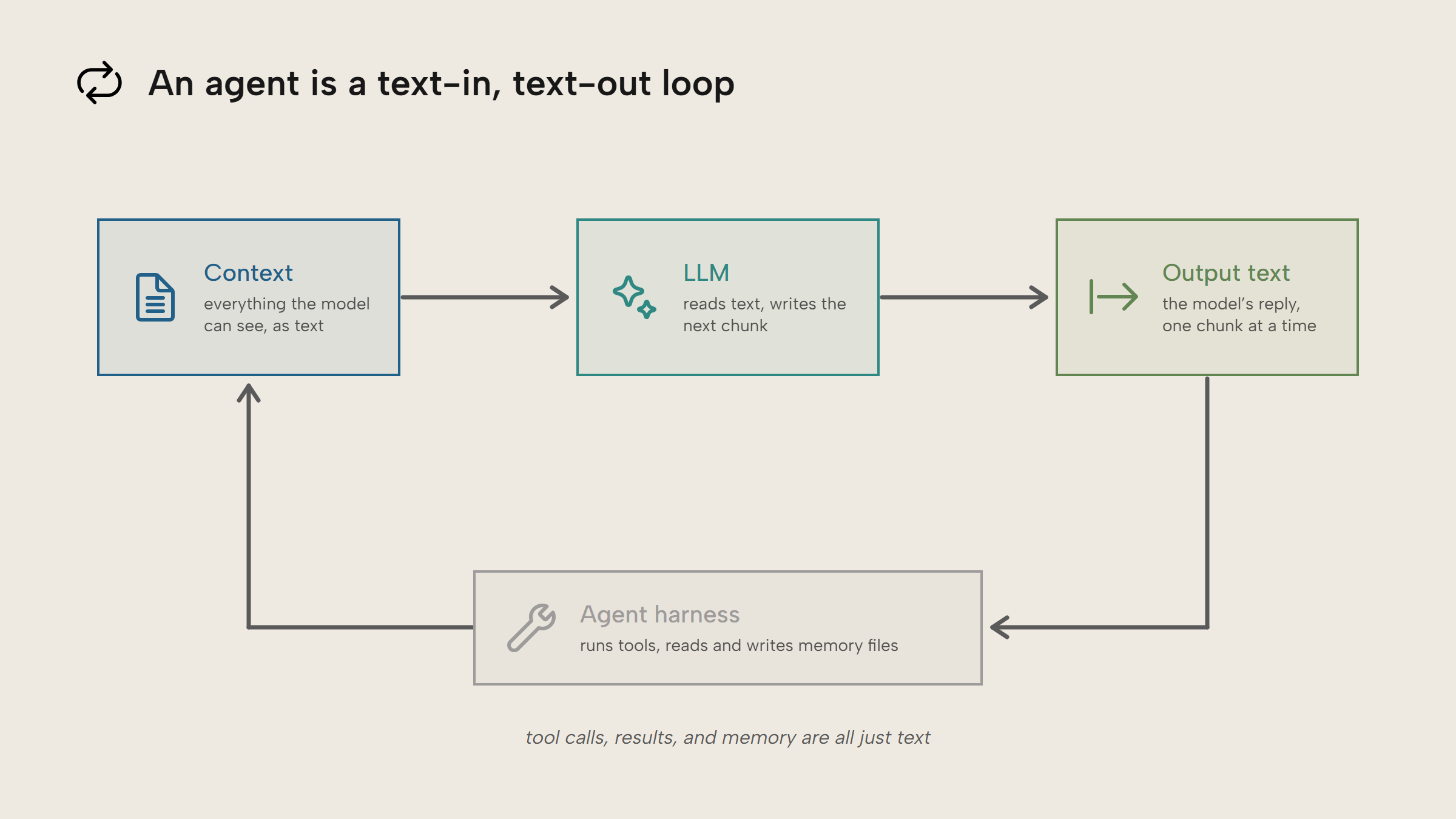
LLMs have no memory.Rather, they operate purely based on the input text and the numerical details of the language model, iterating in a loop. You can think of this like calling a function in a programming language. Because the model is dependent on the input text, this makes managing those inputs important for quality results. When we refer to “memory” for agents, we just mean mechanisms for the agent to save and re-ingest information in context.
The key part to understand is that LLMs have amnesia (metaphorically). They wake up with no memory or history and must work based on whatever little scraps of paper you slide over to them. You are charged for every word on those scraps of paper, so you want to keep them small.The sum total of all the text inputs given to an LLM is context. This includes the system prompt, the user prompt, any tool descriptions, the conversation history, and so on. Good agent harnesses like Claude Code or OpenCode hide a lot of this by default, but it’s still important to manage. Finally, the context window is the maximum amount of text, measured in tokens, that an LLM can process.
If you use a coding agent such as Claude Code or the GitHub Copilot CLI, you can run /context to get a visual representation of how full your context window is. A distinction that will become important later on in the article is context that is loaded each and every session and context that is specific to a session. The former is important to manage because it represents a tax on each and every session:
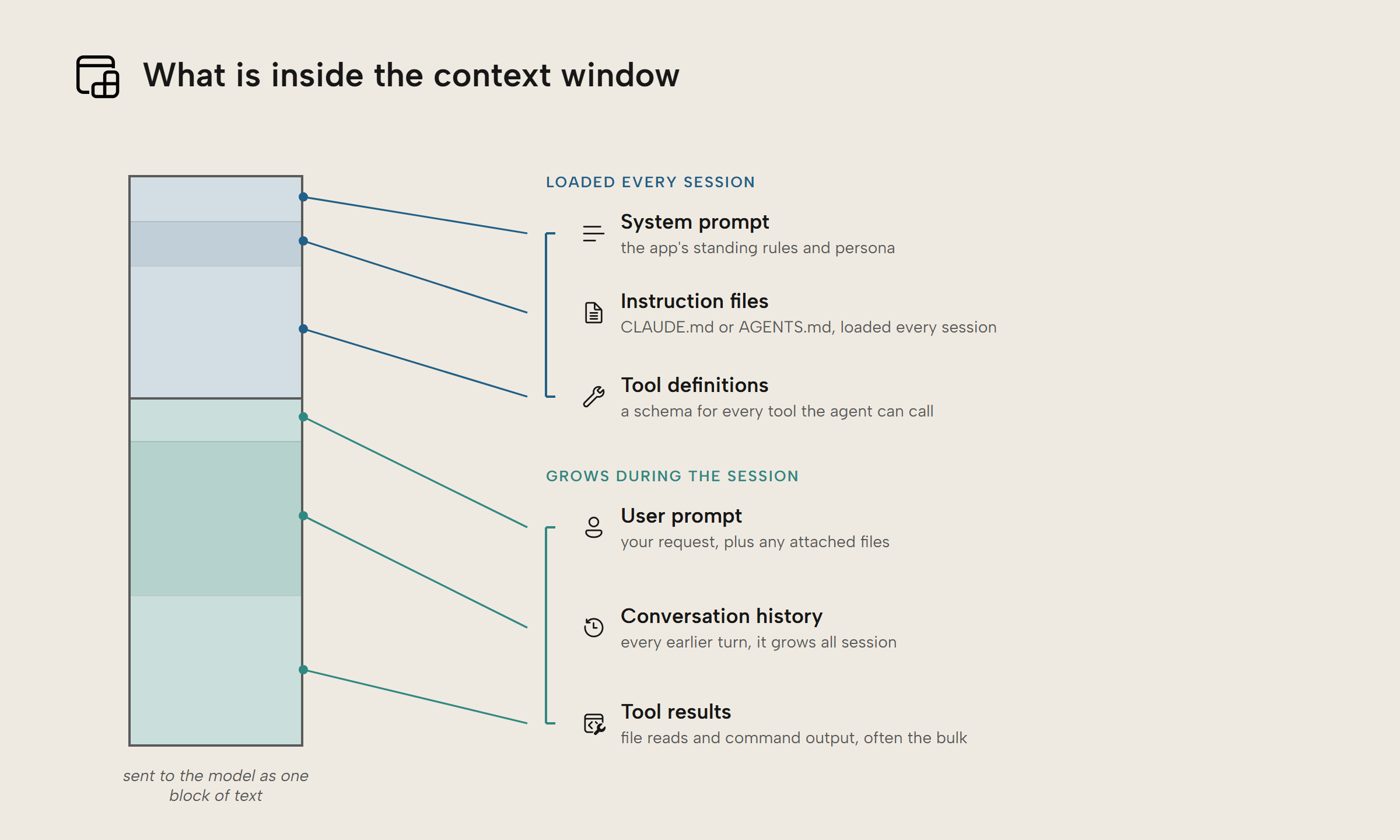
The problem with too much context is threefold:
- Too much context leads to reduced performance on certain tasks.
- Past, irrelevant context for the current task leads to reduced performance or issues getting the agent to follow instructions.
- More context results in higher cost; you pay for every token of context.
Context rot and poor performance
The more input text you provide an agent, the worse it performs, even for simple tasks like recalling what was said. This is often called context rot. So, even though your model may support a million tokens of context, you will often get much better results with just 100-250k of context (as a hypothetical example). Think of the window size like the maximum safe weight on an elevator. Just because you can fill it to the brim doesn’t mean you should!
It’s not just about volume, but what the context is. Agents are prone to focusing on irrelevant context; they’re easily distracted.
Context can be expensive
LLM providers charge based on input and output tokens. So, the more context you provide, the more expensive the request; this is doubly bad if the context is irrelevant, because you’re paying for something you didn’t even care about. All of this is to say managing the context an agent receives, also called context engineering, dramatically affects cost and efficiency of AI agents.
- LLM providers often offer a significant discount (50-90%) for cached input tokens; tokens that the agent “remembers” between turns. Coding agents will write to the cache , but some APIs may require you to manually do so and charge you extra for cache writes. For long-running work, the benefit of input caching is huge. “Hitting the cache” is something usually left to developers who build agent harnesses, but as users, we can still follow some good practices to leverage this and reduce cost:Avoid changing the model or effort mid-session. When you do this, the new model has to reingest all of the old context; the cache is lost. Instead,
/clearor/compactbefore you do this - Avoid waiting a long time (1-2 hours+) between messages. The cache is temporary, and will expire. After a time limit, the model must re-read everything, again. Instead,
/compact when you come back or start an old session.
TIP
For Power BI people, it can help to think about token caching like query folding with Power Query.
In a previous article about AI readiness, we describe the context window as more like a context budget. Your goal is to find that sweet spot in the middle where you give it enough information to guide it; nothing more.
Add just what you need, just in time
With AI skills or MCP servers, it can be tempting to add as many as possible. Unfortunately, however, this adds a constant drag to your agents in the same way as having a heavy load on the back of a bicycle makes it hard to steer and stay upright. Every single MCP server and skill have a price tag that you can pay every session, so you want to know whether it’s worth paying, or not.
So, what type of context should you add and how should you manage it?
TIP
Again, you should think about context with a comparison to Power BI. If you want to optimize a data model, one of the easiest things you can do is reduce the amount of data. Likewise, if you want to optimize an agent, then you should reduce the amount of context.
Scope context appropriately
Context can be scoped at different levels: organization, user, project, and local:
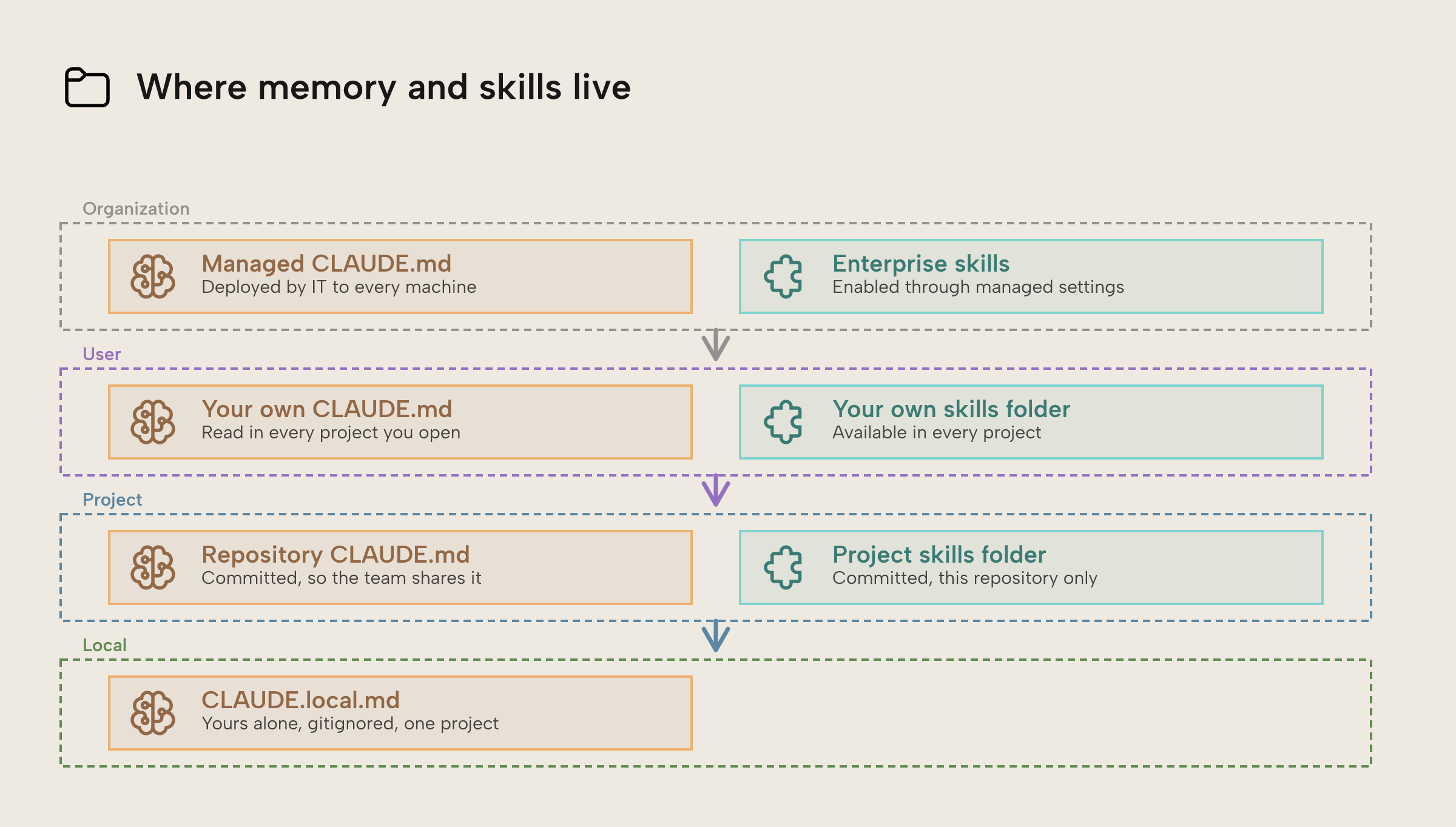
When you work with agents, this only applies to memory and skill files. They work hierarchically; if there’s conflicts between a memory file in your user configuration and your project configuration, then the bottom one wins. In general, you want to have a structure where the context that applies most broadly is as lean as possible; keep project-specific instructions and skills isolated to those projects.
For instance, if you have a pricing project where you create semantic models and reports, you shouldn’t include skills about other topics and areas.
Minimize memory and prune context
First, you should keep always-loaded context to a bare minimum. Depending on your agent harness, such as GitHub Copilot or Claude Code, files like AGENTS.md or CLAUDE.md will be loaded into every session. These should be kept very short, with pointers to reference files for occasionally needed information. Pretend that you are being charged 5 cents for every word you write in here.
TIP
Don’t be afraid to back up and then just delete all your memory files and skills. Especially with newer models, doing this “fresh start” can help you realize exactly how much your stale context was weighing you down.
Use progressive disclosure
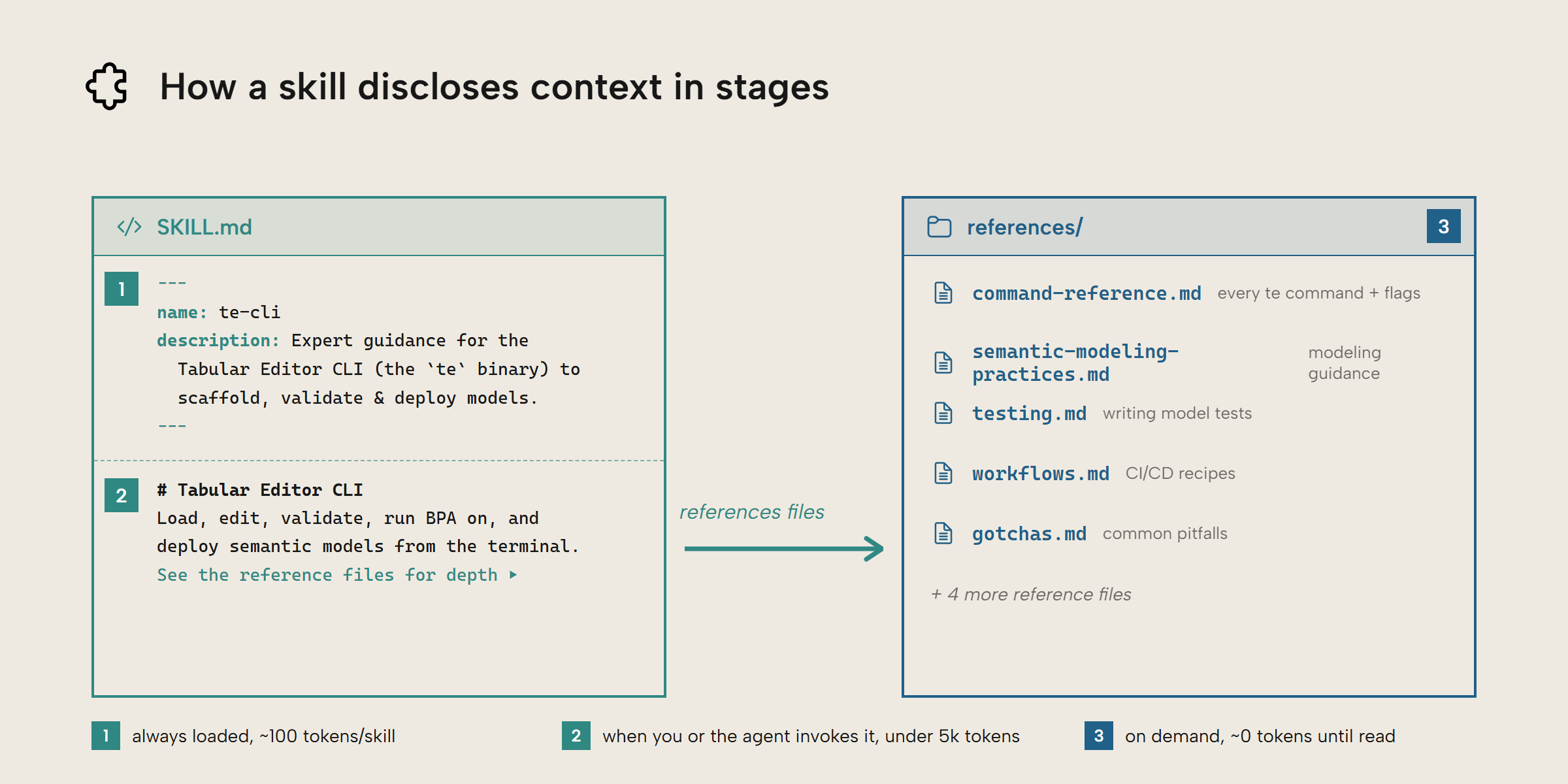
Splitting the context into core context and loadable references illustrates a concept known as progressive disclosure. Progressive disclosure is just a fancy term that refers to the agent only reading and using what it needs, when it needs it. Again, imagine you are being charged 1 cent for every single word that is read by the agent. You wouldn’t want it to read the full instructions every single time. You would want to progressively share, or disclose, more and more of the information the agent needs.
AI Skills are optimized for progressive disclosure. They contain a YAML frontmatter that describes what the skill does. This is often all an AI agent ever sees, so the frontmatter needs to be very clear about when the skill applies; if it’s vague or overly generic, the agent may read the full skill far too often (or never at all). If the user or the agent decides to invoke a skill, then the agent reads the rest of the skill file, which is written in Markdown. Then, the AI agent may decide to read bundled reference files, if any. Each stage is bigger than the last: the frontmatter costs around a hundred tokens in every session, the skill body a few thousand when invoked, and the reference files cost nothing at all until the agent actually reads them.
MCP servers are somewhere in between. Originally, many MCP servers were very token-inefficient because their tool descriptions were always loaded into context. Different agent harnesses have different workarounds for this. Anthropic built a tool search tool that Claude Code uses (a bit meta, right?) while GitHub Copilot groups different tools together as virtual tools.
TIP
While these optimizations help, we recommend installing skills and MCP servers conservatively and per-project where it makes sense. Try to keep as few skills and MCP servers as possible, and as few global context in general as possible.
Clear your context frequently, compact occasionally
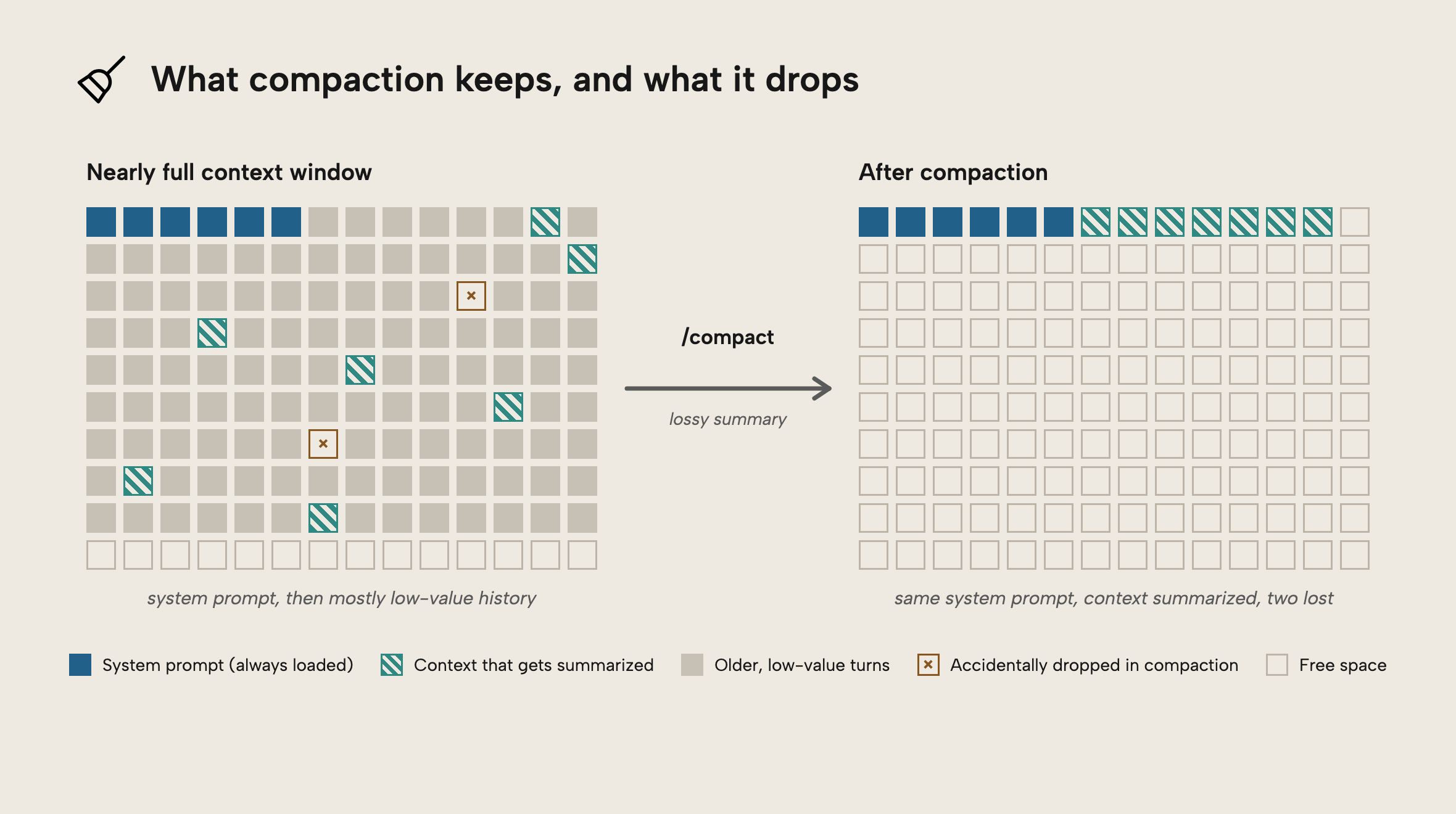
So, what happens if you try to exceed the context window? In many agent harnesses, it will automatically compact, or summarize, the entirety of the agent session. Then it will start a fresh context window based on that summary. You can often manually run a /compact command to do this yourself.
Now, imagine if you had a two-hour meeting and unexpectedly you were asked to summarize it in a few sentences. Let’s say this would then be used as the agenda for next week. You would likely forget important details or even misremember certain details. Compacting is the same. It’s a lossy process and if done more than once, it starts to quickly degrade the quality of a session.
Instead, you should regularly start a fresh session or use a command like /clear to clear the session context. Alternatively, you can ask the agent to write a concise HANDOFF.md and then in a new session ask the agent to read it (some tools like herdr.dev even let agents brief each other). It’s a good idea to use a template of how this document should look, first, though.
This is also where subagents are very useful, if your harness supports them. Because a subagent will have its own context, it can do work like exploring a codebase or reviewing code commits and then return the result to the main agent without polluting the main agent’s context.
Don’t let AI write (all) your context!!!
One of the reasons why we don’t recommend letting an AI document your data model for you is because large language models are verbose. Their whole job is to generate text, so it’s not surprising that they generate a lot of it.
The same advice applies to writing AI skills and documentation that go back into an agent’s context. It can be tempting to tell the agent to write a skill for a given task. Unfortunately, in addition to being verbose, agents will include all sorts of details that are mildly relevant but can be easily rediscovered if needed. It’s reasonable to use AI to help you with a first draft if you are feeling overwhelmed. But ideally, you should be writing the skills and documents that go into your context by hand.
In both cases, even if AI was good at writing concisely and clearly, there are likely specifics to your organization that you want to be putting into the guidance and documentation an AI agent will read.
NOTE
Human-written context is better than AI-generated context largely because you’re documenting implicit information and making it explicit. In contrast, what an AI generates is just summarization of what’s already there, or an imperfect representation of your discussions and documents that you’ve given it. Relying on AI for context curation is like playing a game of telephone, where the meaning and intent of the information, often quite subtle and nuanced, gets quickly buried under idiosyncratic AI writing.
It’s fine to have AI make targeted changes and updates, but you need oversight on this process. That’s why it’s important to have context in source control, and ideally also tested.
TIP
One nuanced exception to the above; it can be a good idea to write your first, small skills with the help of an agent, especially if they’re just intended for you (and not distribution to others). If it works, it works. But this is definitely not something you should do for organizational context!
Curate context, regularly
Managing context for agents isn’t a one-off, monolithic task. You can spend a lot of effort gathering and setting up the context, but you’ll need to keep updating it over time as your business, tools, preferences, and project evolves. If you only add, though, then the context quickly gets too much, and the outdated information becomes irrelevant.
To avoid this, you need to think about curating the context, like a diligent librarian would the books on the shelf. Things need to be organized, clean, and in the right place. Managing context is dull, hygienic work that keeps a workflow healthy.
TIP
This is just like keeping documentation up-to-date, or updating a semantic model and report as business objectives change over time. There’s nothing new, here; it’s just about good habits and consistency.
A simple way to get started:
- For all context:
- Put this context in source control to track changes, like a GitHub or Azure DevOps repository
- For organization- or team-level context like skills and knowledge bases:
- Ensure that all context is owned by stewards who keep it up-to-date. Set up some recurring process to review it and flag context that has gotten too large, or that hasn’t changed in recent weeks.
- Ideally, have some kind of automated testing or evaluations that can measure the performance of agents on representative tasks using that context. You need to ensure that any tests also include ablative ones that demonstrate clearly performance with that context is better than performance without it. These tests need to be done with all models you expect people to use.
- Review this regularly with other SMEs / stewards and ensure that the process to update is as easy as possible. Also ban people from just sending their clanker out to bang on the context and ruin it for everyone else!
- User- and project-level context:
- Review this daily in five minutes: open your folder and read the CLAUDE.md, AGENTS.md, rules, and skills.
- Favor removing things over adding things; be very conservative in your additions.
- With new models or agents, test the context in a few sessions to see whether you need to revise it. It’s common that newer models need less or different instructions to perform well.
- Consider whether an instruction can be a deterministic script or a hook, instead. For instance, if you want the agent to check specific data, provide a .dax or .sql query example that it should use or reference. If you want it to not execute a certain command, write it as a hook that blocks it if it tries. Don’t rely on instructions for these things, as AI isn’t guaranteed to follow them.
WARNING
Building automated tests (or evaluations; evals) for context is a full project on its own. It’s not something that you can “yolo slopcannon out” in a weekend. You need to set up the test conditions, prompts, and different types of testing like ablative or regression testing. We’ll talk more about this in a later article dedicated specifically to setting up evals.
For further reading
- Context Rot: How Increasing Input Tokens Impacts LLM Performance (Chroma). Article showing how context length and distractors decrease LLM accuracy.
- Effective context engineering for AI agents (Anthropic). Article covering in great detail how to manage context for agents.
- AI readiness and best practices for semantic models: a comprehensive guide (Tabular Editor). A thorough article covering managing context and metadata when preparing your model for use with AI.
- How Claude remembers your project (Anthropic). Documentation about how Claude Code tracks long-term information about a project including CLAUDE.md, rules files, and memory files.
In conclusion
LLMs are heavily dependent on text that they ingest to produce useful and relevant outputs. Much of this can be controlled by you in terms of the files, skills, and MCP servers you provide to an agent. The key thing is to find the Goldilocks zone of enough context to do the task but not distracting or irrelevant information.
Take your semantic models further with Tabular Editor.
Give Tabular Editor a spin