Key takeaways
- Prioritize clear, consistent naming: Good naming of tables, columns, and measures makes a model easier for developers, users, and AI to use, and it isn't technically hard.
- Align names with the business: Use human-readable terminology that fits business semantics, with consistent conventions for aggregations, units, and periods, and avoid acronyms and programming conventions.
- Use folders, descriptions, and synonyms: These metadata properties organize the model and resolve ambiguity when users have multiple terms for the same field.
- Let agents help standardize: With clear instructions, a coding agent can standardize naming directly on the TMDL or via an MCP server, just rebind any downstream visuals.
This summary is produced by the author, and not by AI.
Why naming tables, columns, and measures is so important
Naming conventions for your semantic model should be a high priority for any developer. It’s incredibly important not just to ensure your model is organized and professional for developers and users, but also when using AI agents to query or manage it. Without clear naming conventions, people and agents waste time and are more likely to make mistakes.
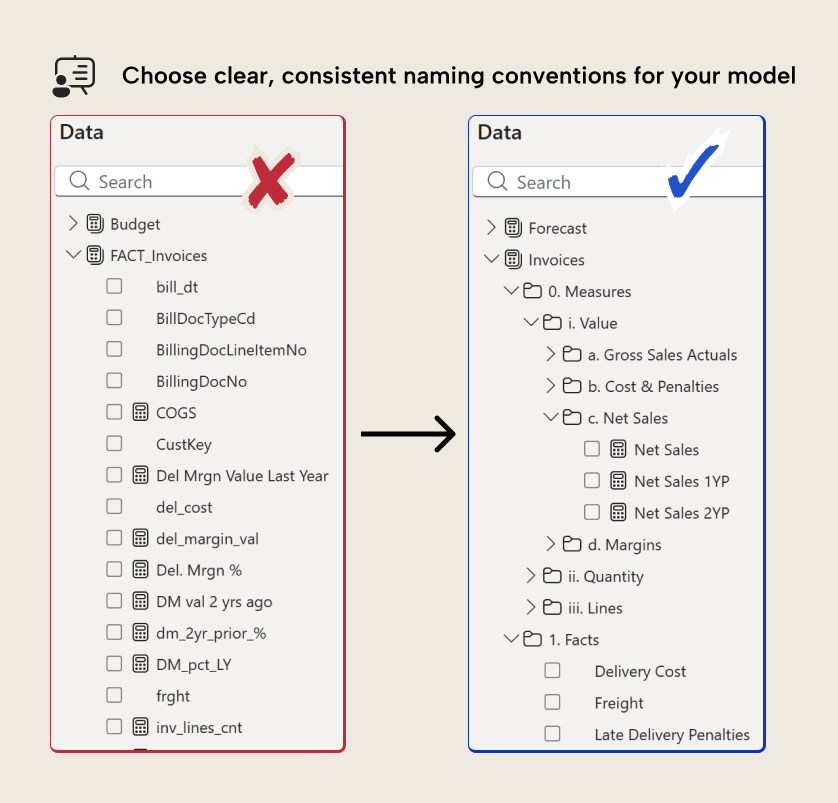
In this article, we provide some guidelines and best practices for setting some naming conventions in your semantic model.
NOTE
Naming conventions differ by team, department, region, and organization. What’s most important is that you know your users and your business, and you choose naming conventions that most align with what they use and expect. Avoid assumptions and talk to your users!
What good naming conventions look like
The most important aspect to consider of how you name columns and measures in your model is whether you use the same terminology as people in your business. How do people refer to sales: Turnover? Revenue? Sales? Gross Sales? Or something else? This is especially important in large organizations with multiple regions and departments, particularly those that have resulted from merging multiple legal entities in the past. Often, teams and regions develop their own semantics and even their own master data or calculations for key metrics. Obviously, this isn’t ideal… but the reality is that it’s just extremely common. A semantic model should provide an authoritative source of truth when it comes to terminology; strive as much as possible to use the most common and representative names for calculations, columns, and tables that best describe the semantic business entity that they represent. This will vary model-by-model and organization-by-organization; never generalize or assume, especially if you’re an external consultant, a new employee, or using an agent to name these objects.
TIP
If your organization has challenges with business semantics and calculation logic, then you should try to discuss this point with key stakeholders as you define your model design. Try to reach consensus on this terminology, and definitely reach consensus on master data and calculations. If users view this as pedantic, remind them that having this consensus helps to mitigate wasted time on data discrepancies and helps the organization make better use of AI.
Also, you should consider setting this up in a Fabric ontology item, where you can set up a richer collection of semantics and the relationships between them for your business data.
In addition, you want to follow some general guidelines with naming conventions:
- Avoid abbreviations and acronyms: Instead of Std. Margin or S.M., write Standard Margin. An exception can be made for standard or common abbreviations and acronyms, but you want to ensure that you define these clearly in the field description.
- Avoid excessive numbers and grammar, and don’t use Unicode characters: Instead of 💰 2022 Revenue $$$, write Revenue (2022). Seriously, there was a period where people would put emojis at the front of table and display folder names. We still have nightmares about it.
- Avoid technical prefixes like DIM_ or FACT_: Instead of DIM_Customer or FACT_Invoices just call them Customer and Invoices. You can group these tables into Dimension and Fact table groups in Tabular Editor 3.
- Use standard casing with spaces instead of CamelCase or snake_case: Instead of OrderStatus or past_due_orders, use Order Status and Past Due Orders. Name it using human readable conventions and not programming conventions.
- Use special prefixes for technical fields or properties to sort or identify them: For instance, in display folders, you can use a numerical prefix like 01. to sort a certain sort order. You can also prefix field parameters with FP_ or calculation groups with CG_ if you don’t expect to expose these to users or in the AI data schema.
- Do specify aggregations, units, and periods, but use a consistent syntax: You must choose a convention for each of the following:
- Periods, like previous year, previous month, yesterday, etc. Instead of Sales Last Year, write Sales (1YP) or Sales (PY). Sales (1YP) is preferable because it’s easy to adjust for Sales (2YP).
- Aggregations, like MTD, YTD, Weekly Average, etc. Instead of Sales Month To Date PY, put Sales MTD (1YP).
- Units, like currency (€), percent (%), units (qty), lines, pieces (pcs), etc. Layering units in can get complicated, like when you have Sales (€) MTD (1YP) and also Sales (Units) YTD (2YP).
- Comparisons to targets, periods, or aggregates (i.e. vs Budget, vs 1YP, or vs Average).
TIP
In short, good naming conventions are representative of the business reality and consistent; consistency is the key. Whatever conventions you use, apply them throughout your model, and ideally across all models in your organization. Again, is this an exciting topic? No. Is it going to cost you a lot of time and pain if you neglect it, though? For sure.
Using synonyms to reduce ambiguity
Irrespective of whatever naming conventions you use, it’ll still be normal and expected that people refer to columns and calculations using other terminology. This is inevitable, especially in writing, where abbreviations and acronyms are more common.
To deal with this, you have to set synonyms in your semantic model by using Prepare your data for AI. Consider only listing real synonyms that people in your organization use, or that are colloquially used in your region. You can also consider multilingual synonyms (translations of the field) depending on the users and the language they use with AI and agents.
TIP
Synonyms only work with AI and agents; if you want to expose synonyms for users, you have to use descriptions. We write about descriptions in another, follow-up article.
Again, it might be valuable to consider setting up these semantics in a Fabric ontology item.
Synonyms are primarily beneficial when you interrogate your data using natural language with AI and agents, but they’re also a way to keep your model more organized.
Organization vs naming
Naming conventions help organize your model, making it easier to use. In Power BI, there are multiple other ways to “organize” your semantic model, including:
- Organizing measures and columns into display folders (and sub-folders), and organizing tables into table groups (in Tabular Editor 3, only).
- Organizing measures (and their display folders) into fact tables or measure tables.
- Formatting code (DAX and Power Query, and native query if you have it) and adding comments to document or explain it.
- Adding descriptions, format strings, and even annotations to document and display fields the way you want.
It’s worthwhile to ensure that you regularly organize your model as you develop it, and that you decide on conventions for these elements as well.
What to do with measure selection and parameters
Sometimes you can have a table, measure, or column that serves multiple purposes. For instance, you can have a measure Targets that serves different measures depending on the selection of a disconnected table:
Targets :=
    SWITCH ( SELECTEDVALUE ( 'Targets'[MeasureName] ),
        "1YP", [Sales 1YP],
        "2YP", [Sales 2YP],
        "Budget", [Budget],
        "FCST", [Forecast],
        BLANK()
    )
This is a very common pattern, and its purpose is to provide flexibility in reports for users to choose which metric should be shown in visuals. If a user selects “1YP” it shows the Sales 1YP measure. If they select “Budget”, then it shows Budget. It is also the basis of many visualization “tricks” in reports, such as using DAX measures as categories, so you can show one bar per measure in a bar chart, waterfall, or column chart.
However, it’s problematic when it comes to naming conventions, particularly if this measure should be used by an agent to query the model or make changes. Consider the following:
Targets YTD :=
    CALCULATE(
        [Targets],
        DATESYTD ( 'Date'[Date] )
    )
This pattern is advantageous because you have fewer measures in the model. Instead of four YTD measures, you have just one for Targets. If a user asks for the Budget YTD from Copilot or a data agent, it might opt for the Targets YTD without applying the filter, though, which would result in Blank(). You could also use a calculation group, but it has the same problem.
In this situation, it’s most likely that Copilot or an agent won’t find the measure, and will calculate the Budget YTD in-line of a DAX query, which could be problematic. The issue here, however, isn’t the naming conventions or the model design, per se. Rather, it’s the lack of instructions about what Targets means and how to use it. This can be fixed with a simple instruction, which could benefit both human users and AI agents:
Lets you select which target to apply. To use this measure, you need to filter 'Targets'[MeasureName] to a single value in a slicer or filter expression to return the measure. If you filter to "1YP", you get the value of Sales 1YP. If you filter to "2YP", then you'll get Sales 2YP, and so on.
A description like this fixes the problem. We’ll discuss descriptions further in our next article. However, debatably, if you intend on this model being consumed primarily by an agent, then this report-centric design might not be ideal over just having more measures… but that’s a different discussion altogether.
TIP
Naming conventions, descriptions, and model organization are all part of your model design. Ensure that when you design your model, you carefully plan that design around how people will consume it. If you’re introducing new avenues of consumption, you may want to revisit your model’s design to ensure that it works best.
Improving naming conventions by using coding agents
Improving your naming conventions used to take a lot of manual, tedious effort. However, it’s something you can offload to AI with relatively low risk… the exception is that if you already have downstream reports connected to the model, then you have to rebind those visuals to use the newly renamed fields. You can do this either by having the agent directly work with TMDL metadata, or by using an MCP server.
This can even be an automated process that you run as part of your continuous integration (CI), so that whenever you commit model metadata to a remote Git repository, a coding agent will audit and fix any naming convention issues. The video below shows a Claude Code Desktop agent invoking the standardize-naming-conventions skill from Kurt's power-bi-agentic-development repo to change the names of a badly named semantic model so they follow a consistent naming convention with sensible folder grouping.
For further reading
- Best Practice Analyzer (BPA) rules for semantic models (tabulareditor.com). Explains how to encode naming conventions as automated BPA rules that flag violations on every save or in a CI pipeline.
- Power BI semantic model checklist (tabulareditor.com). A comprehensive model-quality checklist that includes naming consistency as a first-class criterion alongside measures, relationships, and security.
- Workspace naming conventions (Microsoft Learn). Microsoft's guidance on consistent naming at the workspace level, which complements model-level naming standards.
- Rules for DAX code formatting (SQLBI). SQLBI's reference for DAX formatting and naming rules, covering measure, column, and variable conventions that align with model naming best practices.
In conclusion
Naming conventions are very important for both users and AI/agents. The highest effort is ensuring alignment on the business, but if you have that, you can easily ensure these conventions are followed using modern coding agents.
Give every model object a clearer name in Tabular Editor 3.
Give Tabular Editor a spin