Key takeaways
- Refresh needs more memory than the model size: During refresh, VertiPaq builds new structures while the previous model still sits in memory, as the previous article explained.
- Partitioning is the key technique: Refreshing only a subset of data at a time, via incremental refresh, hybrid tables, or custom partitioning, controls peak memory.
- Scale-out cuts peak refresh memory: Clearing data before refresh avoids holding multiple copies of the model in the same instance.
- Direct Lake shifts refresh, doesn't remove it: Columns load into memory on demand instead of a batch load, so it's a misconception that Direct Lake removes the need to refresh.
- SKU scale-up is a workaround, not a design: If refresh is already automated, partitioning or scale-out is usually more efficient and cost-effective.
Foundations: refresh memory behavior
This article is the third and final part of the series on optimizing semantic model memory in Power BI and Fabric. In the first article, we explained memory limits, why refresh fails, and how to measure where memory goes. In the second, we covered six design patterns to reduce the size of your semantic model:
- In the first article we examined what semantic model memory is and why it’s important to optimize for better performance and reduced cost.
- In the previous article, we explored six design patterns, including removing unnecessary data, reducing cardinality, and splitting models, that reduce steady-state memory usage by shrinking the semantic model.
- In this final article, we focus on refresh memory optimization – techniques that reduce peak memory usage during processing. This will ensure that your refresh uses less resources and completes faster.
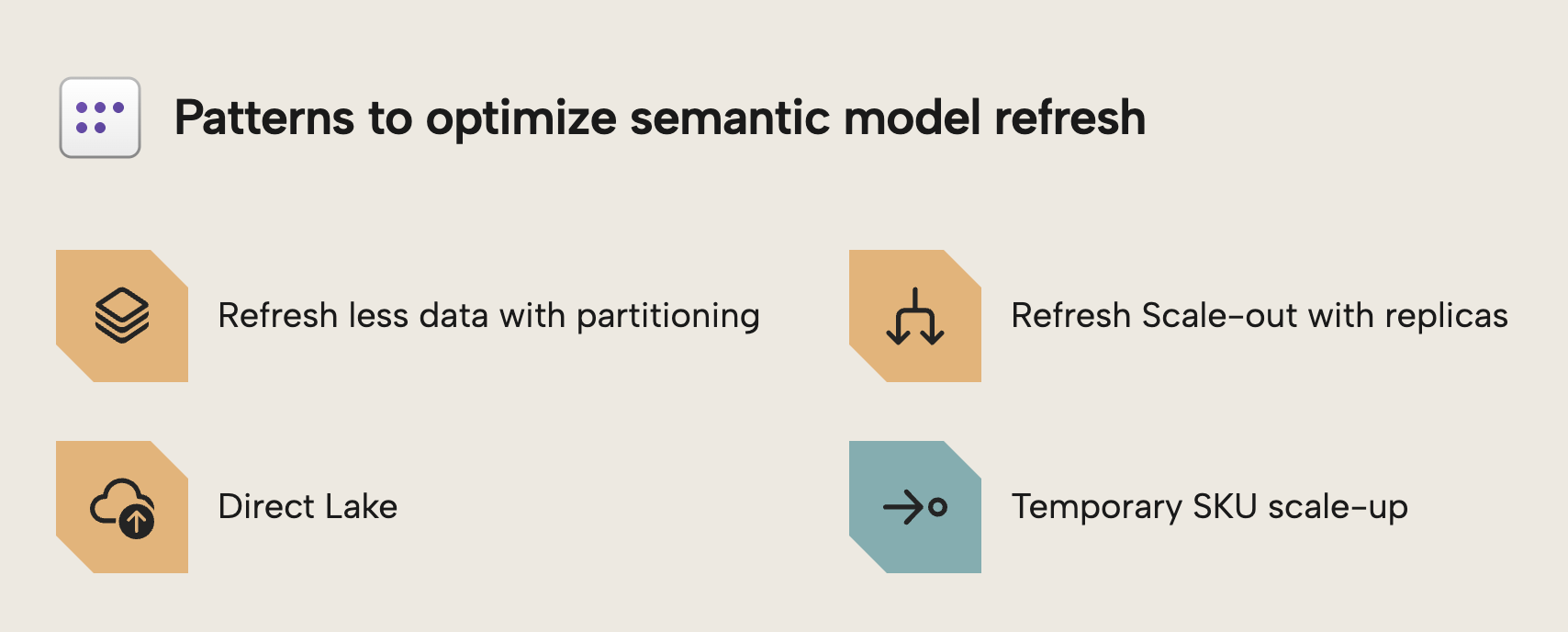
First, let’s review why refresh is different (and more complex) than static model size.
Processing under pressure: Managing peak memory
Model size isn't the same as refresh memory usage. As we covered in the first article, your semantic model has a "resting" size in memory. But during refresh, it temporarily needs much more than that.
When a semantic model is refreshed, the VertiPaq engine doesn't simply overwrite the existing data structures. Instead, it builds new segments for the refreshed data while the old segments remain in memory. Only after processing is complete does the engine commit the new structures and release the old ones. This temporary overlap is why refresh operations can require significantly more memory than the model consumes during normal query execution.
Consider the following illustration of this process from our previous article:
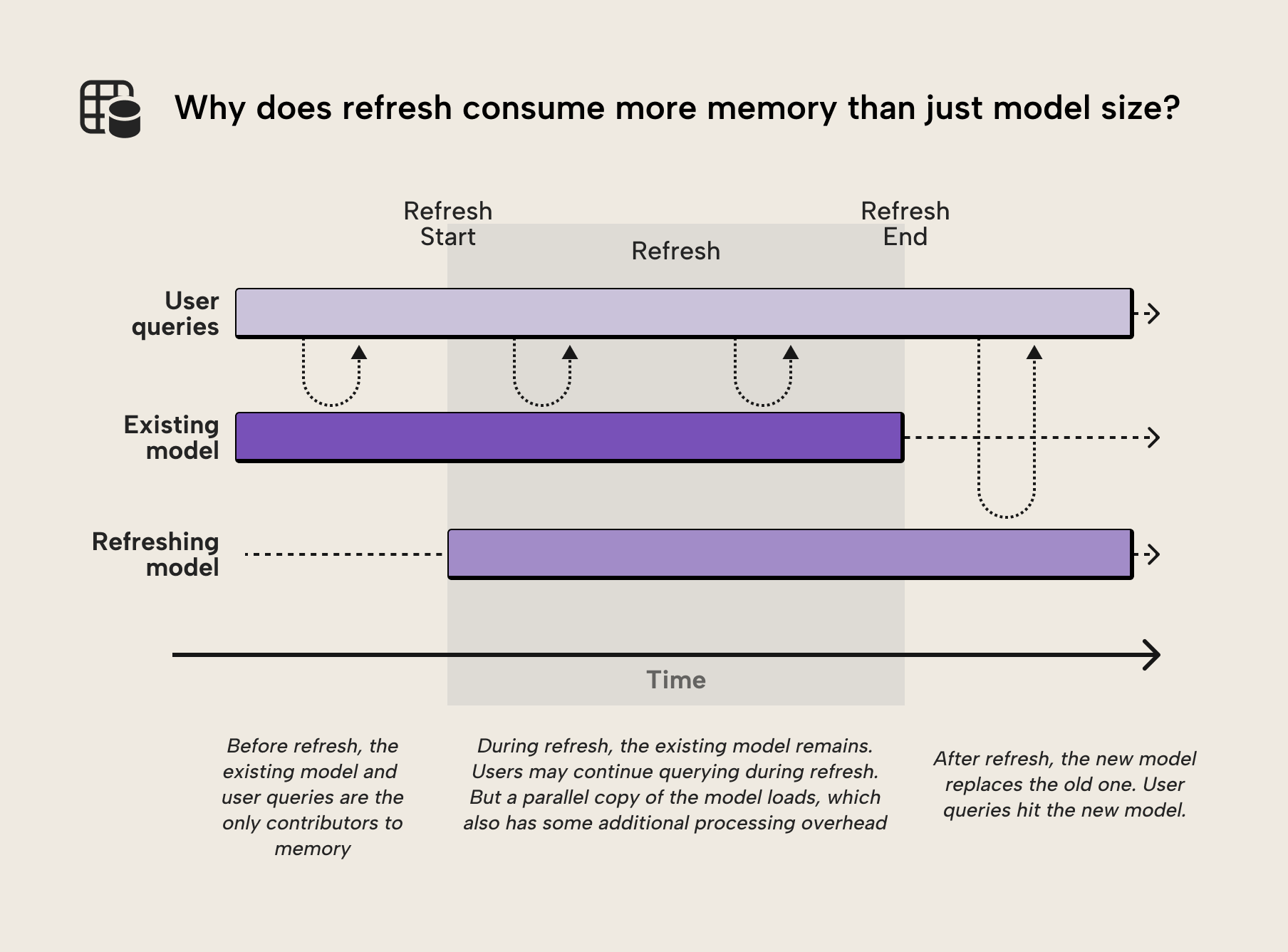
This behavior explains why refresh failures often occur even when the final model size is well within the SKU limits. The model may fit comfortably in memory during normal operation, but the temporary memory requirements during refresh can push you over the edge. Understanding this distinction between steady-state and peak memory is the key to solving refresh failures. This is the difference between steady-state memory and peak memory usage.
- Steady-state memory: the amount of memory required to keep the semantic model loaded in VertiPaq for query execution. This is the "resting" size.
- Peak memory: the maximum memory consumed during refresh, when VertiPaq must hold both old and new data structures simultaneously. This is thus the point of “peak memory usage”.
The focus of this article is how to manage peak memory to prevent pressure on your Fabric capacity and refresh failures. Each of the approaches that we discuss below introduce different trade-offs between memory usage, query latency, complexity, and operational overhead. Choosing the right approach depends on your scenario and model.
Pattern one: refresh less data by using multiple partitions
One of the most effective ways to reduce refresh memory pressure is to refresh less data at once. Partitioning lets you do this by splitting up a table into separate “parts”. For instance, you can divide a large fact table into separate partitions. That way, refresh operations only process the partitions required to get the up-to-date data. You can determine this by using a schedule (like only refreshing partitions that correspond to the latest month or day) or data-driven logic (such as only refreshing new or changed data).
In practice, partitioning is most commonly implemented using incremental refresh. This approach typically sees you partitioning data on a date field and refreshing the more recent data, while the less recent data remains archived and isn't refreshed. Aside from incremental refresh, however, you can also use custom partitions and hybrid tables. The following diagram gives you an overview:
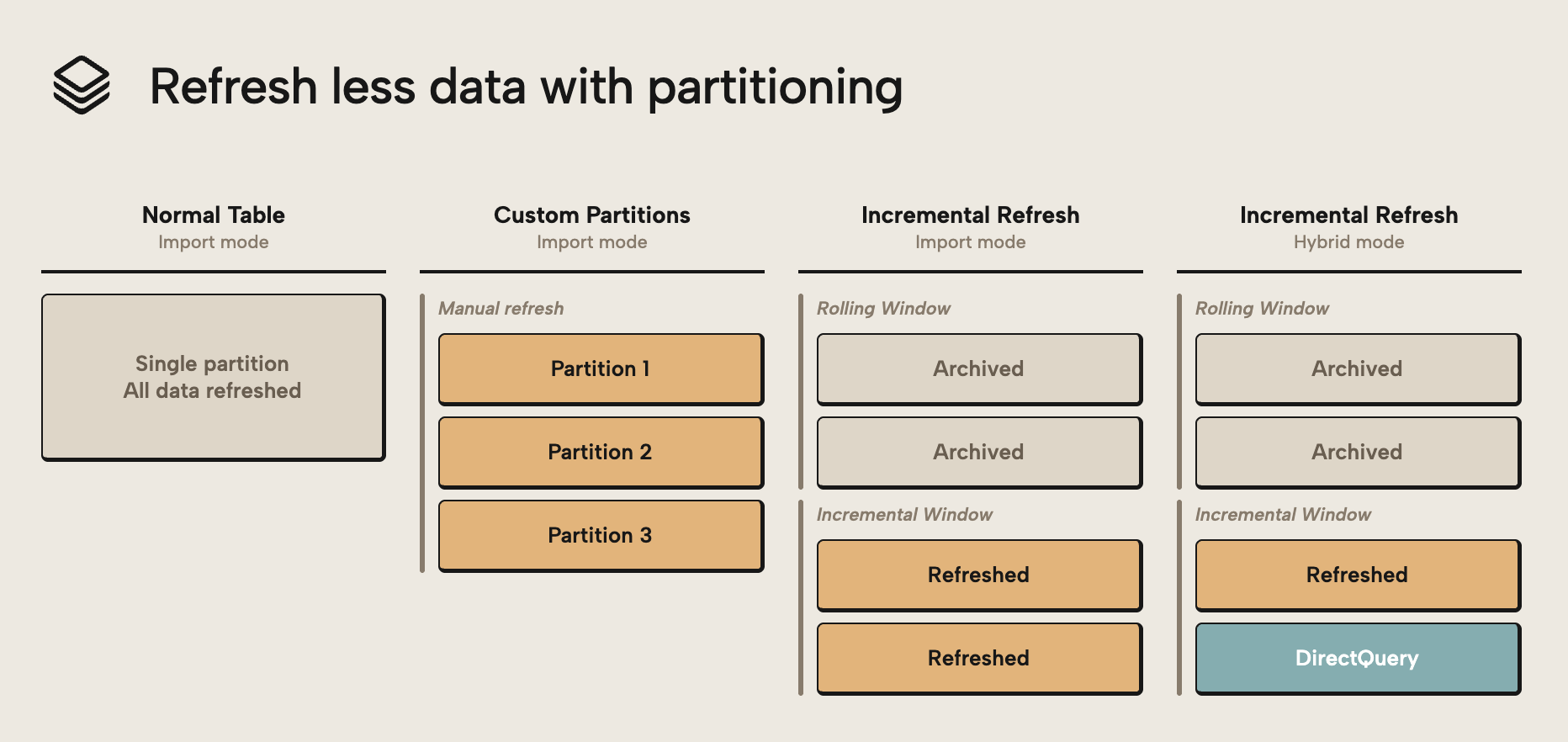
The diagram outlines the following approaches:
- Custom partitions are when you split up a table into multiple partitions, manually, typically (hopefully…) using some kind of data-driven logic.
- Incremental refresh is when partitioning is automatically handled for you based on a DateTime column in your model. Traditional incremental refresh works with entire tables in import storage mode. It’s a common and popular technique.
- Incremental refresh with Hybrid tables turns one of the partitions into a DirectQuery partition. This configuration changes how the table behaves; the most recent partition retrieves data directly from the source.
Partitioning isn't only a refresh performance optimization, but also a key technique for ensuring that large semantic models can be refreshed reliably within the memory limits of a Fabric capacity.
NOTE
Partitioning doesn't automatically reduce refresh memory usage. If multiple partitions are processed in parallel, the engine may need to hold several partitions in memory simultaneously. To minimize peak memory usage, partitions should be processed sequentially, trading refresh speed for lower memory pressure.
For most models, incremental refresh is the simplest way to leverage partitioning.
Optimizing by using incremental refresh
The traditional way to partition table data was by creating (or scripting) partitions that had distinct queries with filter steps to prevent data overlap. However, manually managing partitions quickly becomes complex as a semantic model grows. Incremental refresh provides a built-in mechanism in Power BI and Fabric that automatically creates and maintains time-based partitions, typically separating recent data from historical data.
Instead of defining partitions manually, developers configure a table refresh policy. For example, the policy could specify storing five years of data while refreshing only the most recent two months. When the model is published and refreshed in the service, Power BI automatically creates the required partitions and refreshes only the data within the configured refresh window. Historical partitions remain unchanged and aren't reprocessed.
You can see a visual overview of this process below:
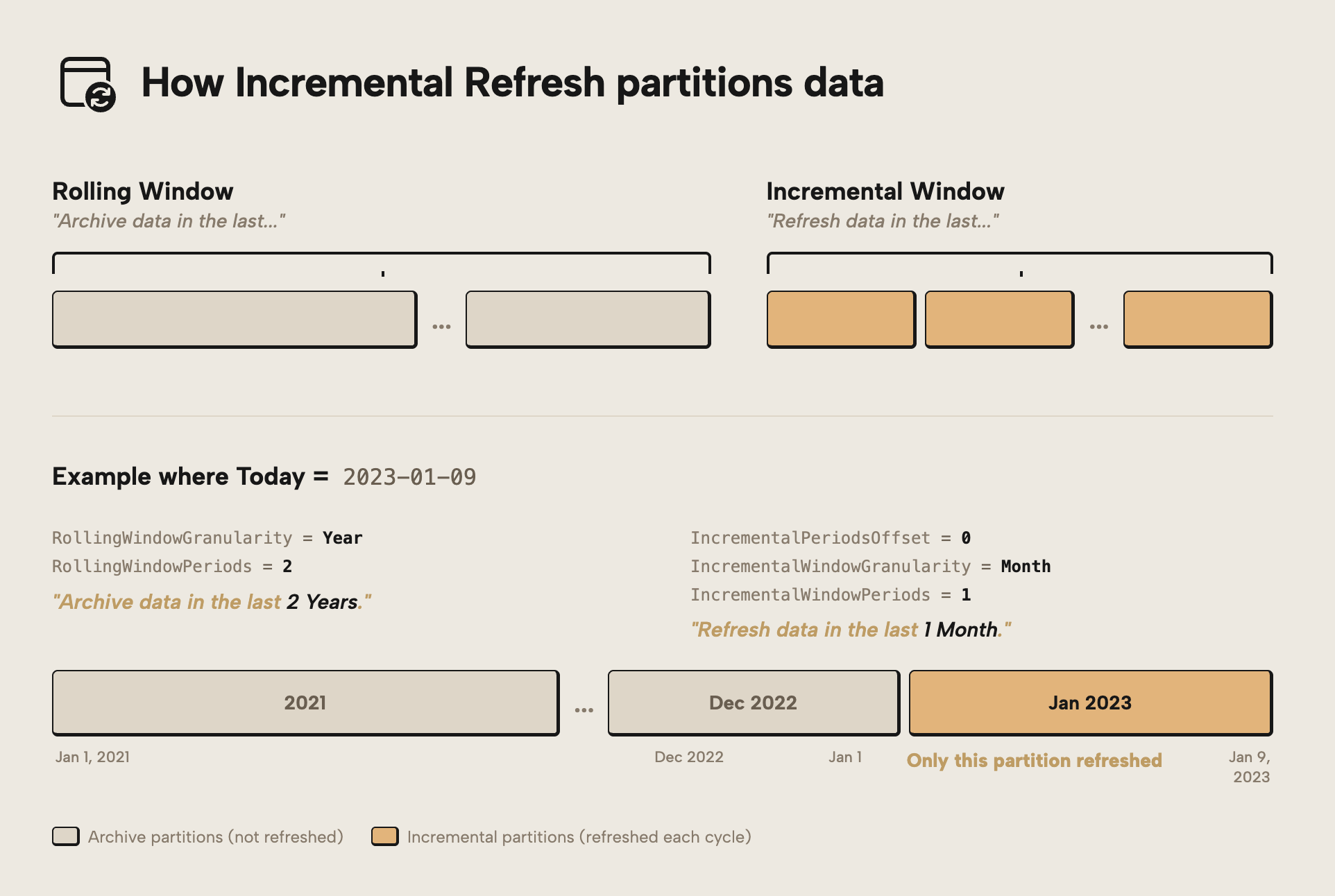
If you want to understand how incremental refresh works in detail, both the Microsoft documentation on configuring incremental refresh and real-time data for Power BI semantic models and the Tabular Editor tutorial on incremental refresh provide a good overview of how refresh policies translate into partitions and refresh behavior in the service.
Because only the newest partitions are refreshed, far less data needs to be processed during each refresh operation. This improves reliability and reduces the overall resource consumption of refresh operations compared to rebuilding the entire dataset repeatedly. In general, incremental refresh should be a go-to feature that you implement for large tables in an import semantic model; it’s the simplest and most straightforward way to alleviate memory pressure during refresh.
NOTE
Incremental Refresh reduces peak refresh memory by limiting how much data is processed in each refresh cycle. However, the memory required still depends on how partitions are processed. If multiple partitions are processed in parallel, memory usage can still approach the limits seen in a full refresh, even though the total data processed is reduced. You can control this parallelism via the Max Parallelism in the advanced refresh dialog of Tabular Editor, and you can also manually select and refresh a few partitions at a time rather than refreshing the entire table.
In more advanced scenarios, however, developers may need additional control over partition boundaries or processing behavior. For this, you might turn to hybrid tables or custom partitioning.
Extend partitioning with hybrid tables
An advanced option with incremental refresh is hybrid tables. Hybrid tables extend the Incremental Refresh pattern by allowing different storage modes to be applied to different partitions within the same table. In short, you have three types of partitions:
- Import partitions in the rolling window: These partitions are archived and not refreshed. Both normal and hybrid tables with incremental refresh include them.
- Import partitions in the incremental window: These partitions are refreshed, and also present in both normal and hybrid tables with incremental refresh.
- DirectQuery partitions in the incremental window: These partitions are exclusive to hybrid tables. Data in this partition directly queries the source, so it’s always up-to-date.
Under the hood, hybrid tables are simply a partition-level storage mode configuration. Each partition in the table can operate in Import or DirectQuery, giving developers flexibility when balancing refresh performance, query latency, and memory usage.
NOTE
If you want a deeper technical explanation of how hybrid tables behave in different scenarios, Hybrid Tables in Power BI – The Ultimate Guide by Nikola Ilic provides a good overview.
By default, all partitions created by incremental refresh are stored in Import mode. When hybrid tables are enabled, the most recent partition can instead operate in DirectQuery mode, allowing queries to retrieve the latest data directly from the source system without waiting for the next refresh cycle. From a refresh perspective, this means the newest data no longer needs to be processed into VertiPaq during scheduled refresh operations. Historical partitions remain in Import mode and are typically refreshed only once before becoming stable.
NOTE
Historical partitions should rarely be refreshed once the data is considered complete. One of the main benefits of partitioning is that older partitions can remain unchanged while only recent data is processed during refresh operations.
Of note, hybrid tables can also be used in a less common but interesting configuration where recent data is stored in Import mode while older data remains in DirectQuery. For example, a model might keep the most recent two years in VertiPaq for fast analytics while accessing older historical data directly from the source system. This atypical pattern can help reduce model size, but it does require custom partitioning and configuration. As discussed in the previous article on model size optimization, moving data out of Import mode is one way to reduce memory usage in large models.
In more advanced scenarios, developers may need full control over how partitions are defined, processed, and refreshed. These cases often lead to custom partitioning strategies, which we will explore next.
Take full control with custom partitioning
While Incremental Refresh automates partition management, some scenarios require more control over how data is partitioned and processed. In these cases, developers may choose to implement custom partitioning strategies. Custom partitioning allows full control over partition boundaries, refresh behavior, and processing order. Instead of relying on a predefined refresh policy, developers can define partitions manually based on business logic, data distribution, or operational requirements.
This flexibility can be useful when working with very large datasets where refresh operations must be carefully controlled to stay within capacity limits. Partitions can be defined based on natural data boundaries such as time periods, business domains, or other logical groupings, depending on refresh requirements. An example of this might be a semantic model that contains data from a product catalog. This table could be millions of rows of products with high-cardinality columns containing information like product SKU or so on, which might be needed by users to search and map certain products. For such a catalogue, you might implement incremental refresh to only refresh the catalogue items that change, if they have a “last updated” DateTime column. Otherwise, you could use custom partitions to segment the data by i.e. Product Category.
TIP
Custom partitioning allows partitions to be processed sequentially rather than in parallel, which reduces the peak memory required during processing. This can be a specific optimization which is helpful when you struggle with too many partitions being processed in parallel, and an alternative to scripting refreshes with maxParallelism.
Custom partitioning also enables advanced scenarios that go beyond the standard Incremental Refresh capabilities. For instance, you can combine different storage modes across partitions, control exactly which partitions are refreshed, or process partitions in a specific order. In fact, in many enterprise models, partition management eventually becomes a DevOps-style task, with partitions created and processed via scripts rather than manual configuration.
Tools such as Tabular Editor provide full control over partition definitions and processing scripts, enabling sophisticated partitioning strategies that are difficult to manage with graphical tools alone. If you want to go deeper, Course 8: Incremental Refresh & Multiple Partitions on Tabular Editor Learn includes a section on custom table partitioning.
Pattern two: refresh scale-out using semantic model replicas
A lesser-known technique for reducing refresh memory pressure is Semantic Model Scale-out, also known as Query Scale-out in the official documentation. The feature was originally designed to improve query scalability by creating multiple replicas of a semantic model. These replicas allow query workloads to be distributed across several instances of the model.
However, the same architecture can also be used to optimize refresh operations. In a standard refresh scenario, VertiPaq must build new segments while the previous version of the model remains in memory. This temporary overlap is one of the main reasons refresh operations can require significantly more memory than the final model size.
With semantic model scale-out enabled, a different refresh approach becomes possible. Instead of refreshing the model in place, the primary replica can first run a Process Clear, which removes all data from memory. A Process Full can then rebuild the model from scratch.
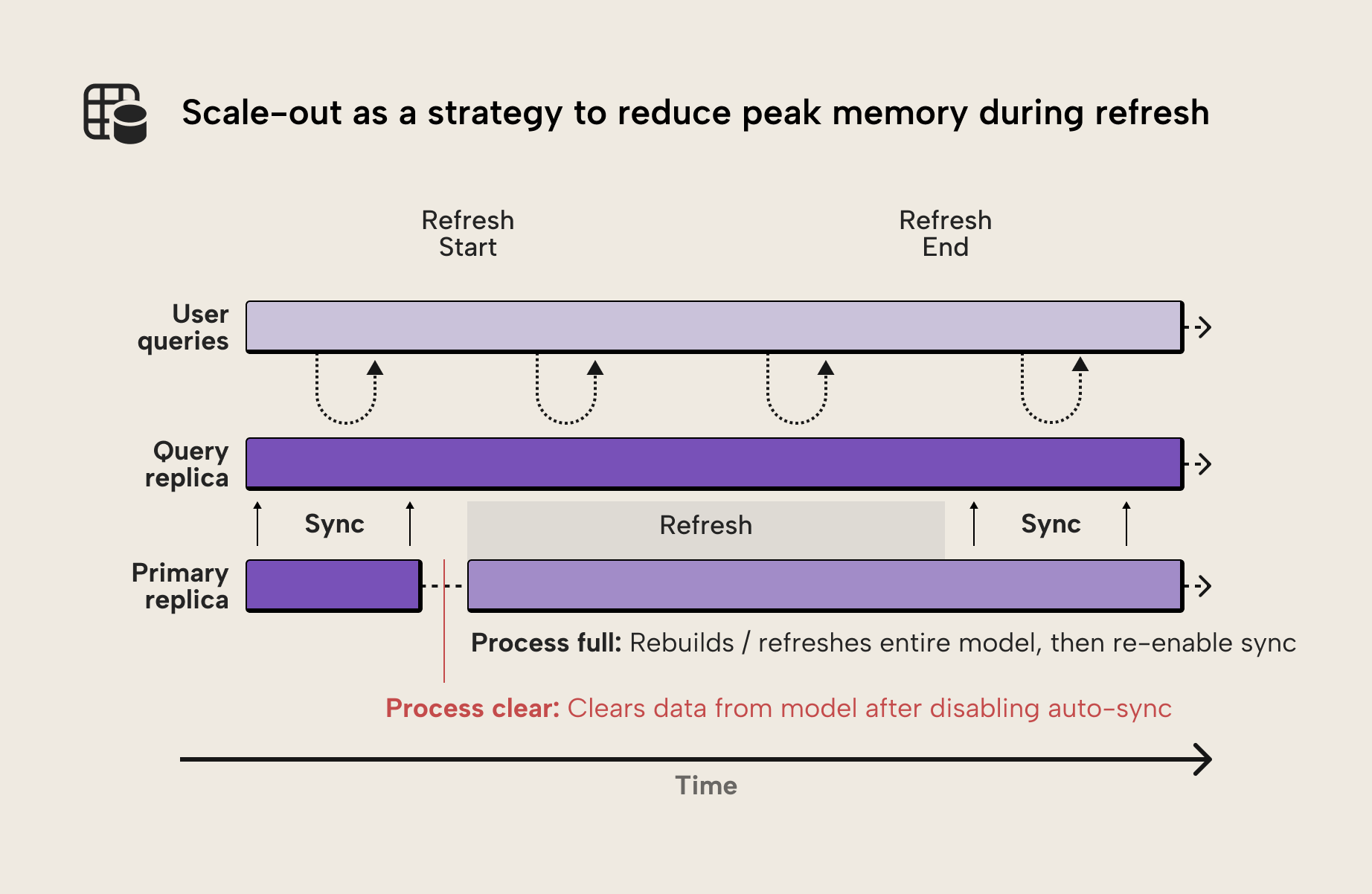
Because the model was cleared first, the refresh operation no longer requires two copies of the data structures to exist simultaneously in memory. This can significantly reduce the peak memory required during refresh.
NOTE
Although the feature is called “Query Scale-out”, it can also be used as a refresh optimization technique. By disabling automatic replica synchronization and refreshing the primary replica directly, the feature can effectively be used for refresh scale-out scenarios.
Another important detail is that the additional replicas created by scale-out operate outside the memory boundary of the primary semantic model. This is what makes the pattern viable: it avoids the need to hold multiple copies of the model within the same instance during refresh. This makes the feature particularly useful for large models that struggle with refresh memory limits.
Because this technique relies on controlling the refresh process programmatically, it requires a more advanced refresh orchestration setup. If you want to explore the prerequisites, configuration steps, and API-based refresh orchestration in detail, a full implementation guide is available.
So far the optimization strategies we discussed here pertain to import models. However, a more drastic approach could be changing to a Direct Lake storage mode if you have Fabric.
Pattern three: using Direct Lake storage mode
With Import storage mode, refresh operations copy data from the source system into the VertiPaq engine. During this process, new data structures are built while the previous version of the model still exists in memory. In addition, temporary memory is required for encoding, compression, and V-order optimization during processing. This combination of factors is one of the main reasons refresh operations can require significantly more memory than the final model size.
With Direct Lake, instead of importing data into the semantic model, VertiPaq reads Delta tables directly from OneLake. The semantic model references existing Parquet files while building its own in-memory structures to support analytical queries.
TIP
We discussed the differences between the various storage modes in detail in a previous article, which you can read here.
Because the data isn't batch-loaded during refresh, Direct Lake avoids the expensive processing step of extracting, transforming, and compressing data into VertiPaq. Instead, data is loaded into VertiPaq memory on demand as queries access it. A Direct Lake refresh therefore becomes a lightweight metadata operation where the semantic model updates its reference to the latest Delta table snapshot.
Unlike Import mode, Direct Lake doesn't reorganize or re-optimize the data layout during processing. Instead, it consumes the existing structure of the underlying Parquet files, including row groups and ordering. This means query performance and memory efficiency are heavily influenced by how the data is written to the Lakehouse.
NOTE
Direct Lake doesn't eliminate semantic model memory usage. Data still needs to be loaded into VertiPaq memory to support efficient query execution, and the same SKU-based memory limits apply as in Import mode. These limits define how much data can reside in memory at any given time.
The difference is in how those limits behave. Instead of failing immediately, Direct Lake will page data in and out of memory when limits are exceeded, which can significantly degrade performance. In practice, heavily used models tend to keep most data in memory, so keeping the effective model size within the memory limit remains the safest approach.
Another important concept in Direct Lake models is transcoding. When VertiPaq reads Delta tables from OneLake, it converts the columnar data structures from the Parquet format into the in-memory structures used by the VertiPaq engine. Queries against a Direct Lake model trigger transcoding for any columns not yet loaded into memory, meaning early queries may take longer as data is loaded on demand.
While the overhead is typically small, it means that initial queries may take slightly longer than subsequent queries that operate on already-loaded data.
TIP
To achieve good performance with Direct Lake, the underlying Delta tables should be structured and V-Ordered appropriately so that transcoded data is stored in VertiPaq in an optimal layout. Direct Lake largely inherits the physical structure of the underlying Parquet files, where row groups correspond closely to VertiPaq segments.
This makes upstream optimization critical. Techniques such as file compaction and OPTIMIZE in the Lakehouse help ensure efficient row group sizes and ordering. Poorly structured data can lead to slower query performance and higher capacity unit (CU) consumption compared to the same data stored in Import mode.
Evaluating whether Direct Lake provides benefits for a specific workload can therefore be complex. It requires a solid understanding of how data is written to the Lakehouse, how queries access that data, and how VertiPaq loads and caches columns during query execution.
Several articles on the Tabular Editor blog explore Direct Lake architecture and modeling considerations in more detail, including Fabric Direct Lake dataset, Fabric Direct Lake with Tabular Editor – Part 2: Creation, What’s new with Direct Lake (August 2025), and the overview of data model types and design considerations for Power BI.
Workaround: temporary SKU scale-up
In some situations, optimizing memory usage for refresh may not be enough to process a large semantic model within the current Fabric capacity. When this happens, a practical operational workaround is to temporarily scale the capacity to a larger SKU during refresh operations.
Fabric capacities can be resized dynamically. By scaling up the capacity before running a refresh and scaling it back down afterwards, additional memory and compute resources become available for the processing workload. This approach can be useful when large refresh operations occur only occasionally, such as during initial dataset loads, backfills of historical data, or periodic full refreshes.
In many enterprise environments, capacity scaling can be automated as part of a refresh orchestration workflow. For example, a pipeline or automation script may scale capacity up, trigger a refresh operation via the REST API, and then scale capacity back down after the refresh completes.
NOTE
If refresh orchestration is already automated using APIs, Semantic Model Scale-out is typically a better solution than temporary SKU scaling. Scale-out allows the refresh node to run a Process Clear followed by Process Full, avoiding the need to keep two copies of the model in memory during refresh. This makes it particularly effective for large refresh operations such as initial dataset loads, historical backfills, or periodic full refreshes.
WARNING
Temporary SKU scale-up should be considered a short-term workaround rather than a design solution. It can unblock refresh operations, but doesn't address the underlying causes of high memory consumption during processing and may lead to higher capacity costs over time.
Whenever possible, the architectural patterns discussed earlier in this article (such as partitioning, refresh scale-out, and Direct Lake) should be considered first.
For further reading
- Optimizing Semantic Model Memory in Fabric (Tabular Editor). Part 1 of this series: covers memory limits, why full refresh needs more memory than the model's resting size, and how to measure memory with VertiPaq Analyzer.
- Optimizing semantic model size in Power BI and Fabric: a comprehensive guide (Tabular Editor). Part 2: six patterns to reduce the steady-state model footprint that refresh then has to process.
- Configure incremental refresh and real-time data for Power BI semantic models (Microsoft Learn). Official reference for setting refresh policies and partition windows, underpinning the partitioning patterns described in this article.
- Direct Lake overview (Microsoft Learn). Explains how Direct Lake framing, transcoding, and column-on-demand loading differ from Import mode refresh, giving technical depth to pattern three.
In conclusion
Optimizing semantic model memory isn't only about reducing the model's size. As this article has shown, refresh operations introduce their own memory challenges, often requiring significantly more memory than the final model size.
Techniques such as partitioning, incremental refresh, and custom partitioning strategies allow developers to control how much data is processed during refresh. More advanced approaches, such as Semantic Model Scale-out, change the refresh architecture entirely and can dramatically reduce peak memory requirements. And in some scenarios, Direct Lake models eliminate the traditional refresh process altogether.
Ultimately, designing reliable large-scale semantic models requires understanding how VertiPaq uses memory across steady-state operation, refresh processing, and query execution. By combining the techniques from this article with the model-size optimizations discussed earlier in the series, developers can build semantic models that scale efficiently within Fabric's capacity constraints.
Plan refresh memory before it hurts production models in Tabular Editor 3.
Give Tabular Editor a spin