Key Takeaways
- Model choice is a core decision: Different models are better suited for different tasks. You should choose the right model to get the best results and avoid issues with costs or long waiting times.
- Models differ in several clear ways: LLMs vary in six ways: their purpose, capabilities, behavior, speed, cost, and configuration. These are the factors that you use to determine what model to choose.
- There are other choices alongside the model itself: You must also decide the effort level, which determines how much token “budget” the model has for thinking. You also can choose who hosts the LLM, which is mainly relevant for open-source models that you can subscribe to from a cloud provider or run locally on your machine.
- You can combine or use multiple models at once: Applications and patterns let you use multiple models at once, leveraging the pros and mitigating the cons of each. While more advanced, this is a good pattern to get familiar with especially as you work on tasks that are less iterative and have longer horizons.
This summary is produced by the author, and not by AI.
Model choice is a core building block of effective agentic development
In this series we explain the various building blocks that you should understand for agentic development. This article focuses on explaining how you choose the best LLM for your use-case depending on its features:
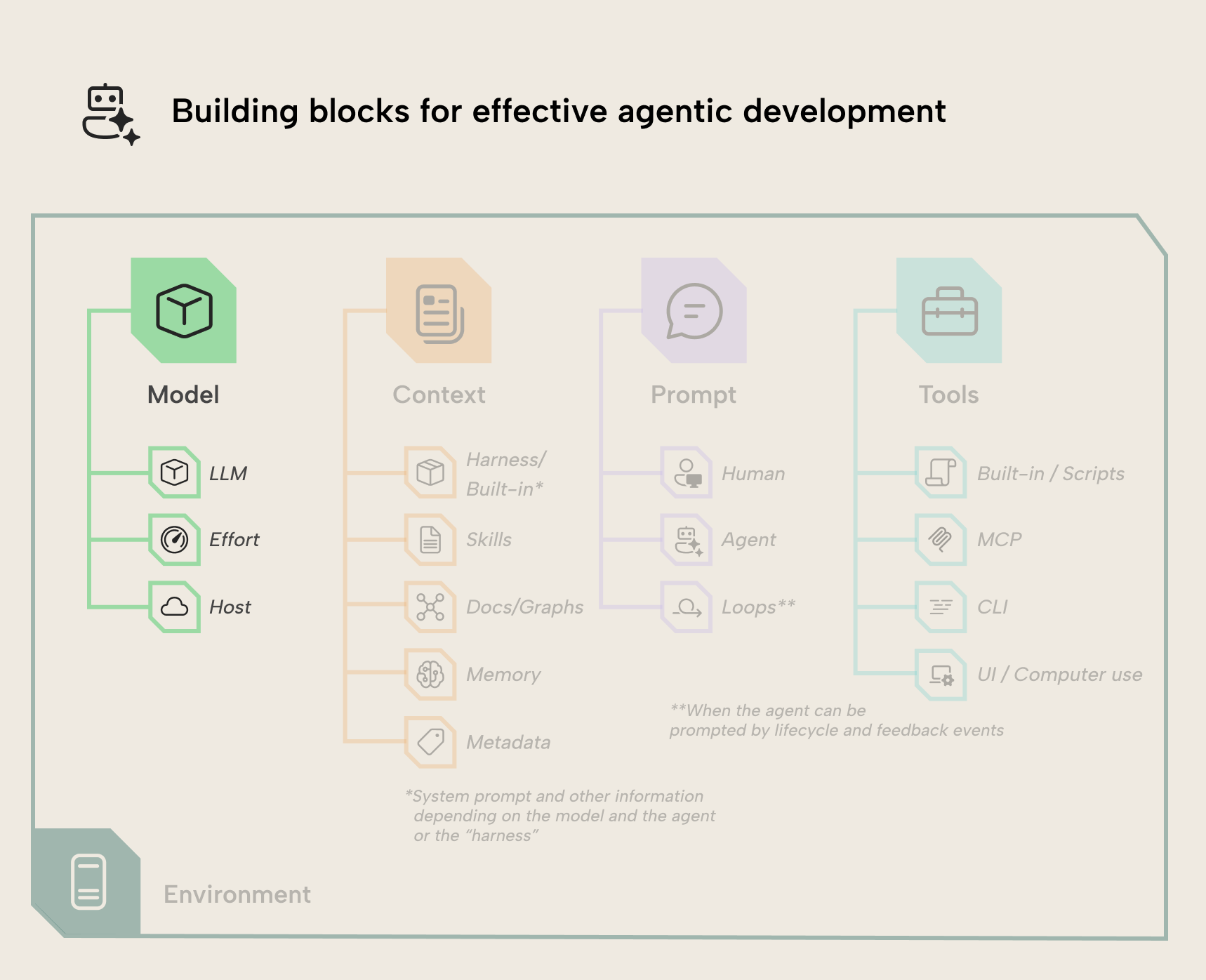
Choosing the model and related settings is the most important choice you make when using AI.
Models differ in several ways
As LLMs and AI agents get more powerful, they also become more expensive and the errors they make become more subtle. Understanding some of the things that impact model capabilities is important for picking the best one for your task. Here’re some of the criteria that you need to think about:
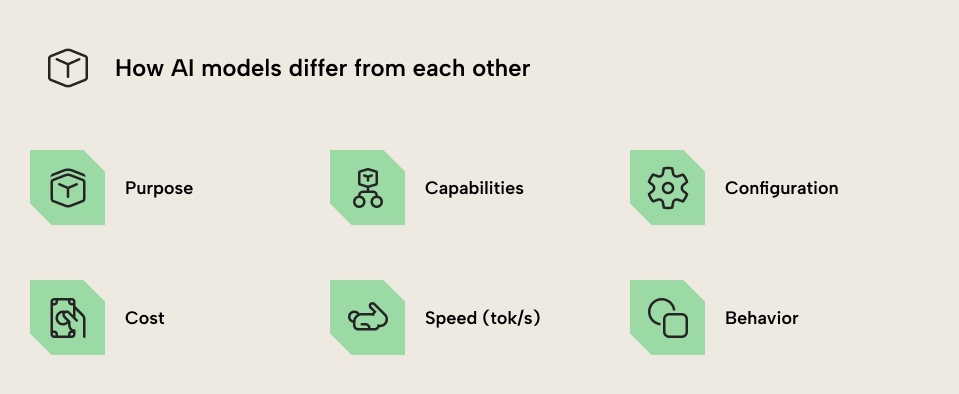
The main ways in which LLMs differ include:
- Purpose: What the model is intended to do. Most of the models you use could be general purpose, but some could be specifically trained for coding tasks. This also refers to smaller models trained for specific tasks, which will likely become more common in the future.
- Capabilities: What the model can do. This includes reasoning, viewing images, calling tools, but also its general competence or “intelligence”. The intelligence of an LLM is something many try to quantify with benchmarks, but truthfully, it is largely subjective. Note that this can be more than intelligence and can also refer to the ability of the model to handle long context or retain context over multiple turns in a session or compactions.
- Configuration (or provider/host): Models have different system prompts, guardrails, but also technical settings that you can’t view or change. These usually manifest as differences in capabilities or behavior, but some can be more explicit, like compliance requirements or if you work with patient or biomedical/chemical data in your organization.
- Speed: How fast the model is in tokens per second (tps; tok/s). This is not a fixed number for the model but a function of how computationally intensive it is. Larger models require more compute and are therefore slower. However you might focus specifically on faster models for things like bulk operations or searches in less-structured data.
- Cost: Computationally intensive models are not just slower but also more expensive. Models have a different price, which is determined per million input and output tokens. If you have a subscription then you probably don’t realize this cost, but usage/token-based pricing is a reality already today for enterprise plans that organizations have. Cost can be the biggest driving factor for what models one should use (or even has available) to avoid ballooning AI spend.
- Behavior: How the model acts. This includes the typical responses of the model, how and when it calls tools or invokes skills, and so on. A practical example that’s become more relevant is whether models expect to work on long-running tasks or not. For instance, models such as Opus 5 and GPT 5.6 Sol can work toward a long horizon; 8, 12, 16 hours and more. However, not all tasks are so clearly defined that this is possible. For instance, data visualization and UI work typically requires iteration unless you have a precise mock-up, and you probably also want higher speeds for work with a human in the loop.
NOTE
These factors can also intersect. For instance, models from some providers have a “fast mode”. This isn’t a property of the model itself, but a configuration that lets you trade more cost for compute resources so that you get higher speeds. Despite this not being a model configuration, it’s in the applications or APIs you use for specific models, so it’s still going to factor into your decision about which models to use and why.
Choosing effort level
Other than choosing the model, you also need to choose its “effort level”. Effort relates to reasoning. That’s a concept where the LLM can generate hidden tokens for a scratchpad before producing its output or between calling tools. It can work through the problem step-by-step, and it has a “budget” of how many tokens it’s allowed to produce.
Effort is thus this budget; the reasoning budget available. Higher reasoning generally results in better performance, but also means it takes longer (more waiting) to get an output, and you have higher costs. Therefore, you probably want to make sure that you choose the right effort for the task.
TIP
Most people typically just stick to a high-capability model and effort level for all tasks, which results in higher costs, slower outputs, and sometimes over-engineering. At the same time, though, it’s unnecessary to micro-manage these decisions at each turn. That’s especially problematic since it can break the cache for models (the tokens that an LLM “remembers” from earlier inputs); they must re-ingest the entire conversation after switching models or effort levels, which also leads to higher cost.
Some practical guidance is:
- Box each task to a session, and
/clearwhen the task is done - Before you start, think about which model/effort level is appropriate
- If you want to switch models mid-session,
/compactor/clearfirst
Why model strength matters
The types of mistakes a large language model makes change with the strength of the model and the model provider. Older and less capable models are more likely to completely fabricate statements without regard for whether they are true; this is often called hallucinating.
For large language models, the power and expense of the model is affected by the quantity of tunable numbers, or parameters, a model has as well as the precision of those parameters (quantization). This is basically just a really fancy way to say that the performance of a model is correlated with how long it was trained and how much training data was used. Models with more parameters and more precise parameters are often more capable but also require more RAM to host and run.
An example of strong vs weak models
Below is an example of a very cheap and very weak local model (Gemma 4 E2B). It has 5 billion parameters and takes up 4 gigabytes of RAM on my machine. By contrast, a frontier model, Kimi K3, is about 500 times as large. I’ve asked Gemma to give us DAX for a weighted % of red products sold.
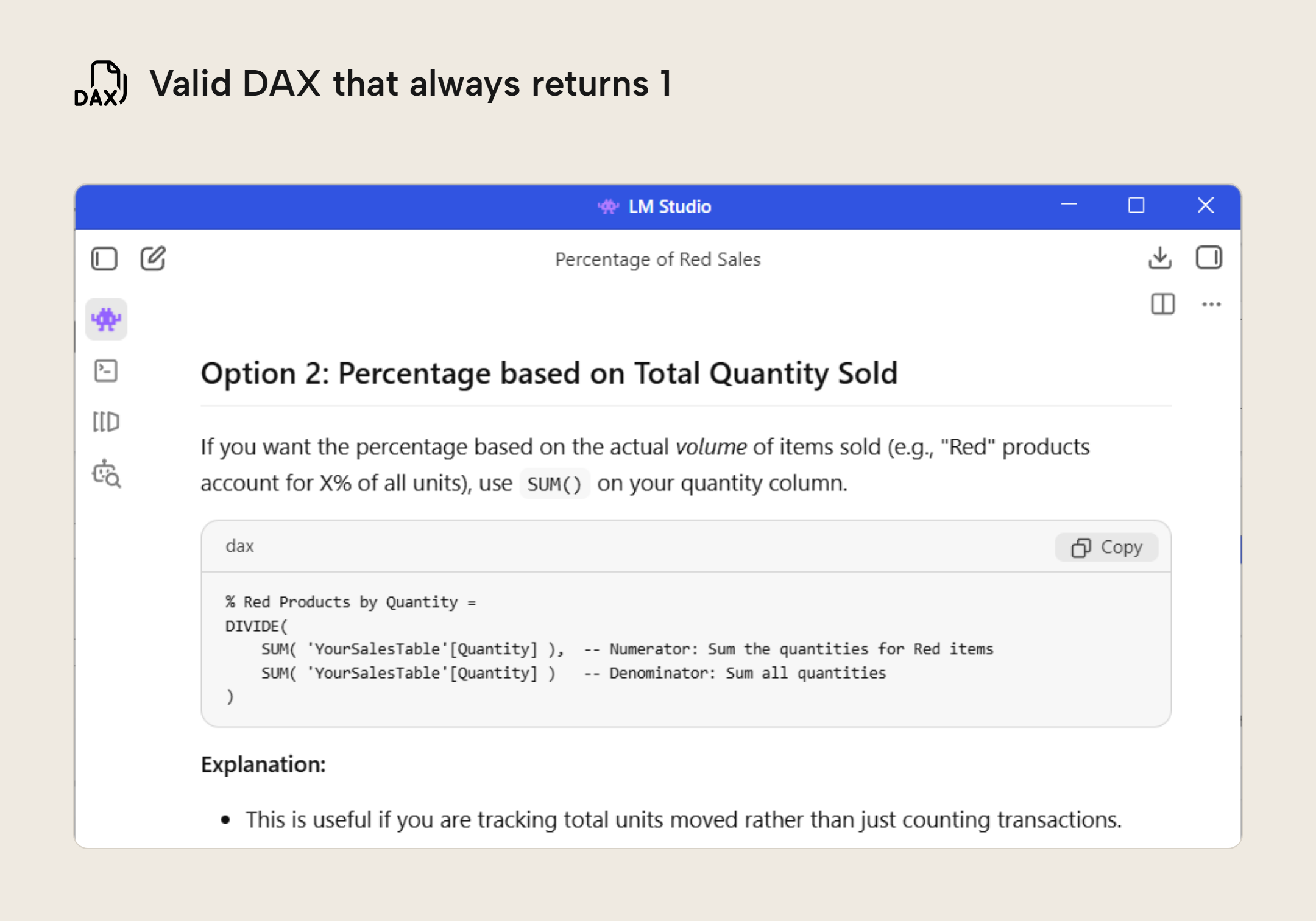
If you take a look, you can see that while it produced perfect English and valid DAX, the measure will always return one because it never filters by red (although it says it does in the comment). This is the type of dumb, obvious error that LLMs are historically known for.
However, if you are using a powerful frontier model, it will never make this obvious of a mistake. Whole categories of errors and hallucinations simply aren’t a problem anymore, especially if an agent has access to the right tools. It’s tempting, therefore, to always use the most powerful model. This is often unnecessary and expensive. Additionally, larger models can still overengineer solutions (or produce buggy code).
WARNING
Consumer subscriptions from inference providers are purportedly heavily subsidized as of August 2026. We’ve observed estimates with raw API usage costing 10-50x as much compared to consumer subscriptions. These subsidies may end. Furthermore, subscriptions are only available to small teams and individuals.
For enterprises (and individuals when token costs increase), using LLMs efficiently is a big focus.
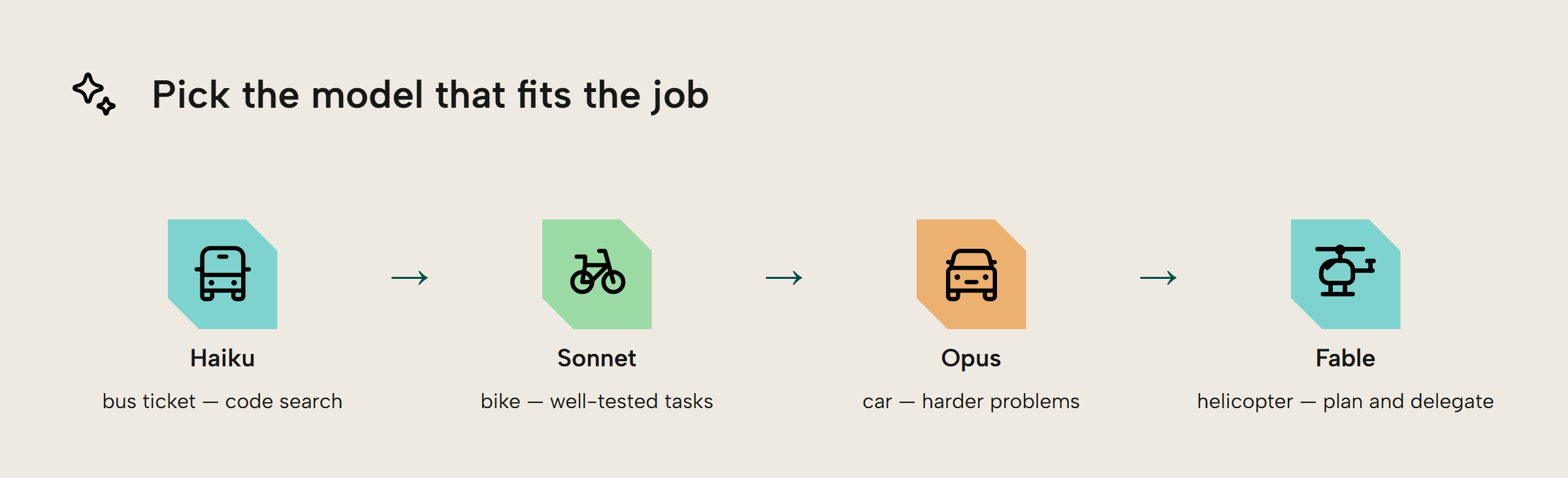
Picking the right size model is going to become more important as AI becomes more expensive. Let’s map the four Anthropic model sizes to a very rough transportation analogy. Imagine you had an employee who needs to perform a few errands for you. You have four choices for how they can get around the city: a single bus ticket, a bike, a car, or a helicopter.
So, higher capability models are more expensive. The increase in capability is also much fuzzier, however, and requires some experimentation to assess. Their lowest capability model, Haiku, is like that single bus ticket. It is cheap but best suited for searching code bases and simple tasks. Sonnet, the bike, is good for well-tested or reliable tasks. This is what you will commonly use if you are budget-constrained.
Opus, the car, is more expensive but is ideal for harder tasks. Finally, Fable, the helicopter, is ideal for getting a high-level view, planning, and delegating work to weaker models. Even if you had unlimited money, most tasks don’t require a Fable level model.
Examples of what tasks to use for which “model family”
Now that we’ve explained how models differ, what effort is, and how model strength matters, here’s some examples of tasks you might do in BI and how you match them to a model/effort combination. Note that this is a reference based on our own subjective experience, we are not presenting this as a hard rule or best practice:
WARNING
Again, if you have only used a personal subscription and never paid API costs yourself out of your pocket or that of your organization, this probably seems frivolous and unnecessary. Try using API or enterprise usage pricing though and you’ll change your mind quite quickly.
- Low-capability but fast models like Haiku 4.5 (which is the lowest capability model you’d use for this), GPT-5.3 code, or some open-source models are great for searching and summarizing unstructured and inconsistent text or directories. Many open-source models that don’t have vision capabilities (that can’t “see” images) work great for this, too, like DeepSeek V4 Flash. Examples could be:
- Searching a tenant audit or artifact usage log for a vague pattern.
- Searching your conversation history with an AI agent for a specific topic or a summary of past conversations.
- Searching Git commit history
- Performing specific and repetitious tasks that are already well-defined. Examples could be making changes to visuals that don’t require design work or reorganizing / ordering them on or between pages.
- Medium-capability models at lower effort like GPT 5.6 Luna/Terra or Sonnet on low or medium can be good for iterative work. Open source models like MiniMax 2.7, Qwen 3.6 (27B) work great here, too. Examples include:
- Iterating on pre-existing work, design, reports, or dashboards.
- Making specific and targeted changes to code or calculations; orchestrated work with human oversight. Most semantic modeling tasks can be easily done with these model/effort combinations.
- “Checking” something like the refresh history of several models and ETL job completions.
- Medium-capability models at higher effort or high-capability models at low effort are good for most other work. These include Sonnet at high-max or Opus at low-medium. Your choice between the medium- and high-capability models depends on other factors like price, behavior, etc. Examples might include:
- Larger implementation work driven by planning and requirements with semantic models or data engineering tasks.
- Debugging issues in semantic models or ETL jobs, including failures.
- High capability models like Opus High-Max or highest capability models like Fable/GPT 5.6-Sol at Low-Medium can be good for planning, research, and creating designs.
- Highest capability models at high effort like Fable, GPT 5.6 Sol, and Kimi K3 are good for higher-order planning or high-context work, such as ingesting large amounts of requirements documents including those that are multimodal. They can also be good for substantial bodies of work which involve orchestration of other agents. Examples can be:
- Planning a complex, end-to-end BI project, presuming that you have done sufficient and accurate requirements gathering, and given the agent tools to address technical requirements.
- Large refactors that significantly change the architecture, like using a different language. If the refactor will use a significantly different design you need to ensure sufficient up-front planning, otherwise the agent will likely take design decisions for you that over-engineer or deviate from your expectations.
- Using a prompt that starts with
/goal(which is typically for long-running tasks) to optimize code without regressions, including DAX, M, a notebook, etc. It’s important that you first define the expectations and criteria here, as the agent needs to have a closed loop for both performance measurement but also accuracy. For DAX this is particularly complex as you need to define various filter contexts up-front, or point it toward example queries and visuals.
How you host the models
Models from “frontier labs” in America currently have the greatest capabilities, but any model provider comes along with security risks. Even if a provider is secure, they will often train on your sessions unless you opt-out or have an enterprise account with certain agreements. Furthermore, it doesn’t eliminate security risks of an agent that can run arbitrary code. Instead, you may be interested in open source models, which are also available to download and host, locally. These models are getting to the point where they are performing better and better; models such as DeepSeek V4 Flash or the Qwen 3.8 series have extremely competitive price to performance from cloud providers, and can also be hosted locally on many mid- to high-end computers.
Even if you can’t self-host bigger or newer models, doing so with smaller models may still be feasible. Local models provide the most security and privacy. One of our goals with the release of the AI assistant in Tabular Editor 3 was to support locally hosted models for stronger privacy.
Using multiple models
Of course, you’re not limited to a single model, provider, or even a single agent. You can combine them together to leverage the best of all worlds. The most common example of this is to use a moderate capability model / effort combination (like GPT 5.6 Luna at max effort, Sonnet at high effort, or Opus at medium effort) for the work, and then a higher capability model (like GPT 5.6 at high or max effort) for review and bugfixes. Generally, you don’t want to have a model ever review its own work, as they tend to typically view it favorably and miss bugs or inefficiencies. This is the same as having a colleague review your pull-request or dashboard, rather than signing it off as “Looks Good To Me” yourself.
There’re many more examples of these multi-model or multi-agent interactions. We’ll discuss these advanced scenarios and “agent-as-orchestrator” patterns in later articles.
Further Reading
- The dark side of LLMs: Security risks in semantic model development (Tabular Editor). An article covering the varying risks of using LLMs. This is particularly relevant in choosing to host local models versus going with an LLM provider.
- LM Studio. Free software for running local models. This was used in some of the screenshots.
- Arena.ai. A fun, free website that allows you to see how random LLMs compare against each other. Note, do not put in anything that is confidential or sensitive.
Conclusion
Model choice determines what your agent can do and the types and quality of responses you get back; it’s the most significant choice you make in agentic development work. That doesn’t mean that you need to micromanage or overthink which model you use; rather, just choose the right model, effort, and host for the scenario you’re in. There are various factors by which models can differ, including their purpose, capabilities, configuration, cost, speed, and behavior. Matching the right model to the right task – like you should already do with tools – will ensure you get the best results, the lowest cost, and the highest efficiency.
Take your semantic models further with Tabular Editor.
Give Tabular Editor a spin