
Key takeaways
- Risks differ by layer: Model-layer vulnerabilities affect the AI's core behavior, while application-layer risks come from how systems interact with data and users.
- Deployment context matters: Consumer, enterprise, and local deployments face different threats, though some risks like prompt injection apply everywhere.
- Not all uses are equally risky: Generating DAX or documentation is relatively safe with good design, while unsupervised agents and unrestricted chatbots are extremely risky.
This summary is produced by the author, and not by AI.
Large language models and security risks
Previously, we have explored the many ways Large Language Models (LLMs) can interact with semantic models from conversational BI to documentation and agentic development. However, in this post, we turn to the dark side and explore the security issues that LLM-enabled applications create, how to spot them, and how to manage them.
The core threat is this: LLMs don’t separate data from instructions, which opens up a new range of security challenges. In contrast, “traditional” software has (or should have!) clear boundaries between the control layer (the code and logic) and the data layer (the user input, databases, etc.).
In this blog post, we explore the structure and risks of LLM applications. First, the two parts of an LLM application (the LLM model and the application code). Then, we go through different deployment scenarios from individual laptops to consumer websites. Finally, we provide a simple set of security questions that developers and managers should ask for all LLM use cases (before it’s too late) and how they apply to common use cases.
Let’s dive into the dark end!
Security risks in “LLMs” and “Applications”
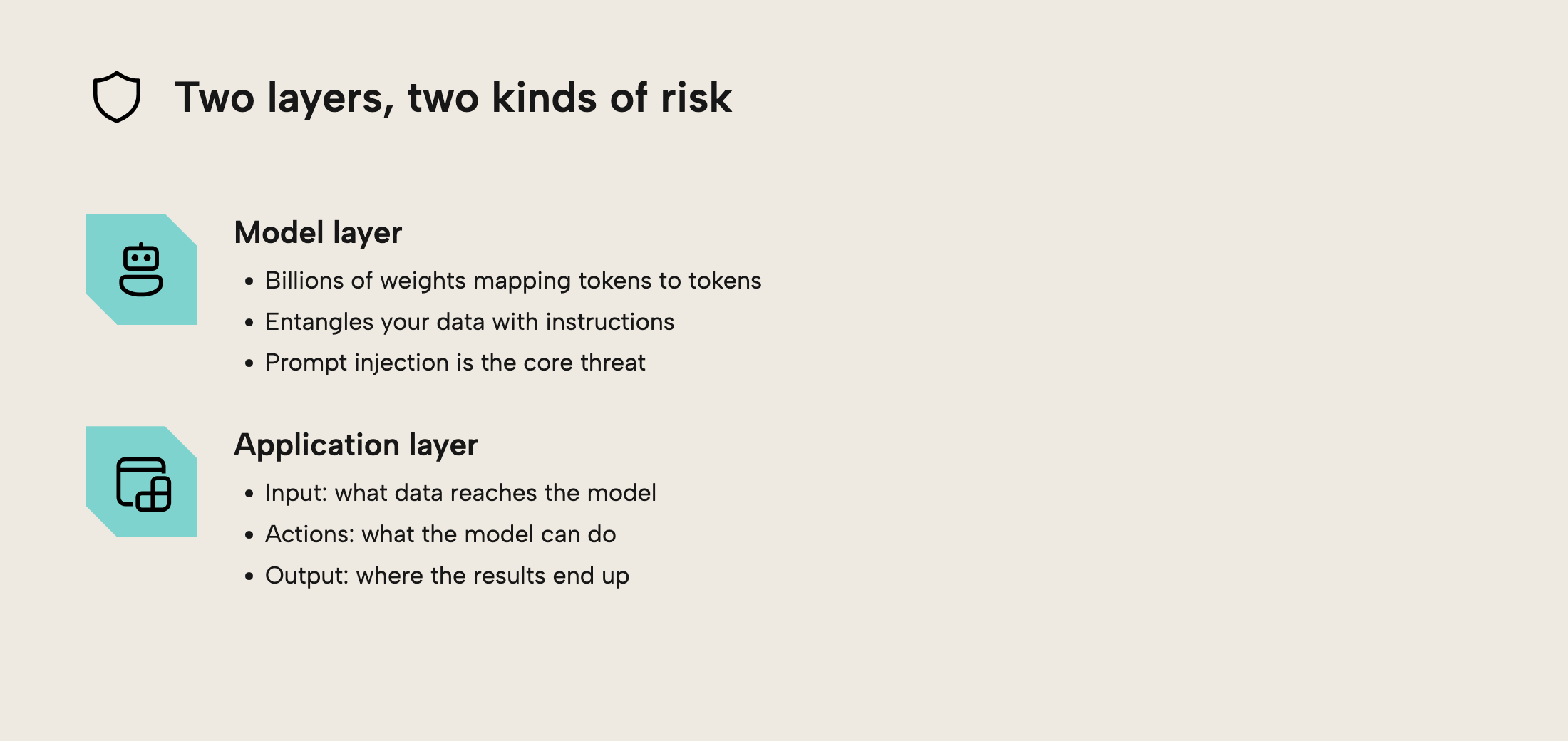
An LLM application can be divided into two layers: the LLM itself (the “model” layer) and all the code surrounding the LLM (the “application” layer). Each layer has distinct risks. Let’s explore each in turn.
The “model” layer
An LLM is fundamentally a mysterious machine consisting of billions (or even trillions) of weights that takes in tokens (chunks of text turned into numbers) and through a mysterious process outputs other likely tokens. No matter whether you interact with the LLM through chat or through API, which MCP servers you connect to, or how the output looks, at the core will be a token-consuming-producing black box.
Herein lies the big problem: because all the LLM sees are tokens, it fundamentally entangles user data and instructions. This opens the door for prompt injections: attacks where adversaries inject malicious instructions into the input that wreak all sorts of havoc. Prompt injections have been used to exfiltrate private data from GitHub repositories and bypass academic quality control.
Prompt injections can be seen like SQL injections on steroids. But where SQL injections can be mitigated by sanitizing and escaping the input, the entanglement of data and instructions in LLMs makes this impossible to completely avoid. Having a layered defence which checks all input for potential instructions can help, but beware! The only guaranteed guard against prompt injection is to have complete control over the input to the LLM - which can be daunting when working with real data.
The “application” layer
All LLM applications need logic that define three things:
- Input: How can the user provide input/data to the LLM? What data sources are available?
- Actions: How can the LLM interact with data? Which does it have available?
- Output: What happens to the output of the LLM?
These three points are defined in the application layer, which provides the custom code for interacting with the model. Sometimes the application layer comes prepackaged from a product and other times it's developed in-house. We return to this distinction in the next section.
In all cases, the application layer introduces risks by opening the LLM to external input and allowing the LLM to affect systems. For the input, this might be through providing access to external MCP servers or tools that provide data, both of which can open the door to prompt injections.
The outputs can be equally harmful. Some LLM applications might be able to write to systems, by auto-structuring documentation, writing test cases for code, or writing C# scripts for tabular editor. If one isn't extremely careful, this output can be used to exfiltrate data or destroy production systems, either accidentally or by devious adversaries.
A particularly tricky part of the application is access to (external) MCP servers. Adversa has compiled a list of 25 vulnerabilities of MCP servers that paint a bleak picture. That is why we recommend relying on your own MCP servers in safe environments or those from trusted first-party vendors, if you want to experiment with the technology.
From app to deployment: Understanding the trade-offs
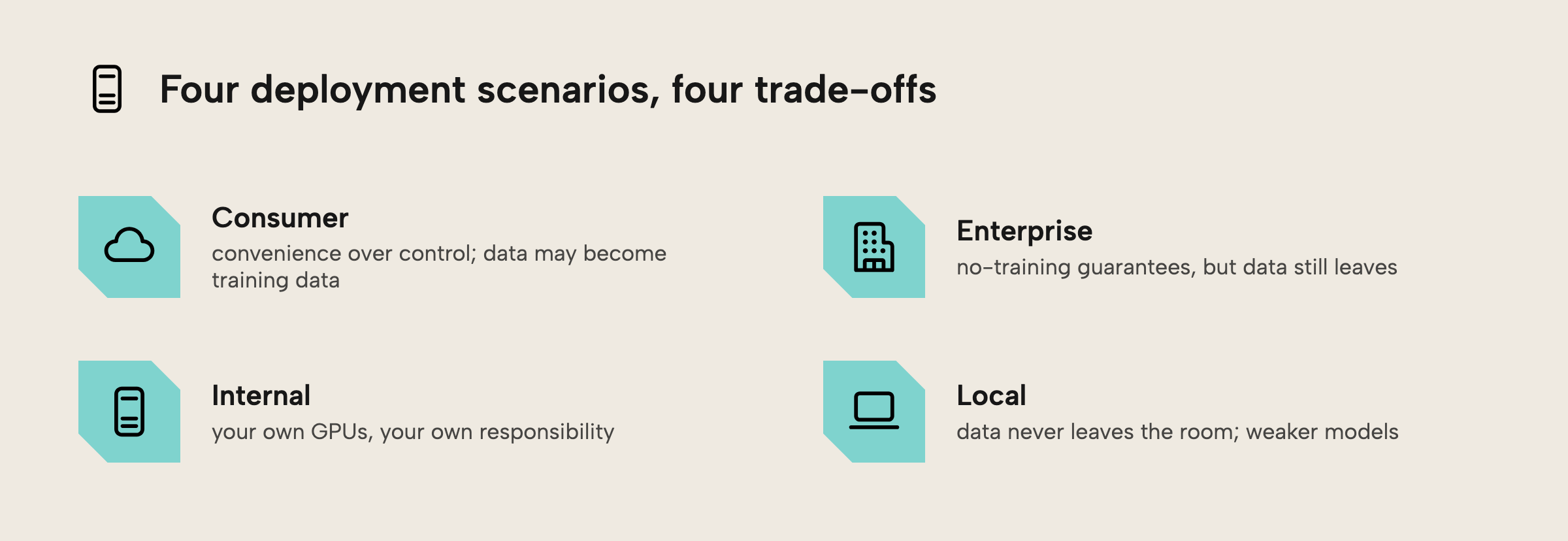
LLM applications aren't deployed in a vacuum. Who builds them and where they live provides security trade-offs that must be considered. Below, we consider the trade-off of four common deployment scenarios:
Consumer
The easiest way to access powerful LLMs is to use a consumer-facing product like ChatGPT or Claude. Here you trade off control for convenience. These websites provide nicely designed access to state-of-the-art models, but your company data might end becoming training data . Furthermore, the popular companies have a target on their back and receive unwanted attention from hackers and bad actors all over the world.
At this point, many companies will know that you ideally shouldn’t lean on consumer chatbots for primary business functions. However, given the convenience of working with these models, they should be careful that employees might end up secretly using these models as “shadow IT”, if there are no safe alternatives. When code is misbehaving, ChatGPT can come to the rescue whether it’s safe or not.
Enterprise
One natural step is to rely on “Enterprise” chatbot solutions like Microsoft Copilot, ChatGPT enterprise from OpenAI, or Claude Enterprise from Anthropic. Often these contracts will provide strict guarantees that data and interactions aren't used for training. While this is much safer, the security risks from the model layer and application layer remain. Developers should still be extremely cautious about which data inputs the models have access to and how the outputs are being used. Remembering to audit the full application - including connecting services - is still crucial.
Even with enterprise solutions, you still trade control for convenience-off of control - your company data still needs to go to “the cloud” to be processed by the enterprise provider. Whether this is an acceptable risk is up to individual organizations to judge.
Internal deployment
For companies that can't accept the lack of control in the managed enterprise solution, one option is to stack some GPUs in the basement and run your own models. This doesn’t mean you have to build your own application. Some LLM applications (like our planned AI integration for Tabular Editor) allow you to “bring your own LLM”, which limits the integrator’s responsibility to the model layer – the applications are ready to use. However, depending on the use case, companies might choose to build their own custom applications using the increasingly sophisticated open-source ecosystem.
Of course, with great powers comes great responsibility. Deploying LLMs safely (and securely) is a tremendous engineering challenge with many layers that can go wrong. Organizations choosing this deployment model therefore have more responsibility for keeping their models safe and secure.
Local deployment
The most conservative (or paranoid) deployment scenario is going fully local: Running LLMs directly on your laptop. This way you have full control over the data - it literally doesn’t leave the room.
However, even this scenario has security risks. For one, it still doesn’t prevent prompt injection; that is still possible, and you can still potentially exfiltrate data from your machine, if you’re not careful. This is particularly true when you download and use custom MCP servers, libraries, or command-line tools for agents.
Also, local deployment generally means smaller, weaker models that are worse at following instructions and can produce worse code. While the lack of instruction-following capabilities might make the local LLMs less susceptible to prompt injection, it also might make them less useful, overall. As such, you’re performing a trade-off of utility for safety. Whether that’s worth it for your scenario is up to you.
Finally, local models also require more advanced hardware to run. They can be expensive and greedy on your local computer, and many require hardware that’s not widely affordable (or available, depending on your market) for most consumers.
Critical questions for evaluating LLM application risk
The above sections don’t exactly paint a rosy picture of LLM security. Before you run out of the building to tell your CTO to stop all LLM applications, stop and read the questions below. If you’re careful about both the inputs, actions, and outputs of the LLM, normal cyber security practices can help in constructing useful (and secure) apps.
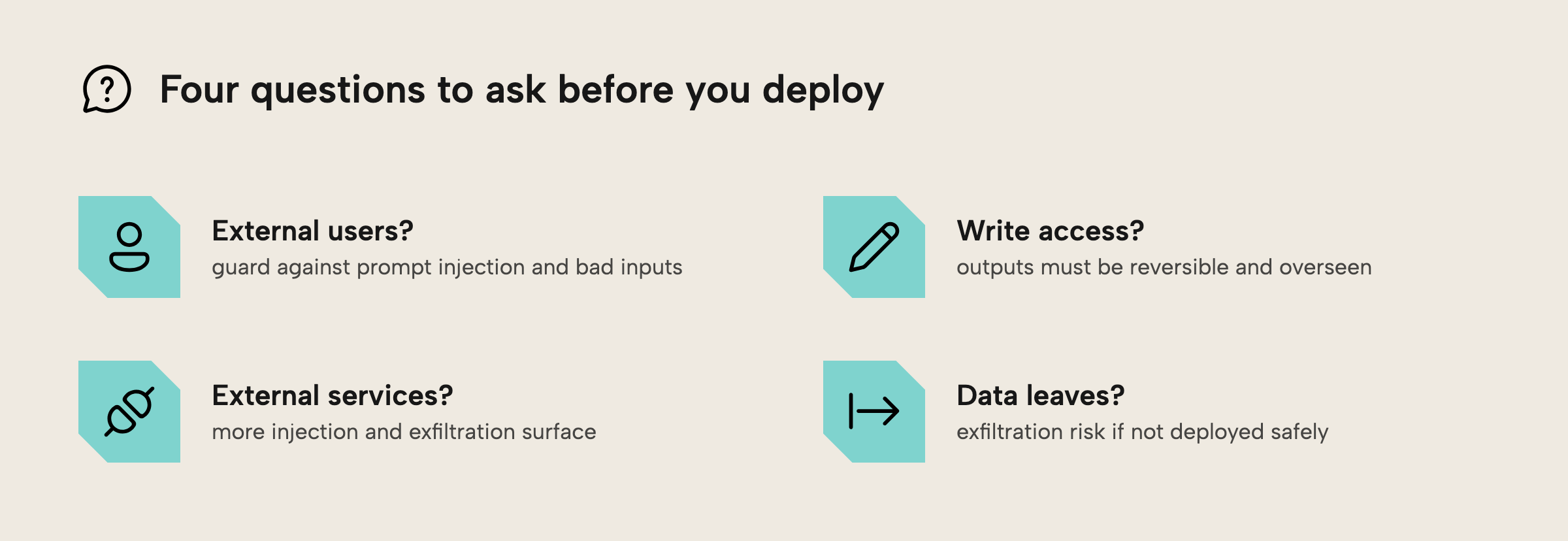
- Do external users have access to the application? If yes, you have to be vigilant about prompt injections, be vigilant about sanitizing inputs, and avoid giving access to sensitive data.
- Does the LLM have write access? If the LLM can write code or impact systems, you have to be careful that these outputs can a) easily be reversed (through it for instance) and b) have sufficient human oversight. Disaster recovery is essential, here.
- Does your application interact with external services? External services, such as web search, provide further opportunities for prompt injection and data exfiltration. Tread carefully!
- Does data leave your organization? Data can leave your organization through above, or if the LLM isn't securely deployed. Be careful.
These challenges are particularly dangerous when they interact. For instance, if you have an LLM with write access to your servers and access to external services, you have basically given adversaries remote code execution capabilities (which spells disaster).
In the next section, we analyse specific use cases.
Specific cases
We'll work through a few representative cases, beginning with generating DAX.
Generating DAX (Relatively safe - if designed correctly)
The first case is using LLMs to assist in generating (or documenting) DAX code using an internal chatbot solution. Going through the questions shows this to be relatively safe:
- No external users: Only employees (like Alice the Analyst) use the service.
- No write access: Humans can manually review and deploy code
- No external services: No need to interact with untrusted sources through external services
- No data leakage: Data doesn’t leave the organization if deployment is safe (i.e., no consumer chatbot)
The key risk to avoid is that users might be tempted to use shadow IT chatbots, if the internal models aren't good enough. These might leak data.
The key control is to ensure that generating the code is isolated from access to the data (and deployment). This way you ensure humans stay in control.
“Ask me anything” chatbot (Extremely high risk)
The second use-case envisions an internal chatbot that has two tools: one that can query the semantic model to answer business related questions and one that can search the internet for up-to-date information. This is potentially extremely unsafe for the reasons below:
- No external users: The chatbot could only be available to business employees (like Bob the Business User from our previous blog post).
- Write access: The LLM can execute queries against the data, which could be dangerous.
- External services: The LLM app interacts with the internet which opens for prompt injections
- Potential data exfiltration: Data can leave the organization through exfiltration
In sum, this service has a huge risk surface area – however nice it could be. The key risk arises from having access to both internal systems (the databases) and external websites (through the search function). One way to critically control this is to remove access to the open search and only query trusted sites (like internal documentation).
Structuring documentation (Low to moderate risk)
The final use case is for LLMs to structure documentation like we introduced in a previous blog post. Documentation assistance can be a fairly low risk use case with the right precautions:
- No external users: again, only employees writing code and documentation have access.
- No (direct) write access: The LLM writes the documentation, but humans review and approve it to control the flow.
- No external services: The data (i.e., the code) is internal and validated.
- No data exfiltration: If a secure LLM is used, no risks of exfiltration
The key risks to avoid in this scenario are a) using unsecured or unsafe LLMs (e.g., consumer chatbots, or LLMs with weak instruction-following capabilities) and b) lacking human oversight for approving the changes. The key control is to ensure that humans stay in the loop and that all changes are version controlled.
Further resources
If you want to learn more about the risks and challenges of LLM applications – and how to fix them – here are a few recommendations:
- Practical Security Advice from NVIDIA: This blog post covers concrete vulnerabilities and tips for addressing them.
- MCP Vulnerabilities: A concise list of vulnerabilities related to MCP servers.
- Vulnerability scanning tool (garak): This tool (also from NVIDIA) provides a concrete way to test for vulnerabilities in language models
- ACL SigSec: ACL SigSec is the leading academic conference for LLM security. Since it’s a fast-moving field, they provide a good view of the cutting-edge.
Frequently asked questions
Finally, a few frequently asked questions that we often hear, for clarity:
- If I query my model from Claude Desktop or GitHub Copilot, does the LLM see my data? Yes. An LLM will have to see your data or code to provide answers. What matters is whether you trust who provides the LLM and where it's hosted.
- “If I use GitHub Copilot in VS Code is my data 'safe' because it's from Microsoft?” It depends. GitHub Copilot is still vulnerable to data exfiltration. If you have critical or secret data, you should be careful
- "Are MCP servers safe to use?" It depends on the MCP server. We recommend experimenting locally with your own or those from verified first-party vendors.
- "If an LLM can only see my model or report metadata, is my data 'safe'?" No. Metadata can still be confidential, and metadata can contain data points.
- “Is it ever safe to use LLMs for semantic models?” Yes. If you take the right precautions, ensure all parts of the pipeline are validated, and have sufficient human oversight, LLMs can provide great value to semantic model development. However, it requires careful consideration.
For further reading
- 5 ways that you could be unintentionally leaking data from Power BI in your organization (Tabular Editor). Practical guide to the data leakage risk referenced in the FAQ, with Power BI-specific examples of metadata that can contain sensitive data points.
- Practical LLM Security Advice from the NVIDIA AI Red Team (NVIDIA). Concrete guidance for prompt injection, tool access, and model-output handling in LLM applications.
- MCP Security Top 25 (Adversa AI). A concise list of MCP server vulnerabilities that supports the external-tool risk discussion in this article.
- OWASP Top 10 for Large Language Model Applications (OWASP). Community reference for LLM security risks including prompt injection, excessive agency, and insecure output handling.
In conclusion
To unlock the potential of LLMs, security must be considered at all stages of the pipeline from inherent risks in LLMs to minimizing the threat surface area of the application. Key questions include where your LLMs are deployed, whether you use off-the-shelf LLMs, which users have access, and what systems the LLM can access. Carefully considering each in turn using our checklist can help select safe and valuable use cases - without being sucked into a whirlwind of scandals.
Review AI security risks before model changes reach Tabular Editor 3.
Give Tabular Editor a spin